 Rohman
The path is depressingly consistent. You needed to do one thing. Sign a contract. Merge two PDFs. Fill out a form. You searched, downloaded "Foxit PhantomPDF" or "Wondershare PDFelement," sat through a 200–900 MB installer, opened the program, and ten minutes later figured out the free version is a demo. Watermark on the export. Locked panels. A nag screen pushing the upgrade.
This post is for the search you ran after the uninstall. What those products really are in 2026, what their free tiers actually let you do, and where to go from here.
"PhantomPDF" stopped existing five years ago
The name is gone. Foxit renamed PhantomPDF to Foxit PDF Editor with the v11 release on May 25, 2021, folding Standard, Business, and Mac SKUs into one product line (Foxit blog). Old listicles still call it PhantomPDF. Old search results still rank for it. The product page on foxit.com is "Foxit PDF Editor."
2026 pricing: PDF Editor at $129.99 a year, PDF Editor+ at $172.79 a year (Foxit shop, G2). It is positioned as the cheaper Adobe option. Acrobat Pro is $239.88 a year billed annually, $29.99 month-to-month (adobe.com).
The "free" download labeled "Foxit PDF Editor" on the website is a trial, not a free editor. Foxit PDF Reader is free, but reader-only. The Windows installer for the editor weighs roughly 890–930 MB.
What PDFelement actually is
Wondershare PDFelement sits in the same niche, priced lower:
- Annual Individual: $79.99/year
- Annual Cross-Platform: $89.99/year
- 2-Year: $109.99
- Perpetual License: $129.99 one-time
The Windows installer is around 190–220 MB. Lighter than Foxit, heavier than nothing.
The trial is the kicker. Wondershare's own support page is unambiguous: "The trial version will add a watermark to the PDF file when you edit or comment on the PDF file in the trial version." The trial also caps conversions at the first two pages and disables OCR and batch processing (trial limits).
So if you downloaded it for a one-off conversion of a 30-page document, you got two pages and a stamp.
The pattern is almost a script
Here is how it usually plays out:
- Search "edit PDF" or "merge PDF."
- Land on a Foxit or Wondershare ad. Download the installer.
- Wait through 200–900 MB and a registration prompt.
- Hit a paywall, watermark, or 2-page cap on the first real action.
- Uninstall. Search "Foxit PDF Editor alternative" or "PDFelement watermark remove."
Both vendors are betting on enough users converting at step 4. The trial isn't broken. It is working as designed.
Foxit's track record with telemetry, bundleware, and breaches
Worth knowing, since the install lands on your machine:
Bundled adware (2013–2014). Foxit Reader 6.x shipped with OpenCandy and the Ask Toolbar. Conduit, a browser hijacker, came in via the same chain (Wikipedia, BleepingComputer).
Mobile telemetry sent despite opt-out (July 2014). SANS Internet Storm Center reported the iPhone build was sending unencrypted telemetry to servers in China even when users had opted out of data collection.
Data breach (August 2019). Foxit's "My Account" service was breached. Email addresses, hashed passwords, names, phone numbers, company names, and IP addresses for 328,549 users ended up exposed.
None of this is current. The My Account service is still mandatory for trial downloads and license activation, so the same data flow exists today.
Wondershare carries a "Warning" privacy rating from Common Sense Media, with flags for profile-building, ad targeting, and third-party tracker sharing. PDFelement runs a "Software Improvement Program" that collects usage telemetry by default, with the opt-out buried in the installer's advanced options.
Cloud sync is convenient. It is also a document upload.
Both products lean hard on cloud. Foxit PDF Editor auto-syncs with Foxit Cloud, OneDrive, Dropbox, Google Drive, Box, and OneDrive Business by default, every four minutes when online. ConnectedPDF embeds a tracking ID in every document and registers metadata to Foxit's cloud (PDF Association). PDFelement's Wondershare Document Cloud does roughly the same job.
If your PDF holds anything you wouldn't paste into a public Slack, contracts, medical forms, tax documents, that auto-sync default is worth a second look.
The actual alternative landscape
Four buckets, depending on what you care about.
Browser-local. OxygenPDF runs everything in your browser via WebAssembly. No installer. No upload. No watermark. No trial limit. Works offline once loaded. The full toolkit, edit, merge, sign, compress, split, convert, OCR, sits behind a single tab.
Cloud SaaS. Smallpdf Pro is $9–10 per user per month with a 2-task-per-day cap on free (smallpdf.com/pricing). iLovePDF lives in the same neighborhood. Both require uploading your file.
Open source. Stirling-PDF covers 50+ tools and self-hosts via Docker. Great if you run a homelab, a wall if you don't. PDFsam Basic handles split, merge, and rotate, nothing more.
Adobe Acrobat Pro. The reference. $239.88/year. Most capable, most expensive. The right call if you live inside PDFs eight hours a day.
Side-by-side
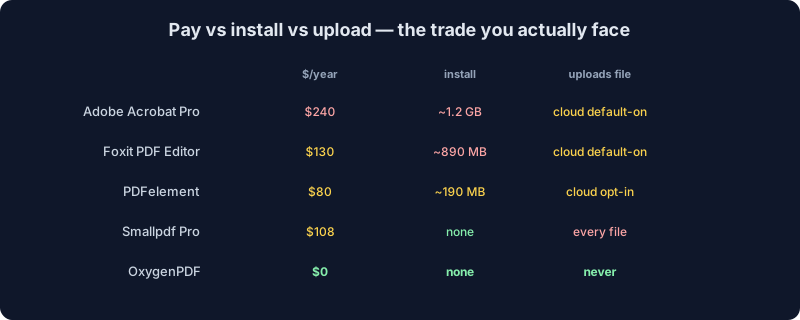
| Tool | Pricing (2026) | Install size | Watermark on free | Upload required | Offline use |
|---|---|---|---|---|---|
| Foxit PDF Editor | $129.99/yr | ~890 MB | Trial limited | Cloud sync default-on | Yes (after install) |
| PDFelement | $79.99/yr | ~190 MB | Yes, on all trial output | Wondershare Cloud opt-in | Yes (after install) |
| Adobe Acrobat Pro | $239.88/yr | ~1.2 GB | Trial 7 days, then locked | Document Cloud default-on | Yes (after install) |
| Smallpdf Pro | $108/yr | None (web) | None on Pro; free = 2 tasks/day | Yes, every file | No |
| OxygenPDF | Free | None (web) | None | No, runs in browser | Yes (after first load) |
The honest summary
Foxit PDF Editor and PDFelement are real desktop apps that do real work. If you are a power user redacting filings, running batch OCR, and wiring up dynamic forms five days a week, $80–130 a year is fine. They earn it. The complaint isn't that they exist. It is that they get marketed as the answer to one-off jobs they were never designed to solve for free.
If you opened this page because you wanted to merge a PDF and ran into a watermark, you do not need a $129 license. You need something that works in your browser, leaves nothing behind, and stops mattering the moment you close the tab. Drop a file at /tools/edit-pdf or /tools/merge-pdf and see how it lands.