 Rohman
You merged two PDFs. Then you compressed the result. Then you went to add page numbers and a dialog stopped you. You have reached your free limit of 3 tasks per hour. The clock says you have forty-seven minutes to think about the $7.50 monthly plan.
This is the search you ran in those forty-seven minutes.
Short answer: OxygenPDF runs the same merge-compress-paginate workflow with no task quota, no page cap, no file-size ceiling, and no watermark, because the toolkit runs inside your browser tab instead of on Sejda's servers. That's the fix if you just hit the wall and need to finish the file tonight. The rest of this article is the fairer, longer version: what Sejda actually charges for, why the wall exists, where it's genuinely the better tool, and the five moments that send people looking for a way around it.
Key takeaways:
- Sejda's free-tier clock resets on the hour, not sixty minutes after your first task, and each chained operation (merge, then compress, then paginate) burns a separate task against the same document.
- Edit PDF and Fill & Sign stamp a Sejda watermark onto free exports; page tools like merge, split, and rotate don't.
- The $63/year Desktop+Web plan is the cheapest paid PDF suite that includes a real desktop app — cheaper than Foxit ($129.99/yr) or Acrobat Pro ($239.88/yr).
- Sejda's "whiteout" tool visually covers text but doesn't delete it; the covered text is still selectable underneath.
- OxygenPDF covers the same core workflows (merge, edit, sign, OCR, redact) with none of the above limits, because nothing you process ever leaves your browser tab to be metered in the first place.
What Sejda is
Sejda is a Dutch indie PDF tool, incorporated as Sejda B.V. in Amstelveen, founded as an open-source project in 2010 (sejda.com/about). The name means "silk" in the Italian dialect of Emilia-Romagna. Similarweb's tracker shows sejda.com taking in about 16.7 million visits over the trailing three months as of September 2026 — roughly 5.6 million a month — and it runs a freemium funnel at real scale. Bootstrapped, profitable, no VC.
The product is well-built. Capterra users rate it 4.7 out of 5 across 47 reviews, higher than Foxit or Wondershare. When Sejda is inside its limits, it works. The complaints are about the wall.
The wall is the point of this post.
The free tier, as Sejda describes it
Quoted from product pages like sejda.com/extract-pdf-pages:
- "Free service for documents up to 200 pages or 50 MB and 3 tasks per hour."
- "Free users are limited to a single file per task."
- "Free users are limited to 10 pages per OCR task."
- "Free users are limited to 20 pages per conversion" on some tools, 50 on others.
A few small details bite harder than they read.
The hour resets on the clock hour, not sixty minutes after your first task (exactpdf). Start at 2:55, hit your second task at 3:01, and you have burned a fresh hour, not a recovered one.
Each chained operation eats a task. Merge, then compress, then number pages is three tasks. One workflow, quota gone.
Edit PDF and Fill & Sign add a Sejda watermark to free output (exactpdf). Page tools (merge, split, rotate) are watermark-free. The two operations a casual user actually wants, fix a typo and sign a form, both stamp.
The desktop trap is different
Sejda Desktop is a real Electron-style app, 240–305 MB on Windows. Their pitch is honest: "files are processed locally, on your computer" (sejda.com/desktop). That part is true.
Free Desktop limits are 3 tasks per day rather than per hour, plus the same 50 MB and 200-page ceiling. That daily ceiling has to be enforced somehow, which means something is tracked, which means the app phones home for license and quota. Not the same as a true offline tool.
Malwarebytes also has a habit of flagging Sejda Desktop as an exploit during normal use. There are forum threads going back years confirming it's a false positive. Sejda is clean. The friction is real.
Pricing in 2026
Three paid plans plus the free tier, from sejda.com/upgrade:
| Plan | Price | What you get |
|---|---|---|
| Web Week Pass | $5 / 7 days | Web only |
| Web Monthly | $7.50 / month | Web only |
| Desktop+Web Annual | $63 / year | Desktop app + Web |
| Desktop Week Pass | $7.95 / 7 days | Desktop only |
Volume discount of 20% kicks in at 10 seats. The annual plan unlocks unlimited tasks, OCR up to 100 pages, multi-file processing, 21 minutes per task, 500 MB uploads.
$63 a year is the cheapest credible paid PDF suite that includes a desktop app. Foxit Editor runs $129.99 (Foxit shop) and Acrobat Pro runs $239.88 prepaid (adobe.com). If you live inside PDFs and Sejda's catalog covers your needs, the math works out.
If you don't, the wall starts feeling engineered.
"We delete files after 2 hours" is a trust statement
Sejda's privacy policy is unusually candid. Files are "permanently deleted after upload or processing respectively." No backups. Public sharing links auto-delete seven days after creation. Third-party reviewers cite a two-hour retention window for normal Web processing.
Sub-processors include FastSpring, Stripe, Cloudflare, DigitalOcean, Mailgun, Postmark. GDPR-aligned. No SOC 2 or ISO 27001 listed.
Sejda also has a clean record. No public breach. That matters. Foxit had a 328,549-user data breach in 2019. Wondershare carries a "Warning" privacy rating from Common Sense Media. Sejda has neither. On the cloud-PDF spectrum it is the least bad option going.
It is still a cloud PDF tool. Every Web file lives on someone else's server for two hours. The window is small. It isn't zero.
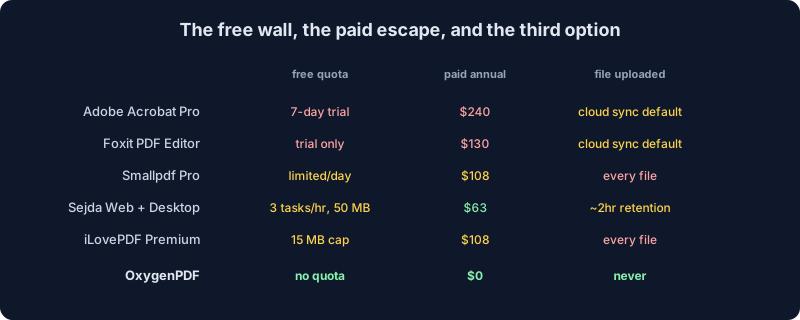
Two rows in that graphic are worth double-checking in text, since a screen reader or an AI crawler can't read words baked into an SVG. Smallpdf's Pro plan runs $9 a month billed annually — $108 a year — per TechRadar's review, with the full breakdown in our own Smallpdf piece; as of late 2026, Smallpdf's pricing material no longer prints an exact daily task number, just "limited" downloads on the free tier, which is why the graphic says "limited/day" rather than repeating an old figure we can't currently verify. iLovePDF's $9-a-month Premium price comes from independent listings on Capterra, GetApp, and Software Advice; the 15 MB figure is specifically iLovePDF's free-tier cap on OCR and Office-format conversions, not a blanket ceiling — free merge tops out at 100 MB, free redaction at 400 MB — sourced straight from ilovepdf.com/pricing and covered fully in our iLovePDF piece.
Laid out as a table instead of a graphic, so it's actually extractable text:
| Tool | Free ceiling | Paid annual | What happens to your file |
|---|---|---|---|
| Adobe Acrobat Pro | 7-day trial only | $239.88 | Uploaded, cloud sync on by default |
| Foxit PDF Editor | Trial only | $129.99 | Uploaded, cloud sync on by default |
| Smallpdf Pro | Limited daily downloads | $108 | Uploaded, retention per their policy |
| Sejda Web + Desktop | 3 tasks/hr, 50 MB, 200 pages | $63 | Uploaded, ~2-hour retention |
| iLovePDF Premium | 15 MB on OCR/Office tools | $108 | Uploaded, ~2-hour retention |
| OxygenPDF | No quota | $0 | Never uploaded |
The whiteout problem
TechRadar's review catches a detail worth flagging if you ever use Sejda on legal, HR, or medical PDFs: "the whiteout option doesn't actually delete the text, but instead simply hides it." The hidden text stays selectable. It is not redaction.
That is the same trap behind the "redacted court filing leaked because the underlying text was still in the PDF" headlines. Cover a name with a black box in Sejda, ship the file, and anyone with Acrobat Reader can drag-select the box and copy the name out. Reach for /tools/redact-pdf when you need the underlying content gone, not just hidden under a sticker.
OxygenPDF's redact tool exists specifically to avoid that trap, and the mechanism is worth spelling out rather than just asserting: it searches the document's actual text for the term you enter (or lets you mark whole pages), renders every affected page to a fresh image with the matched area painted solid black, and rebuilds the PDF from those images. There's no original text sitting underneath the black rectangle by the time the file is reassembled, because the page isn't text-plus-a-shape anymore — it's a picture. That's the structural difference between "hiding" and "redacting," and it's the reason a screenshot of a Sejda whiteout and a screenshot of an OxygenPDF redaction can look identical while one still contains the secret and the other genuinely doesn't. For a deeper walkthrough of why this specific failure mode keeps making headlines, see our full guide to redacting a PDF properly.
TechRadar also flagged that Sejda's text editor is line-by-line and the layout is fixed. Edit a sentence and your new text overlaps the old. Fine for one-line corrections, painful for paragraphs.
What pushes someone to search "Sejda alternative"
Five trigger moments come up over and over:
- Merged, compressed, then went to number pages. Locked out for forty-seven minutes.
- Tried to OCR a 300-page contract. Hit the 200-page wall at export.
- Needed to compress a high-DPI scan. The file was 78 MB. The cap is 50.
- About to upload a contract or tax document, stopped halfway through, closed the tab.
- Filled out a form, hit save, and the export came back with a Sejda watermark across the bottom.
OxygenPDF answers all five the same way. No quota, no page cap, no file-size cap, no watermark, no upload. Everything runs in the browser tab.
Where OxygenPDF sits
OxygenPDF is a PDF toolkit that runs entirely in your browser. Drop a file on the page, do the work, download the result — the file never leaves your tab, and there's no account or upload endpoint for a proxy to even point at. Most of the toolkit runs on the same client-side libraries any serious browser-based PDF tool is built on (pdf-lib for structural edits, pdfjs-dist for rendering and text); a handful of the heavier jobs — the text and table extraction behind PDF to Word, PDF to Excel, and PDF to Markdown — run on a Rust engine compiled to WebAssembly instead, for speed on documents that plain JavaScript parsing would choke on.
We tested the "nothing leaves your tab" claim the boring, verifiable way: open your browser's DevTools, switch to the Network panel, then drop a file into merge-pdf or compress-pdf and run the operation. No request fires. That's not a policy statement asking you to trust a two-hour retention window the way Sejda's privacy page does — it's something you can watch not happen, on your own machine, in under a minute.
A non-exhaustive map:
- /tools/edit-pdf — fix typos, drop in images, annotate, no clock counting down
- /tools/merge-pdf — combine PDFs without burning a task slot
- /tools/split-pdf — pull pages out cleanly
- /tools/compress-pdf — shrink a 78 MB scan past the 50 MB email ceiling
- /tools/sign-pdf — the signature image is drawn straight into the page's own content, the same "baked in, not layered on" approach used for markup elsewhere on the site, so there's no Sejda stamp riding along underneath it
- /tools/ocr-pdf — the default engine, Tesseract, recognizes text entirely on-device; if a scan is rough enough that you reach for one of the optional higher-accuracy cloud engines instead, it asks for your own API key before it will run, so sending a page image off-device is never the silent default
- /tools/redact-pdf — real redaction that removes the underlying text by rebuilding the page as an image, not a shape drawn over it (see above)
- /tools/unprotect-pdf — strip a password you already own; worth knowing that removing a genuine open-password re-renders each page as an image on the way through, so the unlocked file trades away its text layer for being password-free — the same trade-off covered in more depth in our guide to unlocking a PDF password
Sejda's catalog is broader on paper. It has saved Workflows. It has cloud-storage integrations with Drive, Dropbox, and OneDrive. If you need those and you use Sejda daily, the $63 annual plan is a reasonable purchase. We are not pretending otherwise.
The narrow point
Sejda is fine. It is the least bad cloud PDF tool you can pay for, and the privacy story is genuinely better than most peers. If you run it three times a month inside the free limits, keep going.
If you hit the wall (three tasks, two hundred pages, fifty megabytes, a watermark on the form you just filled), the structural answer is not a different cloud tool with a slightly higher quota. It is a tool with no quota because it has no server. Drop a file at /tools/edit-pdf or /tools/merge-pdf and watch what happens. Or rather, what doesn't.
Frequently asked questions
What happens when Sejda's free limit resets?
It resets on the clock hour, not sixty minutes after your first task. Start a task at 2:55 and a second one at 3:01, and you've already burned a fresh hour rather than finishing the one you started, because the reset point is the top of the hour on the clock, not a rolling sixty-minute window tied to your own activity.
Does Sejda watermark free exports?
Only two tools do. Edit PDF and Fill & Sign both stamp a Sejda watermark onto free-tier output. Page-level tools — merge, split, rotate, compress — don't add one. That's part of why the wall feels arbitrary: the two things a casual user is most likely to want, fixing a typo and signing a form, are exactly the ones that get marked.
Is there a truly unlimited free Sejda alternative?
Yes, in the specific sense that matters here: OxygenPDF has no task quota, no page cap, and no file-size ceiling, because there's no server metering what you send it — your own browser tab does the work. A paid competitor's "unlimited" plan, including Sejda's own annual tier, still means unlimited tasks against server capacity someone is paying to run. OxygenPDF has no server in that loop for a limit to attach to.
Is Sejda safe to use for sensitive documents?
Safer than most cloud PDF tools, not risk-free. Sejda states files are permanently deleted after upload or processing, typically within about two hours, and it has no public breach on record, unlike Foxit's 2019 incident. That's still a window during which the file exists on infrastructure you don't control. For anything covered by attorney-client privilege, HIPAA, or an NDA, a client-side tool removes the question entirely instead of asking you to trust a retention policy you can't independently verify.
Does drawing a box over text in Sejda actually redact it?
No. TechRadar's review found that Sejda's whiteout tool "doesn't actually delete the text, but instead simply hides it" — the original characters are still there, selectable, one drag-select away from being copied out. Genuine redaction requires a tool built for it, one that removes the underlying text from the file rather than covering it with a shape.
What counts as a "task" toward Sejda's 3-per-hour limit?
Each operation counts separately, not each file. Uploading one PDF and merging it is one task. Merging that file, then compressing the result, then adding page numbers to it is three tasks against the same document, even though it feels like a single workflow while you're doing it.
Can Sejda Desktop avoid the hourly limit?
Only partly. Free Sejda Desktop swaps the hourly cap for 3 tasks per day, plus the same 50 MB and 200-page ceiling — a different wall, not a missing one. It's also not fully offline in the sense people usually mean: something in the app checks your daily quota and license, so it phones home periodically even though the file processing itself happens on your machine.