 Rohman
You installed PDFelement to convert one contract to Word. The progress bar made it to page three of thirty and stopped. The export came back stamped with a watermark on every page — Wondershare's own support documentation confirms the trial watermarks converted files, not just edited ones — and a sales prompt asking for $79.99.
You can google the watermark away. The bigger story is what the rest of that install is quietly doing on your machine.
Quick answer
Wondershare PDFelement is a legitimate, paid desktop PDF editor whose free download is a 14-day, output-watermarking demo, not a free tier. Its AI assistant, Lumi, is a separate paid add-on that uploads your document text to OpenAI's servers rather than processing it on-device, and its background push service, WSNativePushService.exe, is documented to survive uninstalling the app. None of that makes PDFelement malware — it's real software with a genuinely strong OCR engine — but it does mean the free download can't do the one-off job you probably want it for.
The short version, before the long one:
- No free tier. The trial watermarks any file you edit, comment on, or convert, and caps conversions at a handful of pages.
- Lumi costs extra. $3.99/month or $39.99/year on top of a paid plan, and it runs through OpenAI's models, not locally.
- The install leaves a service running.
WSNativePushService.exeis documented as surviving uninstall on Windows. - The same yearly plan carries two prices. Standard is $79.99 on auto-renew versus $31.99 on manual renew — a 150% premium for not unchecking a box.
- Refunds have a 30-day window and explicitly exclude "dissatisfaction with AI-generated output," per Wondershare's own policy.
The rest of this piece is the sourcing behind each of those claims, plus where PDFelement is a fair deal and where a browser tool does the same job for nothing.
What you actually downloaded
PDFelement is a 218 MB Windows installer (Uptodown) that asks for 1.5 GB of free disk for its application files (wondershare tech spec). It ships from Shenzhen Wondershare Technology Group Co., Ltd., ticker SHE: 300624, publicly listed in China since January 2018. Founded by Tai Bing Wu in 2003. The same company makes Filmora, Recoverit, Repairit, Dr.Fone, MobileTrans, and EdrawMax, and they all share the same telemetry pipeline and the same background service.
That service is WSNativePushService.exe. It lives in C:\Users\<you>\AppData\Local\Wondershare\Wondershare NativePush\, starts with Windows, and is documented as surviving uninstall (file.net, Glarysoft). Removing PDFelement typically leaves the service, the AppData folder, and registry entries behind. CVE-2023-31747 (Exploit-DB) flagged an unquoted service path in this same binary on Filmora. It got patched, but the lesson is that a background process installed by every Wondershare product is a real attack surface, not a footnote.
Fortinet keeps a generic detection labeled Riskware/Wondershare for applications that "may utilize system resources in an undesirable or annoying manner, and/or may pose a security risk." The Malwarebytes forums have years of PUP-detection threads on Wondershare installers. None of this is malware. It is the gray-zone behavior that gets antivirus tools twitchy.
What the free download actually does
Pulled from Wondershare's own trial limitations FAQ:
- "Export PDF files with watermarks after processing PDFs, such as editing, adding comments."
- "Converts half pages of your PDF only and converts 3 pages at most when your PDF file has more than 10 pages."
- OCR capped at 3 pages.
- Combine PDFs capped at 3 files.
- Batch data extract limited to 2 files.
- "Can't access to advanced features including file compression and XFA form filling."
A separate watermark FAQ leaves no room for interpretation: "The trial version will add a watermark to the PDF file when you edit or comment on the PDF file in the trial version." There is no free tier. There is a 14-day demo that stamps everything you make and stops at page three.
If you came in for a 30-page contract conversion, you got pages one to three with a Wondershare logo and an upsell screen.
Does the trial watermark a plain conversion, or only edits and comments?
Both. The headline restriction bullet groups watermarking under "editing, adding comments," which reads like conversion might be exempt. It isn't. The same FAQ page's own troubleshooting note settles it directly: "If the watermark is on your converted word or Excel file, load the original PDF file into the registered full version and convert it again, the new converted word or Excel file will have no watermark anymore." Wondershare is telling you, in its own support copy, that a converted Word or Excel file comes out watermarked in the trial. Converting alone triggers it, exactly like editing does.
So is the page cap three pages, or five?
Both, on the same page, at the same time. That trial-limitations FAQ states the conversion cap as "3 pages at most" in its comparison table, then restates the identical restriction two paragraphs later, in the note explaining how to remove the watermark, as "converts 5 pages at most when your PDF file has more than 10 pages." Same restriction, same document, two different numbers. Independent write-ups and review sites have quoted both figures at different times, which is less a sourcing error on any one of them and more a sign that Wondershare's own documentation doesn't agree with itself. Budget for somewhere between three and five usable pages before the cap kicks in, and don't be surprised if it's not exactly either.
"Lumi" is ChatGPT wearing a Wondershare hoodie
Since 2023, PDFelement has rebranded around an AI assistant called Lumi. Chat with the document, summarize, translate, rewrite, grammar check. The marketing leans hard on "AI for PDFs." It tends to skip two details.
Lumi is a paid add-on, not part of the base subscription. $3.99 a month or $39.99 a year on top of whatever plan you already pay for (Wondershare AI editor page), with monthly credit caps. Pro yearly buyers still hit a 1,000-credit ceiling and a buy-more dialog mid-task (max-productive review).
And Lumi is cloud, not local. The marketing copy literally says "powered by ChatGPT." Wondershare's own ChatOCR documentation puts the quiet part out loud: "using ChatOCR requires uploading your files to the internet so they can be processed by third-party servers and OpenAI's models." The same FAQ page goes further and warns its own users off the feature for anything sensitive: "If you are handling sensitive legal, financial, or personal medical documents, you should use an offline, locally processed OCR tool... to ensure complete data privacy." That's Wondershare's own support documentation telling you not to use Wondershare's own headline AI feature on the documents people most need help with.
So the desktop app you installed because it was "local software" ships your document text off to a third-party AI vendor the moment you click Summarize. As of September 2026 there is still no on-device LLM option. If your contract has anything you wouldn't paste into ChatGPT yourself, the answer is the same: Lumi is doing exactly that on your behalf.
The 2025 RepairIt incident
Wondershare RepairIt is a different product. The reason it matters here is that the source code, AI models, and binaries for multiple Wondershare products were all sitting in the same exposed cloud bucket.
In April 2025, Trend Micro researchers Alfredo Oliveira and David Fiser disclosed two critical vulnerabilities through the Zero Day Initiative: CVE-2025-10643 (CVSS 9.1) and CVE-2025-10644 (CVSS 9.4). Wondershare did not respond to ZDI for five months. The advisory went public in September 2025 (The Hacker News).
What was sitting in that bucket:
- Hard-coded, overly permissive cloud storage tokens embedded directly in the application binary.
- User-uploaded photos and videos, stored unencrypted.
- AI models, software binaries for multiple Wondershare products, container images, internal scripts, and company source code, all in the same place.
Trend Micro's worst-case write-up: "attackers could modify these models or their configurations and infect users unknowingly." Translation: supply chain attack via vendor-signed updates. Tampered binaries pushed to every downstream Wondershare customer the next time the auto-updater phoned home. PDFelement included.
Did that exact attack happen? No public evidence either way. The point is not the worst case. The point is the kind of org-level secret hygiene that produces an unencrypted user-data bucket with hard-coded tokens checked into the shipping binary.
Privacy posture
Common Sense Media rates Wondershare a "Warning" with an overall score of 32%. Data security 17%. Data safety 13%. Their findings: PII collected, shared with third parties, used for ad targeting, displayed publicly.
The Software Improvement Program is on by default. The opt-out lives behind the installer's Advanced Options screen, which most people skip. Click through the defaults and Wondershare collects "information concerning the way the various modules and functionalities of Wondershare software are being used." Wondershare Document Cloud syncs your documents by default once you sign in.
If you work in a regulated industry, healthcare under HIPAA, EU public sector, US federal contractors, anyone with a data residency clause, the parent company's jurisdiction is part of the threat model. Shenzhen Wondershare is subject to PRC data laws, including the 2017 Cybersecurity Law and the 2021 Data Security Law. PDFelement's privacy policy and Document Cloud terms permit data transfer outside your country. If your org's compliance review excludes PRC-jurisdiction processing, this is where the conversation ends.
The pricing maze
PDFelement runs four overlapping price ladders at once. Pulled from pdf.wondershare.com/store/windows-individuals.html on May 3, 2026:
| Plan | Standard | Pro |
|---|---|---|
| Quarterly | $11.99 | $49 |
| Yearly (auto-renew) | $79.99 | $129 |
| Yearly (manual renew) | $31.99 | $129 |
| 2-Year | $109.99 | $149 |
| Perpetual | $51.99 | $159 |
A few things to flag.
The "was $695" strikethrough next to perpetual Pro has been there for years. We couldn't find a period where anyone was actually charged $695 for it — it reads as an anchor price that makes $159 feel like a steal, not a former price.
Auto-renew yearly Standard is $79.99. Manual-renew yearly is $31.99. That is a 150% premium for not having to remember to click renew once a year. The default checkbox is, of course, auto-renew.
"Perpetual" means the lifetime of the version you bought, not yours. Major version bumps want another payment (Wondershare support). Buy v12 today, v13 will be a paid upgrade when it ships.
The cross-platform plan (G2) is $89.99/year and bundles Windows, Mac, iOS, Android, and Web. The AI add-on stacks on top of all of that at $3.99/month or $39.99/year, with credit caps that trigger upsells inside the paid product you already bought.
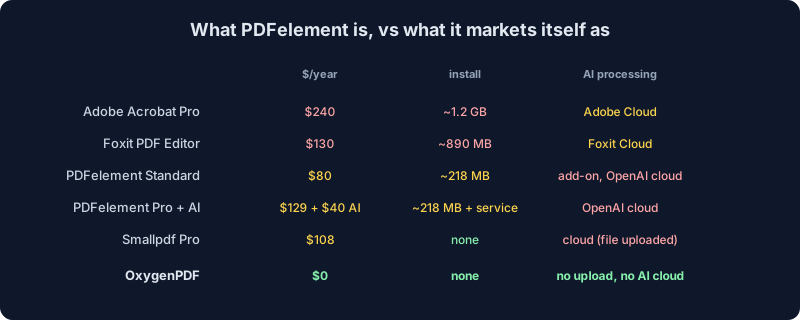
Of the four categories in that chart, OxygenPDF is the only one that lands on $0, no upload, and no AI cloud dependency at the same time — every other option trades away at least one of the three.
What if you already paid, and want your money back?
Worth knowing before you're in this position, not after. Wondershare's own refund policy gives most direct purchases a 30-day window from the payment date, shorter (7 days) for a handful of other Wondershare products. Inside that window, an accidental duplicate purchase, the wrong product bought by mistake, or a technical issue that support couldn't fix in 7 days all qualify.
Two exclusions matter specifically for PDFelement. First, a renewal charge is non-refundable once it's gone through unless you canceled before it was billed — which is exactly the auto-renew-versus-manual-renew gap above, now with a refund window attached to it too. Second, and this is worth sitting with given the rest of this article: Wondershare's policy explicitly lists "dissatisfaction with AI-generated output" as a non-eligible reason for a refund. If Lumi mistranslates a clause or hallucinates a summary of your contract, that specific complaint is carved out of the refund process by name, in the vendor's own policy.
Where PDFelement actually earns its money
The post isn't fair if it skips this bit.
PDFelement's OCR is genuinely good. Independent reviews (Dragon Blogger, Dealarious) put it at 95%+ accuracy on clean scans, in Acrobat territory. Form auto-recognition for fields, checkboxes, and dropdowns is solid on non-XFA forms. Once you've paid, batch operations work well: batch convert, batch OCR, batch watermark, batch Bates. The Mac, iOS, and Android apps are real apps, not afterthoughts bolted on for the sake of the comparison page.
If you do PDF work daily, run OCR every week, fill complex forms, and don't have data residency concerns, PDFelement Pro is a real product that earns its $129. The complaint isn't that it exists. The complaint is that it gets marketed and SEO'd hard at people doing one-off jobs, and those people pay for it with a watermark or a year-long auto-renewal.
What "alternative" actually means here
Four real categories.
| Category | Examples | Real-world trade-off |
|---|---|---|
| Cloud SaaS | Smallpdf, iLovePDF, Sejda | Upload required. Free tiers throttled. $7.50–$15 a month. |
| Desktop paid | Acrobat ($240/yr), Foxit ($130/yr), PDFelement ($79–$129/yr), Nitro (~$250 perpetual) | Local processing, full features, heavy installs, recurring fees, telemetry on by default. |
| Open source | Stirling-PDF, LibreOffice Draw, PDFsam Basic | Free, local, fragmented UX. You'll bounce between three apps to do what one paid product does. |
| Browser-local | OxygenPDF | WebAssembly. No upload, no install, no subscription, no AI cloud. |
Pick by what you actually care about. Want auditable code? Self-host Stirling-PDF. Need PDF/A-3 archival or court-grade redaction? Pay Adobe. Need a one-tab tool that doesn't upload, install, watermark, or phone home? That last row.
Where OxygenPDF lands
Everything runs in your browser via WebAssembly. Drop a file on the page, do the work, download the result. The file never leaves your tab. Open DevTools and watch the Network panel. It stays empty during processing.
A non-exhaustive map:
- /tools/edit-pdf — fix typos, add text, drop in images, annotate
- /tools/merge-pdf — combine PDFs without a 3-file cap
- /tools/split-pdf — pull specific pages out
- /tools/compress-pdf — shrink for email, no trial restriction
- /tools/pdf-to-word — convert the whole document, not the first three pages
- /tools/ocr-pdf — searchable text on scans, no 3-page demo cap
- /tools/sign-pdf — drop a signature without an account
- /tools/redact-pdf — real redaction: the tool rasterizes the page and burns the black box into the image itself, so there's no layer to drag aside afterward, not a colored rectangle sitting on top of recoverable text
- /tools/unprotect-pdf — remove a password you own
PDFelement still wins on a handful of specific jobs. Heavy multi-document OCR pipelines. Complex forms with cascading logic. Batch Bates numbering across thousands of files. If that is your week, $129 a year is fine.
How to actually convert that locked PDF to Word right now
Back to the anecdote at the top. Here's the version of that job that doesn't stop at page three:
- Open /tools/pdf-to-word in any browser, desktop or mobile. No account, no installer.
- Drop in the file. If it's password-protected, the tool asks for the password and hands it straight to the PDF reader rather than pre-decrypting the file into a flat image first — a distinction that matters, because pre-decrypting that way is exactly the shortcut that strips a PDF's real text and leaves nothing for a converter to extract.
- The tool pulls text from every page, not the first three, and preserves page breaks and structure as it builds the document.
- Download the .docx. No watermark, because there was never a trial to gate in the first place.
The whole thing runs client-side, so the 30-page contract from the opening anecdote never leaves the tab it opened in. That's the actual trade this article has been making the whole way through: PDFelement's engine is competent, but the free download was never built to finish your job — it was built to show you enough of the job to make you pay to finish it.
The narrow point
PDFelement is not a scam. It is real software with real users, and the parts of it that work, work. The honest summary is the same one we landed on for Acrobat and Foxit.
If you came in to convert one contract, sign one form, or merge two PDFs, you do not need a $129 license, an AI add-on subscription, a background service that survives uninstall, or a Wondershare account routed through Shenzhen. You need something that opens, takes the file, does the job, and is gone the second you close the tab. Drop a file at /tools/edit-pdf or /tools/merge-pdf and watch what happens. Or rather, what doesn't.
FAQ
Is PDFelement free?
No. The download is a 14-day trial that watermarks every file you edit, comment on, or convert, and caps conversions at a handful of pages. There is no unlimited free tier — only a paid subscription or perpetual license removes the restrictions.
Does PDFelement's AI feature upload my document to OpenAI?
Yes, for Lumi and ChatOCR specifically. Wondershare's own documentation states that using ChatOCR "requires uploading your files to the internet so they can be processed by third-party servers and OpenAI's models," and separately warns against using it for sensitive legal, financial, or medical documents.
Does uninstalling PDFelement remove everything?
Not reliably. Multiple independent sources document WSNativePushService.exe, a background push service shared across Wondershare products, as surviving a standard uninstall, along with its AppData folder and registry entries.
Can I get a refund after paying for PDFelement?
Sometimes. Wondershare's refund policy gives most direct purchases a 30-day window, but excludes renewal charges you didn't cancel in time and explicitly excludes "dissatisfaction with AI-generated output" as a valid reason.
Is it safe to install PDFelement?
It isn't malware, but antivirus tools sometimes flag it as riskware because of its background service and telemetry behavior. Fortinet keeps a generic "Riskware/Wondershare" detection for exactly this pattern across the company's products.
What's a free alternative to PDFelement that doesn't watermark the output?
OxygenPDF runs the equivalent edit, merge, convert, and OCR jobs entirely in your browser, with no upload, no watermark, no page cap, and no account. For auditable, self-hosted software instead, Stirling-PDF is the open-source option.