Rohman
The usual way to stamp CONFIDENTIAL on a document is to open a free online tool and upload that confidential document to a server you know nothing about. The stamp says one thing, the workflow does the opposite.
You can watermark a PDF without the field trip. But start with what a watermark does and doesn't do, because half the people adding one are buying protection it doesn't provide.
Quick answer: Open Insert Watermark, drop in your PDF, pick text, image, or a tiled pattern, set the words, opacity, and position, and download. The mark is drawn into the page content itself — free, in your browser, with nothing uploaded.
What a Watermark Is Actually For
A watermark does three jobs well.
Status is the big one. A large diagonal DRAFT keeps an unfinished contract from being mistaken for the signed one, and it works because the audience is cooperative: your colleagues aren't trying to defeat the stamp, they just need to see it. The same logic covers a REVISED or DO NOT DISTRIBUTE mark on an internal deck: a signal aimed at people who will act on it in good faith, not a barrier aimed at people who won't.
Then there's notice. In a dispute over an NDA or an unauthorized disclosure, a CONFIDENTIAL mark is evidence the recipient knew the document's sensitivity. It won't stop the leak, but it matters in the aftermath, and lawyers stamp documents for exactly this reason.
The third job is economics. A SAMPLE stamp across a template or a tiled mark across photo proofs makes the free version good enough to evaluate and annoying enough to not use. The client who wants the clean copy pays for it.
What a watermark is not: copy protection. It doesn't stop anyone from copying or forwarding the file. It's a label, not a lock.
Watermarks Come Off
Every visible watermark is removable in principle, and the common kinds are removable in practice by anyone with a free tool. We'd know: OxygenPDF ships a Remove Watermark tool, and removing a watermark from a PDF is a whole article of its own. Research out of Google, a 2017 computer-vision paper on stock-photo watermarks, showed that a visible watermark applied consistently across a large image collection can be estimated and stripped automatically, because the same mark, at the same position and opacity, sits on top of thousands of otherwise-different photos. The algorithm doesn't need to know what the watermark says; it just needs enough images to average out everything that isn't the mark. That attack worked because the mark was identical everywhere. Vary each copy and you take that away.
Use removability instead of ignoring it. If a leak would hurt, personalize each copy: "Confidential — prepared for Sarah Chen, March 4." Now the mark does something a generic stamp can't: a leaked copy names its source, and whoever stripped the mark has to explain the naked document. That's a budget version of what the DRM industry calls forensic watermarking, and you can do it with any tool that lets you set arbitrary text.
Three Places a PDF Watermark Can Live
They are not equally sticky, and the gap between them isn't cosmetic: it's the difference between deleting one object and rebuilding the entire page as a picture.
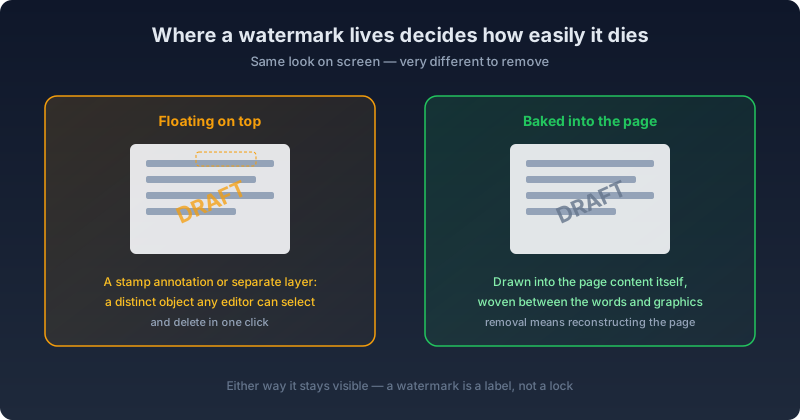
An annotation watermark is a separate object (in PDF terms, a /Watermark or /Stamp annotation) stacked on top of the page rather than mixed into it. Deleting it is mechanical and lossless: find the annotation entry, drop the reference, save. Nothing else on the page shifts, no pixel is re-encoded, and the underlying text stays selectable. The same lossless removal applies to a couple of related cases that look different but behave the same way under the hood: a watermark added as a semi-transparent image object, or one applied purely as a transparency setting on existing content. Both can be swapped out or switched off without touching a single other pixel.
A layer watermark (technically an Optional Content Group, the same mechanism PDF viewers use to let you toggle a "Comments" or "Grid" layer on and off) sounds just as removable, and structurally it is. But actually reversing it means re-rendering every affected page as an image with that layer switched off, then rebuilding the PDF from those pictures. The text you could once select is now a picture of that text. That's a real trade, not a formality. It's the right call when the watermark has to go and nothing else matters, and the wrong one if the document still needs to be searchable, copy-pasteable, or accessible to a screen reader afterward.
A watermark drawn straight into the page's content stream is different in kind, not degree. Its drawing instructions, the same low-level operators that draw the actual text and images on the page, are interleaved with the document's own, with no separate object marking where one ends and the other begins. There's no annotation entry to delete and no layer to hide. Removing it means reconstructing the page and guessing which strokes were watermark and which were the document, which is exactly the case automated detection has to flag as unable to remove cleanly rather than attempt and risk mangling real content.
OxygenPDF's Insert Watermark tool writes marks the third way, straight into the page content. That's the hardest visible kind to strip. It still won't lock anything, but it doesn't peel off at the first click either.
Getting the Watermark to Look Right
The three jobs above only work if the mark actually looks like it belongs: legible enough to read, faint enough not to bury the document underneath it. That balance comes down to a handful of settings, and getting them wrong is the most common reason a watermark ends up either invisible or obnoxious.
Text, Image, or a Tiled Pattern
A single text watermark is the default case: one string, one position, drawn once per page. CONFIDENTIAL across the middle, DRAFT in a corner. An image watermark does the same job with a logo or a signature graphic instead of text, useful for branding a document rather than labeling its status. A tiled pattern repeats a short string across the whole page in a grid, which is what makes a proof sheet or a sample export hard to use as a finished copy without paying for the clean version: you can't crop around a mark that repeats across the whole page.
Opacity, Rotation, and Font
Marks are drawn over the page content, not behind it, so the opacity setting is doing real work: too high and it fights with the text underneath, too low and nobody notices it's there. Somewhere in the 15 to 30 percent range is usually the sweet spot for a mark that has to stay legible without becoming the loudest thing on the page, and the built-in presets already land there: a diagonal red CONFIDENTIAL sits at 30 percent opacity, a tiled gray DRAFT at 20. An image watermark can run higher, since a logo mark is meant to be seen rather than half-ignored. Rotation defaults to a -45 degree diagonal for a single mark, or a shallower -30 degree tilt for a tiled pattern, though both can be set to anything that fits the page. Text renders in one of three families (Helvetica, Times New Roman, or Courier), and because the text engine embeds full Unicode font data rather than relying on the PDF spec's limited built-in fonts, the same string can mix Latin letters with Chinese, Arabic, or Cyrillic text and still render correctly, which is what makes a per-recipient mark like "机密 — 张伟" as workable as an English one.
Placing It, Page by Page
A watermark can sit centered, in any of the four corners, along an edge, on the diagonal, or at an exact custom position you drag into place on the live preview. That position, along with every other setting, can be applied uniformly to the whole document or overridden per page. That's useful when a cover page needs no mark at all, or when only the pages actually leaving the building need CONFIDENTIAL and the rest of the packet doesn't. Set one page's mark the way you want it, then copy that setup to every other page in one action instead of repeating the work.
Presets and Batch Runs
A stamp your team uses repeatedly (a firm's standard CONFIDENTIAL treatment, a specific DRAFT style for a given client) can be saved as a preset and reapplied in one click on the next document, instead of re-entering the same color, size, and rotation every time. When the same mark needs to go on a whole batch of files at once, batch mode configures the watermark once and applies it to every file in the batch in a single pass, downloading each result without repeating the setup step for each document.
The Going Rate for a Rubber Stamp
Pricing for this simple job is strange. As of September 2026, Adobe prices Acrobat Standard at 14.99 US dollars a month and Acrobat Pro at 19.99 US dollars a month on an individual plan billed annually, a lot of subscription for a stamp, and the month-to-month rate without an annual commitment runs higher still. The free online tools are upload services with meters attached: iLovePDF's own pricing page caps its free-tier Add Watermark tool at two tasks. And all of them process your unreleased draft or client contract on their servers, exactly the wrong place for a document that needs a CONFIDENTIAL stamp in the first place.
Stamp It in the Browser
Insert Watermark watermarks the PDF without it ever leaving your machine. Free, no task meter:
- Drop in the PDF (password-protected files work too)
- Pick text, image, or a tiled pattern
- Set the words, color, size, opacity, and rotation, or start from the classic presets: a red CONFIDENTIAL at 30% opacity across the diagonal, a gray tiled DRAFT
- Choose which pages get the mark, with per-page overrides if page one needs different treatment
- Apply and download
Any text works, including non-Latin scripts, which is what makes the per-recipient trick practical. Set up your firm's stamp once and save it as a preset, and reach for batch mode when the same mark needs to land on more than one file.
When You Need More Than a Label
If the goal is controlling who can open the document, a watermark is the wrong tool no matter how it's applied. Password-protect the file instead. And if the document contains something nobody outside should ever read, a stamp over it does exactly nothing: remove the content itself.
Frequently Asked Questions
Does a PDF watermark stop someone from copying the file?
No. A watermark is a visible label drawn on top of or into the page: it changes nothing about whether the file can be copied, forwarded, printed, or saved elsewhere. Stopping those actions is what password protection and permission restrictions are for, and even those have limits once a file is out of your hands. Treat a watermark as a label that travels with the document, not a barrier that stops it moving.
Can a watermark be removed from a PDF later?
Usually, and how easily depends on how it was added. A watermark added as a separate annotation object comes off cleanly with no loss of quality. One added as a toggleable layer can be removed too, though the common way to do it re-renders the page as an image, so selectable text becomes a picture of that text. A watermark drawn directly into the page's own content (the way OxygenPDF's Insert Watermark tool does it) is the hardest case, since there's no separate object to delete without risking the real content underneath it.
Does watermarking work on password-protected PDFs?
Yes. You can drop in a password-protected file and unlock it as part of the same workflow, and the file never has to leave your browser to do it. One thing worth knowing: unlocking a genuinely encrypted PDF works by re-rendering its pages before the watermark is added, so the original page content comes out as a high-resolution image rather than the original selectable text. The watermark itself is still added as fresh, sharp text on top. For a document you'll only ever read or print, that's invisible. For one you still need to copy text out of afterward, watermark an unlocked copy instead if you have one.
What's the difference between a watermark and password protection?
A watermark labels a document: it's visible, and it says something about status (DRAFT), sensitivity (CONFIDENTIAL), or provenance (a per-recipient mark). Password protection restricts access: it decides who can open the file at all. They solve different problems and most sensitive documents benefit from using the right one for the job, or both together when a file needs to be both labeled and locked.
Can I put a different watermark on just one page, not the whole document?
Yes, through per-page overrides. The default is one uniform mark applied to every selected page, but any page can be switched to its own text, color, size, position, or opacity. That's useful for a cover page that should stay clean, or for a single page that needs a different classification than the rest of the packet.
Does watermarking a PDF require an internet connection or an account?
No account, and once the page and its watermark tool have loaded, no upload happens during processing. The file is read, modified, and re-saved entirely in your browser. That's the whole point of doing it this way instead of through an upload-based service: the confidential document you're labeling never has to leave the machine it's already on.
For everything else, the label is the job, and the label shouldn't cost a subscription or a server round trip. Watermark the PDF in your browser, and the only copy that exists stays yours.