Rohman
The print shop's upload page has a checklist, and somewhere between "3 mm bleed" and "CMYK only" it says: convert all text to outlines. You've exported a perfectly good PDF with the fonts embedded. Why do they want the fonts gone?
Because a font is the one part of a PDF that can still go wrong after you've sent it. Outlining removes that risk, and in exchange it removes several things you may care about more than you think. Do it to a copy, keep the master, and know which kind of "outline" you're making.
Quick answer: To convert text to outlines in a PDF, use Acrobat Pro's Preflight fixup "Convert fonts to outlines", Illustrator's Type, then Create Outlines, or Ghostscript with -dNoOutputFonts; all three turn letters into vector shapes. Without those, Flatten PDF Fonts renders every page to a high-resolution image in your browser, which removes the font dependency too. Switch off "Keep text searchable" if the printer checks for fonts. Either way, outline a copy and keep the original.
Why Printers Ask You to Outline Fonts
A PDF normally carries its fonts inside it, so in theory a printer never needs your fonts installed. In practice, two things still go wrong:
- A font that wasn't embedded. Some fonts forbid embedding in their licence, and some apps quietly skip it. A printer's system then substitutes a font it does have, and your headline reflows into something nobody approved.
- The file gets opened instead of printed. A prepress operator who opens your PDF in an editor to fix bleed or add crop marks can trigger the same substitution on a machine without your fonts.
Outlined text can't fail either way. There is no font left to be missing. It's insurance, and print shops buy it because one bad run costs them more than the awkward request costs you.
Not everyone agrees it's needed. Steve Werner's long-running CreativePro article argues "you should almost never have to outline fonts" when they're properly embedded. He's right for modern workflows. But if the printer's checklist says outline, arguing costs you a day. Outline a copy.
What You Lose When Text Becomes Shapes
Once text is outlined, the PDF no longer knows it contains words. That has consequences:
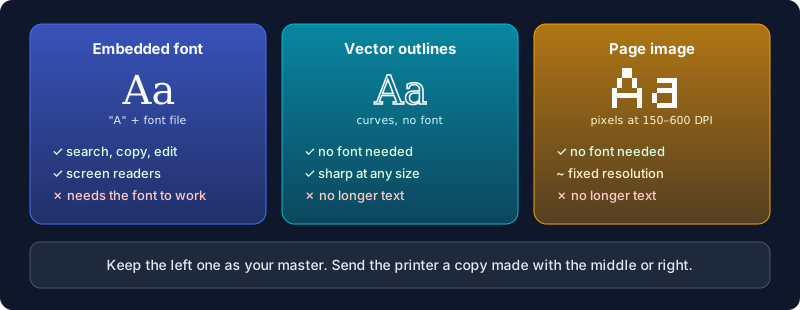
| Embedded fonts | Vector outlines | Page images | |
|---|---|---|---|
| Needs the font to render | Embedded copy | No | No |
| Search with Ctrl+F, copy text | Yes | No | Only with an invisible text layer |
| Edit a typo | Yes | No | No |
| Screen readers can read it | Yes, if tagged | No | Only the untagged search layer |
| Sharp at any zoom | Yes | Yes | Up to the chosen DPI |
| File size | Smallest | Larger | Largest |
Accessibility is the one people forget. A screen reader reads the text in a PDF, and outlined or rasterised pages have none, so the file is silent to anyone who relies on one. CreativePro also notes that fonts carry hinting, which keeps small type crisp at low resolution, and that "this is lost when you outline type."
That's why the master matters. The outlined file exists for one press run. Next month's reprint with a corrected phone number has to start from the version where the phone number is still text.
Vector Outlines vs a Rasterised Page
"Convert to outlines" traditionally means vector outlines: each letter becomes a filled shape, the same curves the font defines, stored as drawing commands. It stays sharp at any size and is what a printer pictures when they write the request. The usual ways to make it:
- Acrobat Pro: Print Production, then Preflight, and run the PDF fixup named "Convert fonts to outlines". Save under a new name.
- Illustrator: select the text and use Type, then Create Outlines, then save a PDF copy.
- InDesign: the same command lives under Type, but run it on a duplicate of the document, never on the one you'll edit later.
- Ghostscript (free, command line):
gs -o outlined.pdf -sDEVICE=pdfwrite -dNoOutputFonts input.pdf. Its own documentation warns this "will produce larger output which will process more slowly, render differently and particularly at lower resolution produce less consistent text rendering. Use with caution."
The other way to make a font-free PDF is to render each page to an image. That's what Flatten PDF Fonts does, and it's worth being plain about: it doesn't trace letters into curves. It draws every page at 150, 300 or 600 DPI and rebuilds the PDF from those pictures. The text looks identical at the resolution you chose and no font is needed to show it.
We measured what that does to a file. A two-page A5 flyer with one embedded font came in at 8.4 KB:
| Flatten setting | Output size | Fonts left in the file |
|---|---|---|
| 150 DPI, searchable | 337 KB | 1 (the invisible search layer) |
| 300 DPI, searchable (default) | 816 KB | 1 |
| 300 DPI, search layer off | 803 KB | None |
| 600 DPI, searchable | 1.9 MB | 1 |
Two things stand out. Size goes up a lot, which is the price of storing pixels instead of letters. And the searchable option, which is on by default, works by laying an invisible text layer over each page, and that layer needs a font. It's a different font from yours and it draws nothing visible, but a preflight check that rejects "any font present" will still flag it. For a printer, switch "Keep text searchable" off.
When a Rasterised Page Is the Wrong Choice
Page images are a good fit for flyers, menus, posters and forms printed at normal sizes, where 300 DPI is the resolution printers ask for anyway. Pick vector outlines instead when:
- The size is extreme. Six-point legal text is where a 300 DPI raster and JPEG compression start to show, and 600 DPI helps at more than twice the file size. At the other end, a banner designed at A4 and enlarged ten times will look soft.
- Colour has to be exact. The rendered pages are RGB images. A printer converting them to CMYK turns black text into a mix of four inks, and small four-colour text is sensitive to the plates lining up. Spot colours become ordinary colour.
How to Outline Fonts in a PDF Copy, Step by Step
- Keep your original PDF and the source file it came from. Don't overwrite either.
- Open Flatten PDF Fonts and add the PDF (up to ten at once). Password-protected files are fine; you'll be asked to unlock them.
- Choose 300 DPI for normal print, 600 DPI for very small text.
- Turn "Keep text searchable" off if the file is going to a printer. Leave it on for an archive copy you'll still want to search.
- Convert. The file downloads as
name-print-ready.pdf, so it can't be mistaken for the master. - Open the result and zoom to 200% on your smallest text before you upload it.
The outline request rarely comes alone. If the same checklist asks for bleed or crop marks, Print Production sets the bleed box and adds printer marks; do that before flattening, since it works on the vector original. If the output is too big for the shop's upload limit, Compress PDF can bring it down, though recompressing page images costs some sharpness, so check the small text again.
Your Unpublished Work Stays Local
Files headed to a printer are often the ones you least want on someone else's server: a book interior before launch, packaging before the product is announced, a menu with prices that aren't public yet. Flatten PDF Fonts renders every page inside your browser tab and builds the new PDF there. Nothing is uploaded, and closing the tab clears it.
Frequently Asked Questions
What does "convert text to outlines" mean in a PDF?
It means replacing live text, which needs a font to display, with shapes that draw the same letters without one. The PDF then looks identical on any system, but the words can no longer be searched, edited or read aloud.
Do I need to outline fonts if they're embedded?
Usually not. An embedded font travels inside the PDF. Printers still ask because some fonts can't be embedded, and outlining removes the risk entirely. If the printer insists, outline a copy rather than argue.
Can I convert fonts to outlines without Acrobat or Illustrator?
Yes. Ghostscript does true vector outlines for free from the command line. Flatten PDF Fonts does it in your browser by rendering each page to a high-resolution image, which also leaves no font to depend on.
Can I undo outlining?
No. Once letters are shapes or pixels, the text is gone from the file. OCR can guess it back, but the original fonts and editability don't return. That's why you keep the master.
Will outlined text still be searchable?
Vector outlines aren't. The browser tool can add an invisible search layer, but it embeds a font to do so, so turn it off for printers that reject any font in the file.
Printer waiting on you? Flatten the fonts in a copy of your PDF in your browser, and keep the master where you can still fix the typo.