Rohman
A landlord or a new employer asks for "a copy of your ID, front and back." An office copier has a button for that. Your home printer doesn't, and your phone has two photos of a card that, printed as they are, come out the size of a postcard or the size of a stamp. Printing an ID card front and back on one page at the right size takes about a minute once you know the two places it goes wrong.
Quick answer: To print an ID card front and back on one page, crop a photo of each side to the card's edges, drop both into ID Card Composer, keep "True size (85.6 × 54 mm)" and compose the A4 PDF. Print it at "Actual size" or 100%, never "Fit to page". Nothing is uploaded.
The Size Most ID Cards Share
Most driver's licences, national ID cards, residence permits and bank cards share one format, ID-1 from ISO/IEC 7810. The standard itself is paywalled, but ICAO Doc 9303, which sets the rules for ID-card-sized travel documents, quotes it: "85.60 mm (3.370 in) wide by 53.98 mm (2.125 in) high."
That's the number a "true size" copy should hit. A copy at the real size looks like the card to whoever receives it, and it doesn't print your ID number 3 cm tall for anyone glancing at the desk.
How to Print an ID Card Front and Back on One Page
- Photograph each side on a dark, plain surface, straight on, with no flash glare across the text.
- Crop each photo tightly to the card's edges in your phone's photo editor. This step decides the printed size (more on that below).
- Open ID Card Composer and drop in both photos. The first goes in the Front slot and the second in Back; you can replace either one. Back is optional if the request only needs one side.
- Keep Card size on "True size (85.6 × 54 mm)". Choose "Enlarged for legibility" only when someone wants to read small print, since it scales the card to about 126 mm wide.
- Leave the dashed cut guide on if you'll cut the cards out. Turn on the anti-reuse watermark if the copy is for one purpose (more on that below).
- Compose the A4 sheet, download the PDF and print it at 100%.
The result is one A4 page with the front near the top, the back below it, a small "Front" and "Back" caption above each, and nothing else.
The Two Ways "True Size" Goes Wrong
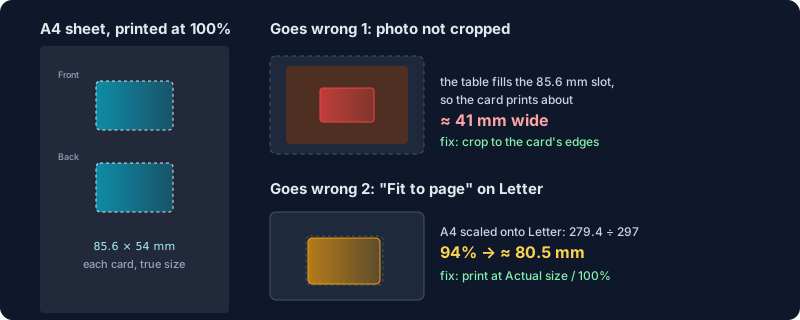
The photo isn't cropped. The composer fits your whole photo inside the card slot without distorting it. If the photo shows the card on a table with a hand-width of wood around it, the table gets printed at 85.6 mm and the card inside it comes out much smaller. In our test, a card photographed with a margin around it printed about 41 mm wide, under half its real size. Crop to the edges first and the card fills the slot exactly; we measured the output at 85.60 × 54.00 mm.
The print dialog shrinks the page. "Fit to page", "Shrink oversized pages" and similar settings rescale everything. The sheet is A4, so on US Letter paper "Fit" scales it to about 94%, and your 85.6 mm card prints at roughly 80.5 mm. Choose "Actual size" or 100% scale instead. On Letter that trims a few millimetres from the top and bottom of the A4 page, nowhere near the cards. Measure the printed card with a ruler before you send it anywhere that cares.
A Copy of Your ID Is a Copy of Your Identity
A clean copy of both sides is everything a fraudster needs to open an account in your name, which is why where you make it matters.
The composer lays out the photos in your browser tab and builds the PDF there. The images aren't uploaded, which is not true of every "free ID copy" site in the search results. If you're curious why we build every tool this way, see why local-first PDF tools.
Two habits help even more:
- Mark the copy with its purpose. The anti-reuse watermark writes one translucent diagonal line across each card at 15% opacity, "FOR ONBOARDING ONLY" by default. Change it to something specific like "Lease application, Oct 2026, Acme Lettings only". The card stays readable, and a copy that turns up somewhere else is obviously out of place.
- Share less when the format allows it. In India, UIDAI offers a masked Aadhaar that shows only the last four digits of the number. If the request accepts it, print that instead of the full card.
What It Can't Do Yet
- A4 only. There's no US Letter page option. Printing at 100% on Letter works, as described above.
- Images only. It takes JPG, PNG and WebP. If your ID is already a PDF, export the pages as images first with PDF to JPG.
- No cropping or straightening. Do that in your phone's editor before you add the photo.
Need several copies, or other photos on one sheet? Our guide to converting JPG to PDF covers general photo-to-PDF layouts, and printing passport photos at home deals with the same exact-size printing problem for photos.
Frequently Asked Questions
What size is an ID card?
85.60 × 53.98 mm (3.370 × 2.125 in). It's the ID-1 format from ISO/IEC 7810, the size of a bank card and of most driver's licences and national ID cards.
How do I print both sides of my ID on one page?
Photograph both sides, crop each photo to the card, and place them on one sheet with a layout tool such as ID Card Composer, which puts the front above the back on an A4 page. Print at 100% scale.
Why does my ID copy print too small?
Either the photo includes background around the card, so the card fills only part of the printed area, or the print dialog is set to "Fit to page". Crop tightly to the card and print at "Actual size".
Can I print an ID copy on US Letter paper?
Yes. The composer makes an A4 PDF; print it on Letter at "Actual size" or 100% and the cards keep their true size, because only the empty top and bottom edges of the A4 page fall off.
Is it safe to make an ID copy online?
Only if the file stays on your device. ID Card Composer builds the sheet in your browser and doesn't upload the photos. Whatever tool you use, add a watermark stating the copy's purpose.
Need it for a form today? Put both sides of your ID on one A4 page, at the real card size, without the photos leaving your phone or laptop.