Rohman
Quick answer: PDF-XChange Editor is Windows-only, and its free version stamps a permanent watermark on any document you save after using a licensed feature. For everyday editing, signing, markup, and redaction, OxygenPDF is a free PDF-XChange Editor alternative that runs in the browser on Mac, Windows, Linux, and ChromeOS — no install, no upload, no watermark.
PDF-XChange Editor has a loyal following among Windows power users — sysadmins, civil engineers, legal support staff — and it earned it. While Adobe Acrobat grew into a multi-gigabyte install with a mandatory subscription, Tracker Software spent two decades doing the opposite: hand-tuned C++ compiled against the Win32 API, near-instant rendering, and a perpetual license you buy once. People don't search for a PDF-XChange Editor alternative because the software is bad. They search because their work stopped living on a single Windows desktop.
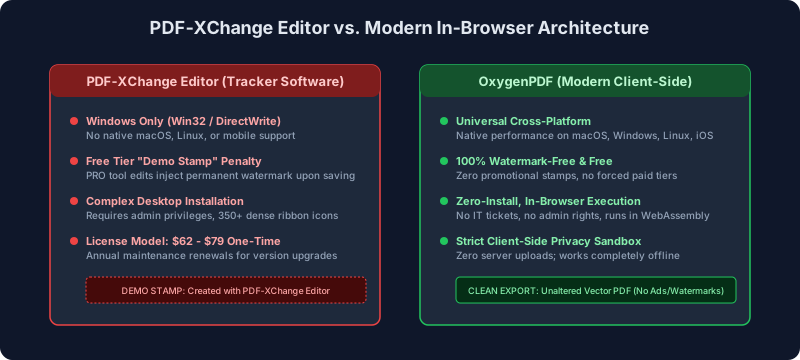
Two walls come up fast. Tracker Software has never shipped a macOS or Linux build, so Mac users are left choosing between emulation layers and remote desktops. And the free version has a catch that surprises people at the worst possible moment: it exposes the full editing feature set, then permanently stamps a "demo" watermark into the file the first time you save after touching a licensed feature. For anyone on a Mac, a locked-down corporate laptop, or a Chromebook, the practical answer is a tool that needs no install at all — client-side processing in the browser, like Edit PDF.
Key takeaways:
- Platform: PDF-XChange Editor is Windows-only; the company has said a native Mac version is not planned.
- Free tier: saving after using any licensed feature writes a permanent demo watermark into the file.
- Price: perpetual licenses run $62–$123 as of September 2026 — fair pricing, but Windows-only.
- Alternative: OxygenPDF handles everyday editing, markup, redaction, and merging free, in the browser, with no upload and no watermark.
- Exception: calibrated CAD measurement on Windows is still a reason to keep PDF-XChange Editor.
What Tracker Software Got Right
The company behind PDF-XChange Editor began in the UK in 1997 as Tracker Software Products, building document-imaging utilities. Its reputation came from PDF-XChange Viewer, a tiny portable reader that opened large files in milliseconds at a time when Adobe Reader was notorious for slow launches and bundled browser toolbars.
The Viewer was superseded by PDF-XChange Editor, which went gold in April 2013 and is still actively maintained — the current release line is version 11. For a few specialized jobs it remains genuinely hard to beat:
- Calibrated measurement. Civil and mechanical estimators use its perimeter, area, and polygon tools with a drawing scale they set themselves (say, 1/4 in = 1 ft), snapping measurements to vector endpoints embedded in the PDF.
- OCR. The Plus tier bundles an "Enhanced OCR" engine — Tracker's own comparison describes it as more accurate than the default engine — on top of the standard Tesseract-based one.
- Access to PDF internals. Power users can inspect raw content streams, edit JavaScript form scripts, and manage annotation trees directly against the ISO 32000 object model.
- Small footprint. Where Electron-wrapped editors idle at a gigabyte or more, PDF-XChange Editor typically sits in the low hundreds of MB even on very large documents.
Pricing, and the Demo Watermark
Unlike Adobe, Foxit, and Nitro — all of which moved to subscriptions — Tracker Software still sells perpetual licenses with optional annual maintenance. As of September 2026, its pricing page lists:
| Tier | Price (single user) | What you get | The catch |
|---|---|---|---|
| Free / evaluation | $0 | Viewing, search, basic comments and highlights | Licensed features stamp a permanent demo watermark on save |
| PDF-XChange Editor | $62 one-time | Text editing, page operations, standard OCR, signatures | No form creation, enhanced OCR, or document compare |
| PDF-XChange Editor Plus | $79 one-time | Everything above plus AcroForm creation, enhanced OCR, compare, Bates numbering | Windows only |
| PDF-XChange Pro | $123 one-time | Editor Plus plus PDF-Tools batch processing and a virtual print driver | More suite than most teams need |
Maintenance renewals cost extra and unlock new major versions; let it lapse and the license stays valid but frozen at the last version released during your maintenance window.
The free version's catch
The evaluation download doesn't disable premium features. It shows the full ribbon — Tracker counts more than 400 features, roughly 145 of them license-gated — and marks the licensed ones with a small PRO badge that's easy to miss. Use one anyway, hit save, and the editor writes a promotional stamp into the file: a banner across the modified pages reading "Created with PDF-XChange Editor — www.pdf-xchange.com — Click to Buy Now!", embedded as a Form XObject in the page's content stream with a clickable link annotation on top.
Once saved, the stamp is part of the file — deleting the text you edited doesn't remove it. Tracker's own knowledge base explains why the stamps exist, and the official manual describes removing them with a licensed copy. If you'd rather not buy a license just to clean one file, Remove Watermark strips watermark XObjects out of the PDF object tree in your browser — the same fix, without the $62. (There's a longer walkthrough in how to remove a watermark from a PDF.)
Why There Is No PDF-XChange Editor for Mac
The single biggest group of people looking for an alternative is Mac users, and the answer is not ambiguous: there is no macOS or Linux version, and none is planned. Asked directly on the company's support forum, Tracker staff said they "do not have plans on trying to develop a native Mac version," and a second staffer explained why — "a very large number of our systems rely on core windows functions," so porting would mean rebuilding them from scratch.
That tracks with the architecture. The UI is built on Win32 common controls and message loops, rendering goes through Direct2D and DirectWrite, and printing hooks the Windows print spooler and GDI. None of that has a macOS equivalent you can shim; a port is a rewrite.
What emulation actually feels like
The usual workarounds are compatibility layers — Wine, CrossOver, Whisky — or a Windows VM in Parallels Desktop. The app does launch. The daily experience, as Mac users on that same forum thread describe it, has friction:
- Blurry text on Retina displays. DirectWrite's subpixel rendering assumes a conventional monitor; translated through Wine onto a high-density Apple display, glyphs come out with color fringing and soft edges.
- Jerky trackpad scrolling. macOS delivers smooth momentum scrolling; Win32 apps expect discrete mouse-wheel ticks, so panning through a blueprint feels stepped.
- Printing quirks. macOS prints through CUPS; translating Win32 GDI print calls through Wine can drop line weights or clip margins.
- Real overhead on Apple Silicon. Wine has to run x86 Windows binaries through Rosetta 2, and a full Windows VM in Parallels means dedicating several GB of RAM and tens of GB of disk just to edit a PDF.
The Other Friction: Interface and IT Policy
Even on Windows, two things push teams toward alternatives.
The interface is dense. Nine ribbon tabs, hundreds of features, cascading property panels. Redacting a number or adding a signature means navigating menus built for people who already know what a MediaBox is. For a specialist that's power; for someone who needs to fix a contract before a call, it's a wall.
Deployment needs admin rights. It ships as a traditional .msi/.exe installer, so on a locked-down corporate laptop it goes through an IT ticket. Its updater runs as a background agent that can trip security monitoring, and without centralized packaging, workstations drift onto different builds.
The Alternatives, Compared
| Editor | Platforms | Install | Price (as of Sept 2026) | Privacy | Best for |
|---|---|---|---|---|---|
| PDF-XChange Editor | Windows | Desktop installer | $62–$79 perpetual | Local processing | Calibrated measurement, Windows power users |
| OxygenPDF | Any OS with a browser | None | Free | Local processing, nothing uploaded | Everyday editing, markup, redaction, mixed-OS teams |
| Apple Preview | macOS | Built in | Free | Local | Viewing, highlights, quick signatures |
| Adobe Acrobat Pro | Mac, Windows | Desktop + cloud account | $239.88/yr annual plan | Cloud sync hooks | Print preflight, enterprise workflows |
| Foxit PDF Editor | Mac, Windows | Desktop + cloud account | $129.99/yr | Cloud sync prompts | Managed Windows fleets |
| LibreOffice Draw | Mac, Windows, Linux | Desktop suite | Free, open source | Local | Occasional edits on Linux |
If Acrobat or Foxit is the other option on your shortlist, we did the same breakdown for both: Adobe Acrobat alternative and Foxit PhantomPDF alternative.
What "Client-Side" Actually Means
When people can't install PDF-XChange Editor — wrong OS, no admin rights — they usually land on a cloud converter like Smallpdf, Sejda, or iLovePDF. Those work by uploading your file to the company's servers, processing it there, and handing it back. For a contract, medical record, or tax return, that means the file sits on someone else's infrastructure for the duration — a real compliance question under GDPR or HIPAA, whatever the deletion policy promises. Free tiers also throttle: daily task caps, file-size ceilings, hourly limits.
Client-side tools flip that around. The page loads from a URL, but the processing runs in your browser's memory sandbox via WebAssembly — the file's bytes never leave your device, which you can verify yourself in the browser's network tab. OxygenPDF works this way:
- Edit PDF — click into existing text, fix typos, adjust headings, without reflowing the document.
- Annotate PDF — highlights, underlines, callouts, and freehand markup that standard PDF viewers read normally.
- Redact PDF — removes the underlying text and vector content, not just a black box drawn over it.
- PDF Reader — a fast viewer for large documents, without the install.
- Flatten PDF — bakes form fields and annotations into the page before distribution.
- Protect PDF — client-side AES encryption and permissions.
Which One Should You Use?
- On a Mac or Linux machine: skip the emulation stack. Use Edit PDF and Annotate PDF in the browser; Apple Preview covers quick local viewing.
- On a locked-down corporate PC: a browser tool needs no admin rights and no install — and since nothing is uploaded, there's no data-leaving-the-network question to answer.
- Measuring calibrated blueprints: keep PDF-XChange Editor on a Windows box. Scale-calibrated CAD measurement is its specialty and one of the few jobs where a dedicated desktop install is still justified.
- Refusing subscriptions on principle: OxygenPDF is free; Acrobat and Foxit are not. PDF-XChange's perpetual license is fair — if you're on Windows.
Scenario A: the Mac user in a Windows shop
Your colleagues run PDF-XChange Editor; you're on a MacBook. Rather than maintain a Wine setup, open the file in Annotate PDF for markup and Edit PDF for text changes. The output is a standard ISO 32000 PDF, so it round-trips cleanly when a Windows colleague opens it.
Scenario B: the employee without admin rights
You need to redact employee data and merge appendices, but IT policy blocks installers. Open OxygenPDF in Chrome or Edge, redact with Redact PDF, assemble with Merge PDF. No ticket, no upload.
Scenario C: the estimator
Your day is calibrated polygon measurements on architectural drawings. Keep PDF-XChange Editor on Windows — that's the job it was built for.
Frequently Asked Questions
Can I run PDF-XChange Editor on a Mac?
There is no native macOS version, and Tracker Software has said one isn't planned. Compatibility layers like Wine or CrossOver, or a Windows VM in Parallels, will run it, but expect blurry fonts on Retina displays, stepped trackpad scrolling, and printing quirks. A browser editor like Edit PDF runs natively on macOS with none of that overhead.
How do I remove the PDF-XChange demo watermark?
If you saved after using a licensed feature, the stamp is written into the file's content stream. Tracker's documented fix is a licensed copy; the free route is a tool like Remove Watermark, which strips the watermark objects from the PDF structure directly in your browser.
Is PDF-XChange Editor free?
Partly. The free version is a capable viewer and commenting tool, and Tracker says over 70% of features work without a license. But saving after using any licensed feature permanently watermarks the document, so it isn't a free editor in practice.
What's the best free alternative on Linux or a Chromebook?
PDF-XChange Editor is compiled against the Windows API and can't run natively on either. OxygenPDF runs in the browser via WebAssembly, so it works on Linux and ChromeOS with full editing, annotation, and redaction — nothing to install, nothing uploaded.
How is OxygenPDF different from other online PDF tools?
Most "online" tools upload your file to a server to process it. OxygenPDF loads the file into your browser's memory and processes it locally — the bytes never cross the network, which you can confirm in the browser's developer tools.
Bottom Line
PDF-XChange Editor earned its reputation honestly — it's fast, capable, and fairly priced for what it is: a Windows tool for an era when work lived on one machine. Modern work doesn't. Mixed operating systems, locked-down laptops, and files that need editing wherever they land make a Windows-only installer a poor default.
You don't have to fight Wine on a Mac, accept a watermarked contract, or upload a sensitive file to someone's server. Open the file in Edit PDF and make the change — free, no watermark, and the file never leaves your device.