Rohman
A supplier sends an invoice. It opens in Chrome, it looks like any other PDF, and somewhere inside it is an XML file your accounting software wants. Chrome gives you no sign it exists.
PDFs carry files more often than people think, and most viewers keep quiet about it. To extract attachments from a PDF you first need to know where they can live, because there are two places, and some tools only look in one.
Quick answer: Open the PDF in a viewer that has an attachments panel (Acrobat, or Firefox's built-in viewer), or drop it into PDF Attachments. That tool lists document-level attachments and paperclip annotations together, with page numbers for the paperclips, and lets you download each file or all of them as one ZIP. It runs in your browser and uploads nothing.
Two places a PDF hides a file
The PDF specification has had embedded files since PDF 1.3. In the words of ISO 32000-1, section 7.11.4, they make "the PDF file a self-contained unit that can be stored or transmitted as a single entity." A spreadsheet or an XML file gets stored inside the PDF, compressed, right next to the pages.
What differs is how the file is hooked up.
A document-level attachment hangs off the document itself, in a structure called the EmbeddedFiles name tree. It has no mark on any page; you only see it in a viewer's attachments panel. Acrobat's Attach File command creates this kind, and a PDF Portfolio keeps its contents here too: the spec's portable collections (section 12.3.5) present the files in that same name tree, for things like "email archives, photo collections, and engineering bid sets."
A file attachment annotation is pinned to a spot on a page. It shows up as a small icon, usually a paperclip, and clicking it opens the file. Under the hood (section 12.5.6.15) it's an annotation that points at an embedded file, much as a sticky note points at its comment text.
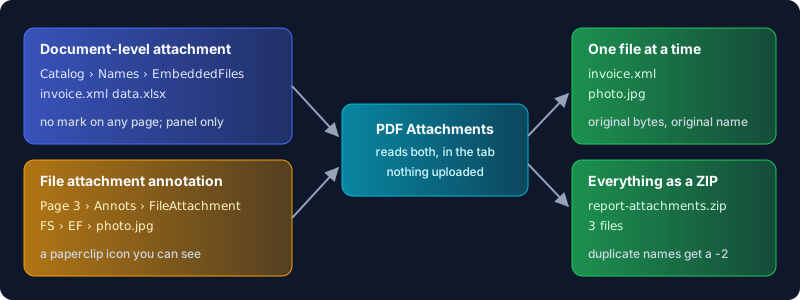
So the paperclip you can see is only half the story. A PDF with no icons anywhere can still be carrying a dozen files.
Why your browser shows nothing
The spec itself lets viewers ignore attachments. The same section says embedded files "are included purely for convenience and need not be directly processed by any conforming reader." Plenty of readers take that literally.
Chrome and Edge both render PDFs with PDFium, and neither shows document-level attachments. A request to add them, Support for attachments at PDF viewer, was filed back when Chrome was on version 24, and a 2025 report that "attachments embedded within PDF files are not shown" was closed as a duplicate of it. Firefox does better: its pdf.js viewer has an Attachments view in the sidebar (viewer source). Acrobat and Acrobat Reader have a full attachments panel, and Adobe documents how to open attachments from it.
If someone says the PDF "has a spreadsheet inside" and you can't find it, blame the viewer first.
Where attachments turn up
Start with e-invoices. Factur-X in France and ZUGFeRD in Germany are the same hybrid format: a readable invoice as a PDF/A-3 file, with the machine-readable invoice data embedded as an XML attachment that follows the European standard EN 16931 (FNFE-MPE). According to FNFE-MPE, B2B e-invoicing has been mandatory in Germany since 1 January 2025 with ZUGFeRD among the approved formats, and Factur-X is one of three formats every French company must be able to receive. PDF/A-3 is the archival flavour that allows files of any type to be embedded; our guide to PDF/A covers how it differs from the earlier parts.
Reports often carry their own data. A finance team sends a board pack and attaches the workbook the charts came from, so nobody has to ask. Deliverables carry their sources, like original artwork or the annexes to a contract.
Saved emails do it automatically. Convert an .eml or .msg with Email to PDF and the email's own attachments are embedded in the PDF by default, so the message and its files stay together.
How to extract attachments from a PDF with PDF Attachments
- Open PDF Attachments and drop in your PDF. It is read in the browser tab; nothing leaves your device.
- If the file is password-protected, type the password. The tool can still list and extract its attachments.
- Switch to the Extract tab. Every embedded file is listed with its name and size, whether it sits at document level or behind a paperclip on a page. The Manage tab also shows which page each paperclip is on.
- Click the download icon next to a file to save just that one, or Download all as ZIP to get everything in one archive. Two files with the same name get a
-2suffix inside the ZIP instead of overwriting each other.
You get the original bytes back. Embedded files are usually compressed inside the PDF, and the tool decompresses them before saving, so the XML opens as XML and the workbook opens in Excel.
The same tool goes the other way. In the Add tab you can attach a file to a PDF, any type, up to 50 attachments and 500 MB in total, then save a new copy. In Manage you can rename an embedded file or mark it for removal. Nothing changes until you press Save.
Attachments are also how malware travels
An attached file is a file. It can be a harmless CSV or it can be an executable, and a PDF reader that opens it hands it to whatever program your system associates with that extension. Adobe's Acrobat security guide says attachments "represent a potential security risk because they can contain malicious content, open other dangerous file, or launch applications," and Acrobat ships with a block list of extensions it refuses to open from an attachment: .exe, .bat, .js, .vbs, .jar, .lnk, .msi and many more.
Two habits follow. Before you open an extracted file, look at its extension and ask whether you expected it. Before you forward a PDF outside your organisation, check what it carries, because the source workbook attached to a polished report may hold numbers you never meant to share.
Removing attachments is part of sanitizing a PDF. Sanitize PDF in deep mode deletes the whole embedded-file tree, and our guide to sanitizing a PDF covers the other things worth stripping before a document leaves your hands. Doing it locally matters more here than for most edits: the attachments are often the most sensitive part of the file, and uploading the PDF to strip them sends them to a server first.
What this can't do
Paperclip annotations are the weak spot. PDF Attachments finds and extracts them, but deleting one does not reliably remove the paperclip from the page, and some files store the annotation in a way the delete button can't reach. To get rid of paperclips, remove the annotations themselves; removing annotations from a PDF explains the options. Note that this strips every annotation, links and comments included.
Saving changes to an encrypted PDF has a real cost. The tool can read a protected file, but to write a new one it rebuilds each page from an image, so the text stops being selectable and searchable. Unlock the file first if the text matters.
Two more limits. Converting a file with PDF to PDF/A keeps attachments only at level 3b and drops them at every other level, because earlier PDF/A parts don't allow arbitrary embedded files. And nothing here validates content: the tool will extract a Factur-X XML file perfectly but won't tell you whether the invoice data is correct.
Frequently Asked Questions
How do I extract embedded files from a PDF file?
Open the PDF in a viewer with an attachments panel, such as Acrobat or Firefox, select the file and save it. Or drop the PDF into PDF Attachments, open the Extract tab and download each file, or all of them as a ZIP. Chrome and Edge don't show document-level attachments at all.
How to separate PDF attachments?
Extracting copies the attachments out and leaves the PDF as it was. To end up with a PDF that no longer carries them, mark them for removal in the Manage tab and save a new copy, or run Sanitize PDF in deep mode, which removes every document-level attachment in one pass.
How do I add a file to an existing PDF?
In Acrobat, use Attach File. In PDF Attachments, open the PDF, go to the Add tab, drop in the files (any type, up to 50 and 500 MB total) and save. The files are embedded at document level, so the recipient finds them in their viewer's attachments panel rather than on a page.
Why can't I attach a PDF file?
Usually it's the viewer: Chrome, Edge and many mobile apps can display a PDF but can't edit its attachments at all. In Acrobat, an administrator can lock the attachment settings so that certain file types won't open or save. And every tool has a ceiling; PDF Attachments stops at 50 files or 500 MB per PDF.
What is a PDF portfolio?
It's a PDF that presents several embedded files as a browsable collection, often with a cover page. The files themselves sit in the same embedded-file tree as ordinary attachments, so any tool that reads document-level attachments can extract them.
Get the files out
A PDF can hold far more than its pages, and the viewer you happen to use decides whether you ever find out. If something should be inside a file and you can't see it, open it in PDF Attachments: you get every embedded file and every paperclip in one list, ready to save, and none of them leaves your computer.