Rohman
Quick answer: Printable graph paper usually measures wrong because the print dialog shrinks the page to fit your printer's non-printable margin — a 5 mm grid comes out closer to 4.8 mm. Print at Actual Size or 100% scale with every fit-to-page option off, and generate the sheet at the paper size your printer is actually loaded with.
Search for printable graph paper and you will find thousands of ready-made PDFs, with no guarantee that any of them prints at the size it claims. Download one, print a sheet of 5 mm graph paper at home, lay a ruler across it, and there is a decent chance the squares are not 5 mm. They will be close. Close is useless if you are drawing a floor plan to scale or plotting a graph where the axes need to actually line up.
The generator did its job. The print dialog undid it.
That holds regardless of where the PDF came from — a search result, a textbook's companion site, or the generator built into this page. This piece covers why the shrink happens, how much of it is your printer's own hardware limit rather than a setting you forgot, why Letter and A4 make the problem worse instead of just different, which ruling actually matches the job in front of you, and how to check a printed sheet in under a minute so you only have to solve this once per printer.
Your Printer Cannot Reach the Edge of the Paper
Almost every consumer printer has a non-printable border: a few millimetres around the sheet where the rollers grip and nothing can be laid down. Everything below follows from that.
Because the printable area is smaller than the paper, print dialogs default to scaling your page down to fit inside it. Acrobat's print dialog offers Fit, Actual size, Shrink oversized pages and Custom Scale, and it does not reliably land on the one you want. Chrome applies fit-to-printable-area to PDFs and resets the scale control on every print job, so getting it right once does not keep it right.
The result is a page reduced by two to five percent. Nothing looks broken and the text still reads. But a 5 mm grid is now 4.8 mm, and everything you measure on it inherits that error.
None of this is the file's fault. OxygenPDF's generator draws the grid as vector lines at exact point coordinates — a 5 mm ruling is stored as 14.173 pt, not rounded to a tidier number — so whatever gap shows up against your ruler was added afterward, by the print pipeline scaling the whole page down to fit the printable area it actually has.
The fix is one setting. Print at Actual Size, or scale 100%, with every fit-to-page and shrink-to-fit option off. If the grid then runs off the edge slightly, that is the honest outcome. The paper really is bigger than your printer can reach.
Letter and A4 Make It Worse
The two common paper sizes are not close enough to swap.
US Letter is 8.5 × 11 inches, or 215.9 × 279.4 mm, standardized in the US as ANSI/ASME Y14.1. A4 is 210 × 297 mm under ISO 216, the standard used almost everywhere else. A4 is about 6 mm narrower and 18 mm taller than Letter.
| US Letter | A4 | |
|---|---|---|
| Width | 215.9 mm (8.5 in) | 210 mm (8.27 in) |
| Height | 279.4 mm (11 in) | 297 mm (11.69 in) |
| Aspect ratio | 1 : 1.294 | 1 : 1.414 (√2) |
| Governing standard | ANSI/ASME Y14.1 | ISO 216 |
The two aren't just different sizes — they're different shapes. A4's ratio is exactly 1-to-√2 by design: cut an A-series sheet in half across its long side and each half keeps the same ratio as the whole sheet, which is why two A4 pages scale down to fit one A3 sheet and an A4 folds cleanly into A5. Letter has no such relationship to Legal or to A4; its ratio comes from a papermaking tradition rather than a geometric rule. Download a sheet laid out for A4 and print it on Letter with fitting enabled, and the dialog does not just shrink it evenly — because the shapes don't stack, one axis runs out of room before the other, so the grid gets squashed by roughly 6% on top of the usual printable-area shrink, and the leftover margin ends up lopsided instead of even on every side.
This is why so much free graph paper on the internet measures wrong for so many people: it was drawn for the other continent's paper. Generate the grid on the page size you actually load into your printer, rather than rescaling someone else's sheet.
Measure Ten Squares, Not One
A single 5 mm square is too small to check against a ruler. A 2% error is a tenth of a millimetre, and most people cannot reliably read a ruler to better than about half a millimetre by eye.
Count ten squares and measure across all of them. Ten 5 mm squares should span exactly 50 mm; ten quarter-inch squares should span exactly 2.5 inches. Now that same 2% error is a full millimetre, sitting right next to a ruler marking, and obvious.
Do this once per printer. The scaling behaviour is a property of the driver and the paper size, not of the file, so once you know your setup prints true you can stop checking.
Which Grid You Actually Need
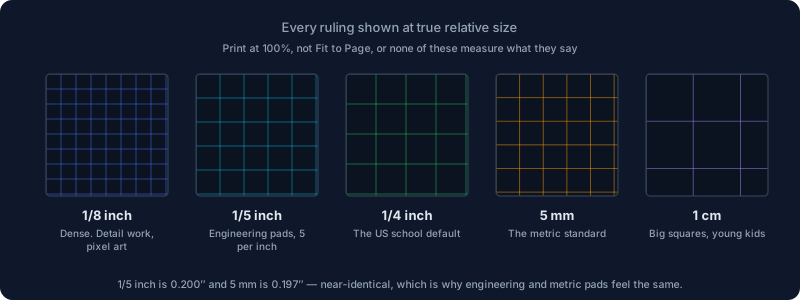
1/4 inch is the US school default, and the one most American maths homework assumes. Big enough to count quickly, small enough to plot on.
1/5 inch is the engineering ruling, five squares to the inch, the one on the green-tinted pads sold for engineering courses. Its whole appeal is that inches divide into it cleanly.
5 mm is the standard almost everywhere else, and the default for squared exercise books across Europe and Asia. Here is the detail that surprises people: 1/5 inch is 0.200″ and 5 mm is 0.197″. They are 1.6% apart, which is why an engineering pad and a metric pad feel identical in the hand and are not interchangeable if you are measuring.
1/8 inch is for detail work: dense sketching, or cross-stitch charts where one square is one stitch.
1 cm is for young children, and for anything that has to be legible across a room.
Dot grid is not a grid at all once you write on it. The dots give you alignment without lines running through your work, which is why bullet journals standardised on 5 mm dots.
Laid out side by side for reference:
| Ruling | Inches | Millimetres | Squares per inch | Typical use |
|---|---|---|---|---|
| 1/8 inch | 0.125 in | 3.18 mm | 8 | Detail work, cross-stitch |
| 1/5 inch (engineering) | 0.2 in | 5.08 mm | 5 | Engineering pads |
| 1/4 inch | 0.25 in | 6.35 mm | 4 | US school default |
| 5 mm | 0.197 in | 5 mm | ~5.08 | Metric standard |
| 1 cm | 0.394 in | 10 mm | ~2.54 | Young children, legibility |
| 5 mm dot grid | 0.197 in | 5 mm | ~5.08 | Bullet journals |
Choosing for a job rather than a preference: knitting and cross-stitch want small squares. Tabletop maps want 1/4 inch, because the five-foot square is the convention the rules already assume. Architects reach for the same 1/4-inch ruling for an entirely different reason: at the standard US drafting scale of 1/4 inch to the foot — 1:48 — each square on the page already represents one foot on the finished building, so a quick floor-plan sketch needs no separate scaling math.
Graph paper itself predates all of these conventions. The first patented coordinate-ruled paper dates to 1794, credited to a Dr. Buxton in England, though grid-printed pages exist in pattern books going back further still. The sparser 4- or 5-square-per-inch American ruling later picked up the name "quadrille" or "quad" paper — a different lineage from the finer engineering and metric grids, even though today they sit side by side in the same office-supply aisle. American maths education pushed hard for squared paper specifically in the early 1900s, on the reasoning that freehand-ruled margins were too unreliable for beginners to plot against — the same complaint this article is making, just upstream of printers by about a century.
Printing Straight to a Tablet Skips the Printer Entirely
None of the scaling problems above exist if there is no printer in the pipeline. OxygenPDF's page-size picker also lists exact screen specifications for the e-ink tablets people actually write on with a stylus — Supernote, reMarkable, Boox, and Samsung's Galaxy Tab S9/S10 line — sized in pixels and pixels-per-inch rather than in paper units. Pick, say, a reMarkable 2 (1404 × 1872 pixels at 226 ppi) or a Supernote A5 X, and the generator runs the same pixel-to-point conversion at generation time, before a single line is drawn, so the file fills that device's screen edge to edge with no print job and no fit-to-page setting to get wrong in the first place.
This is a category the fit-to-page problem always missed: someone writing on a reMarkable, a Boox, or a similar tablet was never printing at all. Load a PDF sized for the wrong page dimensions into a note-taking app instead, and it gets stretched or letterboxed by the reader rather than shrunk by a print driver — the same underlying mismatch, minus the ruler you'd normally use to catch it.
Keep the Lines Faint
A black grid competes with your pencil. Real graph paper uses a light blue or grey line, weak enough that your own marks sit on top of it and strong enough to still follow. Light blue had a second advantage historically: it dropped out when a page was photographed for reproduction. Early process cameras and photographic film were tuned not to register that specific wavelength, the same property behind "non-photo blue" pencils that letterers and comic artists still use to sketch guide lines invisible to a camera — so a note or a grid drawn in it could be shot for printing without the blue itself surviving into the copy.
If you are printing a lot of it, faint lines also use meaningfully less ink than a dark grid across an entire sheet.
Making a Sheet
- Open Graph Paper
- Pick a ruling — 1/8 in, 1/5 in engineering, 1/4 in, 5 mm, 1 cm, or a 5 mm dot grid
- Set the page size to the paper in your printer, not the one the download defaulted to
- Print at 100% with fit-to-page off, then measure ten squares
It generates in your browser and downloads as a PDF, so there is no upload and no account. A few more controls sit past the ruling picker: a colour swatch for the line itself (not locked to pale blue — pick whatever prints faint enough on your paper, or something bolder for a screen-only PDF), a line-weight control, a page margin you can widen for hole-punching or narrow to gain drawing area, and a page-count slider that builds up to 100 pages in one file, useful for a bound notebook rather than a single loose sheet. Orientation is its own toggle, separate from page size, so a landscape sheet on Letter does not mean hunting for a differently-shaped page. The same generator, with the pattern switched to lined or dot-grid instead of grid, is Create PDF — it adds a Cornell-notes layout and plain pages, for when graph paper alone is not quite the page you need. For ruled rather than squared paper specifically, Lined Paper does narrow, college and wide rulings the same way.
Two Things Worth Knowing
Generate at the size you print. Resizing afterwards reintroduces the exact scaling error this whole article is about — but if you are stuck with a sheet in the wrong size, Fix Page Size is the least-bad way to convert it.
Double-sided grids want heavier paper. Standard 80 gsm office paper shows the grid from the other side clearly enough to be distracting. Engineering pads sidestep this by convention, printing the grid on the back of each sheet rather than the front, so the writing surface stays clean and the lines show faintly through.
Frequently Asked Questions
Why does my 5 mm graph paper print bigger or smaller than 5 mm?
Almost always the print dialog, not the file. Every consumer printer has a non-printable margin, so "Fit to page" or "Shrink oversized pages" scales the whole sheet down by roughly two to five percent to make it fit. Turn on Actual Size or 100% scale, and turn off every fit-to-page option, before you print. The same trap catches passport photos printed at home, where a millimetre matters even more.
Can I print A4 graph paper on Letter paper and have it come out right?
Not reliably. Letter and A4 are different shapes, not just different sizes, so fitting one onto the other squashes the grid unevenly on top of the usual printable-margin shrink. Regenerate the sheet at the page size you are actually loading into the printer instead of rescaling a file made for the other one.
What's the difference between graph paper, grid paper, and quad paper?
Nothing — they're the same product under different names. "Quad" or "quadrille" paper is the older American term for the sparser 4- or 5-square-per-inch ruling, while "graph paper" became the standard term once coordinate geometry entered US school curricula in the early 1900s.
Can I generate graph paper sized for my reMarkable, Supernote, or Boox tablet?
Yes. The page-size picker lists exact pixel and ppi specifications for the common e-ink tablets alongside the usual paper sizes, so the grid fills the device's screen edge to edge with no printing step involved at all.
Is a 5 mm dot grid the same spacing as 5 mm graph paper?
Yes — the same 5 mm spacing, just a dot at each intersection instead of a full crossing line. Bullet journals popularized 5 mm dot spacing specifically because it's small enough for neat handwriting and dense enough to sketch simple tables and habit trackers against.
Why do engineering pads print their grid on the back of the page?
So the front stays visually clean. Printing the ruling on the underside lets it show through just enough to align writing and simple sketches, without the grid itself photocopying as darkly as ink written directly on the front.
Graph paper is the rare thing where the file is trivial and the printing is where it goes wrong. Get the scale right once, and every sheet after that is correct.
Make a sheet of graph paper — generated in your browser, nothing uploaded.