Rohman
Somebody on a forum told you Stirling PDF is the private way to edit PDFs, and they were right. Then the install guide asked for Docker and a 4 GB memory budget, and all you wanted was to merge two scans before lunch.
That gap is why people go looking for a Stirling PDF alternative. The project is good. It is also a server, and a server is something you have to run.
Quick answer: If you want Stirling PDF's privacy without hosting anything, use a toolkit that runs in the browser tab. OxygenPDF's Merge PDF and OCR PDF process the file on your own device, with no Docker and no upload. Keep Stirling if your team needs a shared server, or an API that runs automated pipelines.
What Stirling PDF gets right
Credit first, because it has earned it. Stirling PDF calls itself "the open-source PDF platform", and the numbers back that up: about 94,700 GitHub stars as of October 2026, and a commit pushed the day before I checked. The README lists 50+ tools and REST APIs "available for nearly all tools".
The core is MIT-licensed. The project is open-core, though, and its LICENSE file carves out several directories (proprietary, SaaS, desktop, processor) that carry their own terms. Fair enough. Someone has to pay the maintainers.
Where it really shines is the part most individuals never touch: no-code pipelines, folder watching, single sign-on and an API you can call from your own code. Nothing in a browser tab competes with that.
What running Stirling PDF yourself actually costs
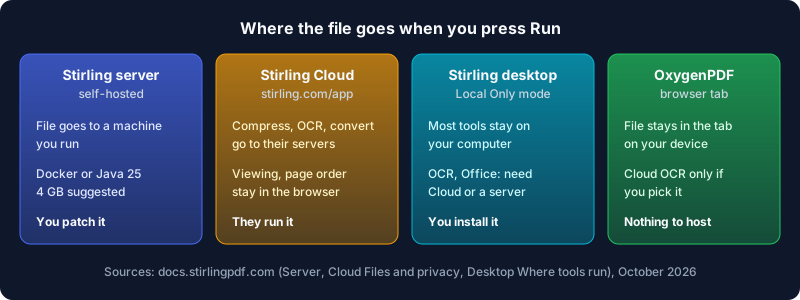
The README's quick start is a single docker run line, and it does work. The Docker install guide is where the real shape of the job shows up. The standard latest image bundles LibreOffice, Tesseract, Ghostscript, Calibre and more, and suggests 4 GB of memory. The latest-ultra-lite image gets that down to 2 GB by dropping OCR and Office conversions. You mount /configs and /storage. Upgrades are yours as well: pin a version tag to decide when they land, and back up /configs before the big ones.
Then there's the first login: admin / stirling, followed by a forced password change. Turn login off and "anyone who can reach the server can then use it."
Searching for Stirling-PDF without Docker? The JAR install exists. It needs Java 25, and you install the conversion programs yourself, because Stirling "turns off any tool whose program is missing" at startup. That's a fine trade for a sysadmin. For someone fixing a lease on a Sunday it's a weekend project.
Stirling Cloud and the desktop app: where your file goes
Stirling has two answers for people who don't want a server, and both are honest about data flow if you read the docs.
Stirling Cloud, at stirling.com/app, needs no install and runs manual tools free. Its Files and privacy page splits the work in two. Viewing and rearranging pages happens "in your browser. The file stays on your device." Server tools "such as compress, OCR, convert and watermark" are "sent to Stirling's servers, processed and returned." The infrastructure is AWS, and files you choose to save stay until you delete them.
The desktop app runs on Windows, macOS and Linux, and in Local Only mode "every tool runs on your computer. Nothing is uploaded." The catch is in Where your tools run: OCR and Office conversions "usually need Cloud or a server", so they sit behind a cloud badge.
Stirling PDF vs OxygenPDF at a glance
| Stirling PDF (self-hosted) | Stirling Cloud | OxygenPDF | |
|---|---|---|---|
| Setup | Docker or Java 25 | None, sign in or guest | None |
| Where compress and OCR run | Your server | Stirling's servers | Your browser tab |
| Who patches it | You | Stirling | Nothing to patch |
| REST API and pipelines | Yes | Yes, on credits | No |
| Multi-user, SSO | Free up to 5 users | Free team of 5, then Team plan | No accounts needed |
| Price | Free plan; Team $99/month | Manual tools free | Free |
Stirling's figures come from its plans page and pricing, checked October 2026.
When Stirling PDF is the better pick
Pick Stirling, and don't look back, in these cases:
- Your team shares one tool. A server with SSO, user limits and audit logging (Enterprise) is a different product category from a browser tab.
- You automate. Watched folders, pipelines and a REST API turn a stack of invoices into a job that runs overnight. OxygenPDF has no API.
- You need server-grade conversion. Office documents go through LibreOffice, and compression can call Ghostscript and QPDF. A browser tab can't ship those programs.
- You already run a homelab. If Docker is already there, the install really is one command.
How to do the usual Stirling jobs in a browser tab
Merging is the most common job, so here it is with Merge PDF:
- Open the tool and drop in two or more PDFs. They load from your disk into the tab.
- Drag the files into order, and rotate any file that came out of the scanner sideways.
- Scanned the fronts and the backs as two separate files? Pick the Duplex Scan Fix mode and it weaves them back into one double-sided document.
- Press Merge, rename the result, and download it.
The same pattern covers the rest. Compress PDF takes a preset or a target size in MB, which is handy for a portal with a 5 MB cap. OCR PDF runs Tesseract or PaddleOCR on-device and gives you a searchable PDF or a .txt file. Redact PDF finds text by search or by a box you draw, and Edit PDF fixes the typo.
You can check the privacy claim yourself: keep the DevTools Network panel open while a merge runs, and no request carries your file. Why local-first PDF tools matter explains the model behind that.
What a browser tab can't do
A fair comparison has to include where OxygenPDF loses.
Compress PDF works by rendering each page as an image and rebuilding the file from JPEGs. Scans shrink a lot. A text-heavy report shrinks too, but its text stops being selectable. Run OCR afterwards if you need the words back.
Redact PDF removes the covered text from the page's content stream and keeps the rest of the page as real, selectable text. When a page's content can't be rewritten that way, it falls back to turning just that page into an image, so the redaction still holds but that page loses its text layer.
OCR has cloud engines (Surya, GOT-OCR 2.0 and others) for hard layouts. They stay off unless you pick one, and they need your own Replicate API token. Pick one and page images leave the device. Stay on the on-device engines and nothing leaves.
Big batches are limited by your device's memory, because the tab is the server. There's no API and no shared server either. If you need those, the honest answer is Stirling. For a wider look at open-source options, see the open source PDF editor survey.
Frequently Asked Questions
How good is Stirling PDF?
Very good for what it targets. It has 50+ tools, an active codebase, a REST API and pipeline automation, plus a free self-hosted plan for up to 5 users. The price is operational: you run a server, or you accept that some tools send files to Stirling Cloud or need one.
Is Stirling PDF free to use?
Mostly, yes. The pricing page lists a $0 plan for individuals that covers every way of running it, with 1,000 monthly automation credits. Team costs $99 a month for 100 users. On Stirling Cloud, tools you run by hand are free, while automation and API calls use credits.
What is the difference between BentoPDF and Stirling PDF?
Where processing happens. BentoPDF's README describes a client-side toolkit where "no server-side processing is required", licensed AGPL-3.0, which you can also self-host. Stirling PDF runs its heavy tools on a server that bundles LibreOffice, Tesseract, Ghostscript and Calibre, so you get server-side conversion at the cost of running that server.
Can I run Stirling-PDF without Docker?
Yes. Stirling publishes JAR builds that need Java 25, and the desktop app installs like any other program on Windows, macOS and Linux. With the JAR you install the conversion programs yourself. Missing ones simply switch their tools off.
What's the best free PDF program?
It depends on where you want the file to go. For a team with a server, Stirling PDF. For one person who wants nothing installed and nothing uploaded, a browser-local toolkit like OxygenPDF. If you're weighing other options, the PDF24 alternative post covers the Windows-only case.
Skip the server
Stirling PDF solves a team's problem well. If your problem is two PDFs and no time, the Stirling PDF alternative you want is the one with no container at all. Open Merge PDF and finish the job in the tab, with the file staying on your machine.