Rohman
A web page with a dead link gets fixed when someone edits the page. A PDF doesn't get edited. It gets downloaded, emailed and archived, and the links inside it point at whatever existed on the day it was exported. Three years later the catalog still sends customers to a product page that 404s, and the annual report links to a domain your company let lapse.
If you need to check broken links in a PDF, this is the job: find every link the file actually contains, test the ones that go to the web, and fix them in the PDF itself, because the Word or InDesign file it came from is often long gone.
Quick answer: To check broken links in a PDF, list its link annotations (the invisible clickable areas), test each web address, then rewrite or delete the bad ones. Dead Link Debugger does all three in your browser: it lists every link with its page, flags malformed addresses offline, tests them online only if you opt in, and saves a fixed copy.
Link Rot Is the Default, Not the Exception
The numbers are worse than most people guess. Pew Research Center found that 38% of webpages that existed in 2013 were no longer accessible a decade later, and that 23% of news pages and 21% of government pages contain at least one broken link.
Legal writing, which depends on citations staying put, fares no better. A Harvard Law School study of three Harvard law journals found that more than 70% of the URLs they cited no longer led to the material originally cited.
A PDF makes this worse because it freezes. A link on a website can be patched in thirty seconds. A link in a PDF that has been downloaded a thousand times stays broken in every copy, including the one on your own server, until someone fixes the file.
What a Link in a PDF Actually Is
Before you can find dead links in a PDF, it helps to know what you're looking for, because the blue underlined text is not the link.
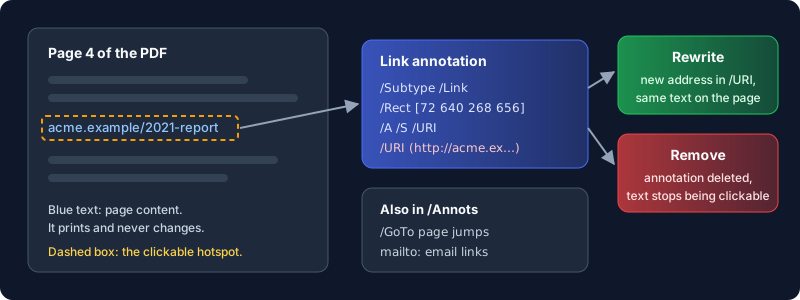
The text is part of the page, drawn like every other word. The click comes from a separate object sitting on top of it: a link annotation, which is a rectangle plus an action. For a web link that action is a URI action holding the address. For a jump inside the document it's a GoTo action pointing at a page. The two are connected only by position. Nothing ties the words "acme.example/2021-report" to the address the rectangle opens, which is why a PDF can show one URL and open another.
That split decides what any fixer can and can't do. Rewriting a link changes the address inside the annotation. It does not change the printed words. And text that merely looks like a URL, typed into a document that was never exported with live links, has no annotation behind it at all. There is nothing there to check.
How to Check Broken Links in a PDF, Step by Step
- Open Dead Link Debugger and drop in the PDF. It lists every link annotation with its page number and target, plus a count of external links, internal links and how many it has flagged.
- Read the offline flags first. Before anything touches the network, each address is checked against URL syntax. An address like
example.org/reportgets a "Missing https://" badge, because without a scheme most viewers treat it as a file path. An empty or unparseable target shows as Malformed. - To test whether the web links still work, tick "Check links online" and press Check links. Each http or https address comes back as OK, Redirect (with the address it ends up at), Dead (a 404 or 410, or a server that can't be reached at all), Unverifiable (the site refused an automated check or didn't answer in time) or Error (any other 4xx or 5xx status code). The verdict is based on where the link finally lands, so a redirect that ends on a missing page reads Dead, not Redirect.
- Fix the rows that need it. Type a replacement address into the field under a link, or press the trash icon to remove the link entirely. Removing a link deletes the clickable area; the words stay on the page.
- Press Apply, check the summary ("2 links rewritten, 1 removed"), and download the fixed PDF. Download report gives you a Markdown table of every link, its status and the fix applied, which is handy when someone has to sign off on the change.
In my test file, an old http://github.com/ link came back as Redirect to https://github.com/, a deleted page came back Dead, and mailto: and scheme-less addresses were skipped. After saving, the annotations held the new addresses and the page text read exactly as before.
What the Online Check Can and Can't Tell You
Here's the honest part, and it matters if you're auditing something you'll be held to.
A browser can't simply ask an arbitrary website whether a page exists. Cross-origin rules block the answer for most sites, which would leave nearly every link "unverifiable". So when you press Check links, the tool sends each address (the URL string only, never the PDF) to a small OxygenPDF endpoint, and that server makes a HEAD request to the site (or a GET, if the site rejects HEAD), follows up to five redirects, and returns the final status code. Private and local addresses are refused, and each probe gives up after ten seconds. The file itself is parsed and rewritten in your browser and never leaves it. The check is off until you tick the box, so if even the list of URLs is sensitive, skip it and rely on the offline syntax pass.
Some limits follow from that design:
- A 403 is not a dead link. Sites behind bot protection often refuse automated requests with a 401, 403 or 429. Those come back as Unverifiable, with the code beside the badge, not as Dead. Open them in a normal browser before you rewrite anything.
- Dead includes "unreachable". A domain that no longer resolves, or a server that refuses the connection, is reported Dead. A server slower than ten seconds comes back Unverifiable instead, and deserves a second try.
- Any redirect counts. An
httptohttpsupgrade that lands on a working page shows as Redirect. That link works, but pointing it straight at the final address saves your readers a hop and protects you if the redirect is ever removed. - Soft 404s slip through. A site that answers "page not found" with a 200 status looks fine to any status check, including this one.
Internal links are listed with their target page so you can see them, but they're read-only. In practice they rarely rot: they break when pages are deleted, which is a different problem. Our sibling guide on making citations clickable covers that kind of link from the other direction.
Limits to Know Before You Rely on It
Password-protected PDFs work. A file with an open password asks for it; one with only an editing or printing restriction opens without a prompt. Either way the links are read without rasterising the pages, so every one is listed, and the saved copy keeps its text and links. The saved copy isn't re-protected, though, so add the password back afterwards if the file needs it.
The real limits are structural. The fix changes where a link goes, not what the page says, so if the printed URL itself is wrong you need a text edit in the PDF editor as well. And the tool works on links that exist; it can't turn a typed URL into a clickable one. If you control the source, the better long-term move is to export it properly in the first place. Our HTML to PDF guide covers what survives that conversion.
Frequently Asked Questions
How do I find broken links in a PDF?
List the PDF's link annotations and test each address. Dead Link Debugger lists them with page numbers, flags malformed addresses offline, and, if you opt in, checks each web link's HTTP status.
Can I fix links in a PDF without the original file?
Yes. A link's address lives in an annotation inside the PDF, so it can be rewritten or removed directly. The visible text doesn't change, only where the click goes.
Does fixing a link change how the PDF looks?
No. Only the link annotation is edited or deleted. If the old URL is printed on the page, it stays printed; edit that text separately if it matters.
Is it safe to check PDF links online?
Your PDF never leaves your browser. The optional online check sends only the link addresses to OxygenPDF's checking endpoint, which then contacts each site. Leave the box unticked if the URLs themselves are confidential.
Why does a working link show as unverifiable?
Many sites block automated requests and answer with a 401, 403 or 429. The tool reports those as Unverifiable rather than Dead, with the status code beside it, so open them by hand before you change anything.
Does it check links in a password-protected PDF?
Yes. Enter the password when asked, or nothing at all if the file only restricts editing or printing. Every link is listed and the fixed copy keeps its text and links, but it's saved without the password, so re-protect it if you need to.
Got a PDF that has been online for years? Audit its links in your browser, fix the dead ones, and ship a copy that goes where it says it goes.