Rohman
You scanned the lease at 300 DPI because the fine print on page 14, the renewal clause, is the part that actually matters. Forty pages later you had a file worth reading twice. You dragged it onto iLovePDF's OCR tool so you could search it and copy that clause into an email. The file was 18 MB. The tool turned it away before it started: free accounts get 15 MB per OCR job, one file at a time. That is usually where the "iLovePDF alternative" search starts.
Nobody made you wait an hour. Nobody made you watch a clock. iLovePDF just asked you to make the file smaller, or pay.
The short version: OxygenPDF runs OCR, merge, edit, sign, redact, and every other PDF tool inside the browser tab you already have open. There's no upload step for a size cap to interrupt, because there's no server on the other end doing the metering — the file never leaves your device. Everything below is the long version: what iLovePDF actually gets right, exactly where its free tier draws the line tool by tool, and what changes once nothing is being measured at all.
What iLovePDF is
iLovePDF started in a study in Barcelona in 2010, founded by Marco Grossi (ilovepdf.com/help/about). It has never taken outside funding and is still privately held, with roughly 72 employees as of mid-2026 (Crunchbase). That's a real bootstrapped story, not a venture-backed growth chart.
In one line: iLovePDF is a Barcelona-based, self-funded online PDF toolkit that processes your file on its own servers and hands it back, rather than working on it inside your browser. That one structural fact — server-side, not browser-side — is what explains every file-size cap in this article.
It's also enormous. Semrush counts 250.21 million visits in July 2026 alone, dwarfing a competitor like Sejda's 5.7 million. iLovePDF's own pricing page claims "16.5 million documents processed every day" and calls itself the "#1 most-used online PDF software worldwide." Whether it's actually first is a marketing claim; the traffic behind the claim is not.
The reputation holds up under independent scrutiny, too. Trustpilot has it at 4.9 out of 5 across 13,393 reviews. Capterra puts it at 4.7 out of 5 across 1,746 reviews. Those aren't small samples a marketing team could quietly pad. A lot of people use this tool and walk away satisfied.
The free tier, tool by tool
Sejda gives you one number to remember: three tasks an hour. Foxit gives you a countdown on a trial. iLovePDF's pricing page gives you a spreadsheet. Every tool carries its own file-size cap and its own files-per-task cap on the free Basic plan, and none of them match:
| Tool | Free file-size cap | Files per task |
|---|---|---|
| Merge PDF | 100 MB | Up to 25 |
| Compress PDF | 200 MB | 2 |
| OCR PDF, Word/Excel/PowerPoint conversion | 15 MB | 1 |
| PDF to JPG | 25 MB | 2 |
| Image to PDF | 40 MB | 20 |
| Sign PDF | 50 MB | 3 |
| Redact PDF, Compare PDF | 400 MB | 1–2 |
Premium clears out most of this. Most tools jump to a 4 GB cap and anywhere from 10 to 500 files per task. Not all of them, though. Edit PDF stays at 100 MB and 1 file per task on every plan, Basic through Business. Sign PDF stays at 50 MB on every plan too; paying only buys two extra files per batch, from 3 up to 5. Redact and Compare keep their already-generous 400 MB ceiling and never move at all. Someone at iLovePDF decided a handful of tools just don't get bigger, no matter what you're paying for.
What iLovePDF does well
Credit where it's due. Twenty-five-plus tools live under one roof here (ilovepdf.com/help/about) — genuinely broad for a single account. There's a real desktop app for offline work (ilovepdf.com/desktop), mobile apps that open files straight out of Google Drive, Dropbox, OneDrive and SharePoint, a REST API for anyone who wants PDF processing wired into their own product, and iLoveSign, a full e-signature workflow with an audit trail, something OxygenPDF doesn't attempt.
Raw tool count isn't the gap anymore — OxygenPDF ships more than 60 free tools of its own, all unlimited on the web, no account required. What iLovePDF still has that a browser tab genuinely can't offer is reach across devices you don't fully control: an installer for an offline laptop, a phone app that survives a dropped connection, an API a developer can call from a server they own, and a signature workflow built for the day someone disputes it, not just the day someone draws it. If your work involves PDFs for eight hours and you want one account that follows you from a laptop to a phone to a build pipeline, that breadth is a legitimate reason to pay for it.
Where your file actually goes
Every one of those tools works the same way underneath: your file leaves your device, lands on iLovePDF's servers, gets processed, and comes back. iLovePDF says it deletes files "automatically and permanently... within two hours of being processed" (ilovepdf.com/help/security), holds ISO/IEC 27001:2017 certification, and is GDPR compliant as a Barcelona-based company. Signed documents through iLoveSign are the one exception, kept longer under separate terms, because a signature has to be provable after the fact.
We found no public breach on iLovePDF's record, unlike Foxit's 328,549-user leak in 2019. Worth saying plainly. Still, two hours is not zero. Premium accounts get to choose which of 11 regions process a file, against 7 on Basic, which only matters once you're already thinking about where a document is allowed to travel.
For more on what "we delete it after processing" actually means once servers, backups, and logs are involved, see why local-first PDF tools skip the question entirely.
Premium pricing in 2026
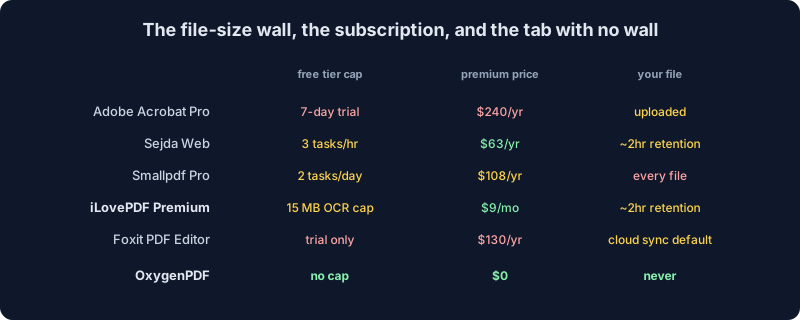
Independent listings on Capterra, GetApp and Software Advice converge on the same figure: $9 a month, flat rate, per user, with a discount for paying annually. Business is quote-only, aimed at teams past 25 seats with SSO and a dedicated account manager.
$9 a month buys real headroom: the 4 GB caps, the higher file counts, desktop and API access. It does not buy a bigger Edit PDF, Sign PDF, Redact, or Compare limit. Those hold steady regardless of plan.
For comparison, OxygenPDF doesn't charge anything to remove a file-size cap, because the free web tools were never built with one to remove. Pro on OxygenPDF exists for a different reason entirely — the desktop app's full tool set, a multi-tab workspace, and saved batch workflows — and it's a one-time purchase, not a subscription: $29 at the current launch price against a $79 list price, backed by a 14-day money-back guarantee. Upload a 200 MB file to any free OxygenPDF web tool today and it still runs to completion; past 50 MB you'll see a one-time note pointing at Pro, not a rejected upload. iLovePDF's $9/month buys you out of a limit. OxygenPDF's free tools never had that limit built in, so there's nothing there to buy your way out of.
The batch-processing catch
Sejda states its wall in one sentence: three tasks, then wait. iLovePDF doesn't give you a sentence. Its pricing page lists "Batch processing: Limited" for the free tier next to "Tools: Limited tools," no single number attached. The real limit is the sum of dozens of separate per-tool caps, discovered one rejected upload at a time. That's more honest in one way, since there's no clock counting down while you think, and vaguer in another. You don't find the wall until you walk straight into it.
What pushes someone to search "iLovePDF alternative"
The moments repeat themselves:
- A scanned contract lands at 18 MB and OCR wants it under 15.
- Thirty files need merging and the free cap tops out at 25.
- A folder of client invoices needs converting one at a time, because Office conversions cap out at a single file per task on Basic.
- Someone rereads the two-hour deletion policy and remembers exactly what's inside the PDF they were about to upload.
None of that is an edge case. It's what ordinary PDF work looks like once a document is bigger than a coupon.
Where OxygenPDF sits
OxygenPDF runs every tool inside your browser tab — plain JavaScript for structural work like merging and editing, WebAssembly for the heavier lifting OCR needs. Nothing you process through the default tools crosses the network, so there's no file-size table to memorize and no two-hour deletion window to trust, because there was never a copy sitting anywhere else to delete in the first place.
What we don't have is iLovePDF's breadth: no desktop installer, no mobile app, no server-side API, no e-signature workflow built for a legal dispute. If that's what your work needs, $9 a month for a service with a 4.9 on Trustpilot is a fair trade, not a trap. If what you need is to OCR one scan, merge one folder, or sign one form without wondering where the file just went, keep reading — here's exactly what happens instead.
How each of those moments actually resolves in a browser tab
Take the four bullets above one at a time, because "no file-size cap" is an easy thing to claim on a landing page and a specific, checkable thing underneath the hood.
The 18 MB scan. OxygenPDF's OCR tool defaults to Tesseract, an open-source OCR engine that runs entirely client-side via WebAssembly — the same compiled engine Tesseract.js wraps for the browser. It reads an 18 MB scan the same way it reads an 800 KB one, because the file is already sitting in the tab's own memory; there's no upload step where a size check could even happen. When a rough scan needs more accuracy than speed, the same tool also offers on-device vision models like PaddleOCR and Florence-2, plus a small set of cloud engines for the hardest cases — but those cloud options are opt-in and require you to add your own Replicate API key before they'll run, so nothing leaves your device unless you deliberately switch one job over to them.
The 30-file merge. The merge tool has no files-per-task counter anywhere in how it works — not generous, genuinely absent. Drop in 30 files or 300; the only ceiling is how much memory your device has free, and 300 ordinary PDFs is not a realistic problem for a laptop bought in the last several years.
The single-file conversion batch. Because nothing in the free tools gates by file count, there's no "Basic plan" distinction that limits a conversion tool to one file per task. Queue the whole folder of invoices at once and walk away.
The two-hour deletion worry. This one resolves by not existing. A deletion policy is a promise about what happens after a file reaches a server. OxygenPDF's tools never send the file anywhere, so there's no window, no policy, and no backup or access log that could quietly outlive the promise.
That JavaScript-versus-WebAssembly split is deliberate, not a limitation — Building PDF Tools with WebAssembly covers why pdf-lib handles merge and edit in plain JavaScript while OCR is the one operation that reaches for a compiled module instead.
What OxygenPDF's redact and sign tools actually do underneath
Two claims in this category are worth being precise about, because "it's private" and "it's secure" get thrown around loosely by every PDF tool's marketing, ours included if we're not careful.
Redact PDF doesn't just paint a black box over text that's still sitting there underneath it, selectable the moment someone copies the page instead of looking at it. It renders the whole page to a canvas at double resolution, draws the black rectangles directly onto that raster image, and rebuilds the output PDF from the flattened result. The redacted text isn't hidden behind pixels — it doesn't exist as text on the output page at all, because none of the original text on that page survives the rasterization step. That's a real trade-off: the rest of the page's text stops being selectable or searchable too, so a heavily redacted document isn't something you can search-and-copy from afterward. For a redaction tool, though, removing too much is the safe direction to fail in, not the dangerous one.
Sign PDF is more modest than it might sound. It takes the signature you draw or upload, converts it to an image, and embeds that image onto the page at the position you dropped it. That produces a real, visually legitimate signature — it is not a certified digital signature with a certificate chain, and it builds no audit trail. In the US, the ESIGN Act (15 U.S.C. § 7001) says an electronic signature can't be denied legal effect just for being electronic, but it also cares that the resulting record stays accessible and accurately reproducible for as long as it's required to be kept. In the EU, eIDAS defines a "qualified" tier of electronic signature recognized across every member state and pairs it with trust services like timestamping, built specifically so a document's timing and integrity can be checked later. Whether or not a given e-signature workflow clears either bar is a question specific to that document and that dispute — but it's exactly the category of question an audit trail exists to answer, and it's a question OxygenPDF's sign tool was never built to answer at all. If a signature might ever need to hold up as evidence, that's iLoveSign's territory, not a browser tab's.
Frequently Asked Questions
Is iLovePDF free?
Yes, for occasional use. The free Basic plan gives you every tool with no time limit and no credit card, but each tool carries its own file-size and files-per-task cap — as low as 15 MB and one file at a time for OCR and the Office conversions. Premium starts at $9 a month and raises most, though not all, of those caps.
Is iLovePDF safe to use?
By the evidence available, yes. It holds ISO/IEC 27001:2017 certification, states a two-hour file-deletion window, and has no public breach on record, unlike Foxit's 2019 leak of 328,549 users. "Safe" here still means your file travels to a third-party server and back — a different risk profile than a tool that never uploads it in the first place, not a claim that the company is careless with what it does receive.
What's the best free alternative to iLovePDF if I keep hitting the file-size wall?
It depends what you're optimizing for. If you want to stay in a familiar cloud-tool shape but with a single clear limit instead of a spreadsheet of them, Sejda's three-tasks-an-hour rule is at least one number to remember (see the Sejda breakdown). If you want the wall gone entirely, a browser-based tool like OxygenPDF processes the file locally, so there's no size table to check against to begin with.
Does OxygenPDF have a file-size limit?
Not a hard one on the free web tools. A file processes as long as your device has the memory to hold it; there's no per-tool cap to look up on a pricing page first. Files over 50 MB show a one-time note pointing at the Pro upgrade, but the free tool still finishes the job either way — the note doesn't block anything.
Do I need an account to use OxygenPDF's tools?
No. Every tool covered in this article runs without creating an account or entering payment details. Signing in only matters if you've bought Pro and want that entitlement to follow you across devices.
The narrow point
iLovePDF earned its scale honestly. Bootstrapped since 2010, no funding round propping it up, a quarter-billion visits a month, and a Trustpilot score most software companies would kill for. That's a company that built something people genuinely want to use, and some of its free-tier caps (400 MB for Redact and Compare) are more generous than tools that charge for the privilege.
The remaining caps exist because the model requires them. A server has to meter what it processes somehow, one file-size limit at a time, however clearly that gets disclosed on a pricing page. A browser tab doesn't meter anything, because there's no server counting in the first place. Try the merge tool or the OCR tool and see what's different: nothing to wait for, nothing leaving the tab. For the same trade-off from a different angle, the Sejda breakdown covers the cloud-PDF pattern this post is really about.