Rohman
The path is depressingly consistent. You needed to do one thing. Sign a contract. Merge two PDFs. Fill out a form. You searched, downloaded "Foxit PhantomPDF" or "Wondershare PDFelement," sat through a 200–900 MB installer, opened the program, and ten minutes later figured out the free version is a demo. Watermark on the export. Locked panels. A nag screen pushing the upgrade.
This post is for the search you ran after the uninstall. What those products really are in 2026, what their free tiers actually let you do, and where to go from here. Short version, if you don't need the full case: for a one-off edit, merge, or signature, OxygenPDF does the same job free, in the browser tab you already have open, with nothing to install and nothing stamped across the output. The rest of this piece is why that trade works, and the specific jobs where it doesn't.
"PhantomPDF" stopped existing five years ago
The name is gone. Foxit renamed PhantomPDF to Foxit PDF Editor with the v11 release on May 25, 2021, folding Standard, Business, and Mac SKUs into one product line (Foxit blog). Old listicles still call it PhantomPDF, and "Foxit PhantomPDF alternative" is still the search that lands people here. The product page on foxit.com is "Foxit PDF Editor."
2026 pricing: PDF Editor at $129.99 a year ($10.99/mo billed monthly), PDF Editor+ at $159.99 a year (Foxit's own pricing page). It is positioned as the cheaper Adobe option. Acrobat Pro is $239.88 a year billed annually, $29.99 month-to-month (adobe.com) — Foxit's own marketing quotes a higher Acrobat figure than that, which is why it's worth checking a vendor's price for its own competitor against that competitor's actual pricing page rather than taking the comparison chart at face value.
The "free" download labeled "Foxit PDF Editor" on the website is a trial, not a free editor. Foxit PDF Reader is free, but reader-only. The Windows installer for the editor weighs roughly 890–930 MB.
What PDFelement actually is
Wondershare PDFelement sits in the same niche, priced lower, and split across more tiers than a single number captures. Standard and Pro run separate ladders, and each ladder quietly has two prices on it: a cheaper one if you remember to turn off auto-renew, and a more expensive default if you don't.
- Standard, yearly, auto-renew (the default): $79.99
- Standard, yearly, manual renew: $31.99
- Standard, 2-year: $109.99
- Standard, perpetual: $51.99 one-time
- Cross-platform (Windows, Mac, iOS, Android, Web): $89.99/year
- Pro, perpetual: $159 one-time
That auto-renew-versus-manual gap is not a rounding error. It's roughly a 150% premium for not unchecking a box once a year, and the box ships checked.
The Windows installer is around 190–220 MB. Lighter than Foxit, heavier than nothing. Wondershare has its own history worth reading in full if PDFelement is the product you're actually deciding on: our PDFelement deep-dive covers the background service that outlives the uninstall and the "AI assistant" that quietly routes your document text to OpenAI's servers.
The trial is the kicker. Wondershare's own support page is unambiguous: "The trial version will add a watermark to the PDF file when you edit or comment on the PDF file in the trial version." The trial also caps conversions at the first two pages and disables OCR and batch processing (trial limits).
So if you downloaded it for a one-off conversion of a 30-page document, you got two pages and a stamp.
The pattern is almost a script
Here is how it usually plays out:
- Search "edit PDF" or "merge PDF."
- Land on a Foxit or Wondershare ad. Download the installer.
- Wait through 200–900 MB and a registration prompt.
- Hit a paywall, watermark, or 2-page cap on the first real action.
- Uninstall. Search "Foxit PDF Editor alternative" or "PDFelement watermark remove."
Both vendors are betting on enough users converting at step 4. The trial isn't broken. It is working as designed.
There's a name for this shape of software: crippled trialware, sometimes called nagware. It's the full product, unlocked and installed on your machine, with one deliberate limitation engineered to trigger at the exact moment you try to keep your output, a watermark, a page cap, a countdown to a locked interface. It isn't a defect anyone forgot to fix. It's a conversion funnel wearing a file format.
Foxit's track record with telemetry, bundleware, and breaches
Worth knowing, since the install lands on your machine:
Bundled adware (2013–2014). Foxit Reader 6.x shipped with OpenCandy and the Ask Toolbar. Conduit, a browser hijacker, came in via the same chain (Wikipedia, BleepingComputer).
Mobile telemetry sent despite opt-out (July 2014). A SANS Internet Storm Center diary entry documented the Foxit iPhone app connecting to a telemetry and ad-tracking server in China, alog.umeng.com, after the user had already declined the app's data-collection prompt. The request body included a field literally labeled is_pirated: no — an honesty the same payload didn't extend to what else it was reporting home (SANS ISC diary #18425, corroborated in Wikipedia's Foxit PDF Reader entry).
Data breach (August 2019). Foxit's "My Account" service was breached. Email addresses, hashed passwords, names, phone numbers, company names, and IP addresses for 328,549 users ended up exposed.
None of this is current. The My Account service is still mandatory for trial downloads and license activation, so the same data flow exists today — the exact account system that got breached in 2019 is the one your trial or your paid license runs through right now.
Wondershare carries a "Warning" privacy rating from Common Sense Media, with an overall score of 32% and flags for profile-building, ad targeting, and third-party tracker sharing. PDFelement runs a "Software Improvement Program" that collects usage telemetry by default, with the opt-out buried in the installer's advanced options.
Cloud sync is convenient. It is also a document upload.
Both products lean hard on cloud. Foxit PDF Editor auto-syncs with Foxit Cloud, OneDrive, Dropbox, Google Drive, Box, and OneDrive Business by default, every four minutes when online. ConnectedPDF embeds a tracking ID in every document and registers metadata to Foxit's cloud (PDF Association). PDFelement's Wondershare Document Cloud does roughly the same job.
If your PDF holds anything you wouldn't paste into a public Slack, contracts, medical forms, tax documents, that auto-sync default is worth a second look.
What's left after you hit uninstall
Uninstalling the program is not the same as leaving the ecosystem behind.
PDFelement leaves more behind on disk than the installer that put it there. Wondershare's push-notification service, WSNativePushService.exe, ships alongside every product in the company's lineup, from PDFelement to Filmora to Dr.Fone, starts with Windows, and is documented as surviving a normal uninstall, sitting in AppData\Local\Wondershare\Wondershare NativePush\ with the Windows registry entries pointing at it.
The company's security track record beyond that one binary is worth knowing too. In September 2025, Trend Micro researchers disclosed two critical vulnerabilities, CVE-2025-10643 and CVE-2025-10644 (CVSS 9.1 and 9.4), in a different Wondershare product, RepairIt, that had left a cloud storage bucket exposed with "AI models, software binaries for various products developed by Wondershare, container images, scripts, and company source code" sitting in it. The researchers disclosed the flaws to Wondershare through the Zero Day Initiative in April 2025 and, by their own account, got no response for five months before going public. Whether that specific bucket ever touched PDFelement's own update pipeline isn't publicly documented either way; what is documented is the standard of secret hygiene it takes to leave source code and unencrypted user files in the same open bucket. Our PDFelement deep-dive has the full incident writeup.
The actual alternative landscape
Four buckets, depending on what you care about.
Browser-local. OxygenPDF runs entirely client-side: no installer, no upload, no watermark, no trial limit, and it keeps working offline once the page has loaded. Structural work, merging, splitting, rotating, watermarking, runs on plain JavaScript; OCR and document-format conversion lean on WebAssembly for the parts that genuinely need the extra speed. The full engineering breakdown of what runs where, and why, is its own post if you want the detail instead of the summary. The toolkit itself, edit, merge, sign, compress, split, convert, OCR, sits behind a single tab.
Cloud SaaS. Smallpdf Pro is $9–10 per user per month with a 2-task-per-day cap on free (smallpdf.com/pricing). iLovePDF lives in the same neighborhood. Both require uploading your file to a server before they'll touch it.
Open source. Stirling-PDF advertises "50+ PDF tools," self-hosts via Docker, and now also ships a desktop client for anyone who'd rather skip the container. PDFsam Basic is free and open source too, AGPL-licensed, and does more than a bare-bones split-and-merge tool: merge, split at page numbers or bookmarks, extract pages, rotate, and mix pages from multiple files, with no watermark and no internet connection required. What it doesn't do is anything past structural work, no editing, compression, or OCR without paying for PDFsam Visual or the subscription-only PDFsam Enhanced. Great if you run a homelab or don't mind a native install. A wall if you want neither.
Adobe Acrobat Pro. The reference, and the subject of its own alternatives breakdown on this site. $239.88/year. Most capable, most expensive. The right call if you live inside PDFs eight hours a day.
Side-by-side
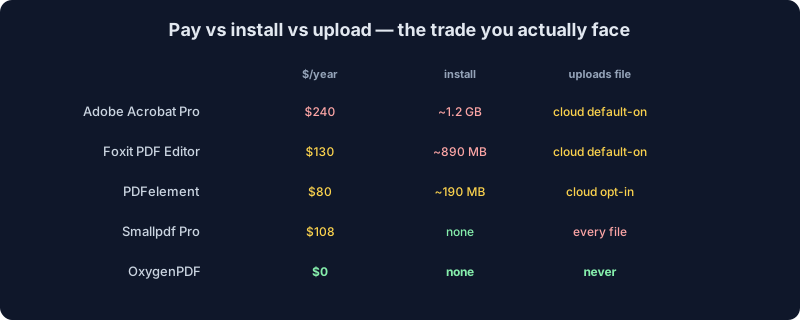
| Tool | Pricing (2026) | Install size | Watermark on free | Upload required | Offline use |
|---|---|---|---|---|---|
| Foxit PDF Editor | $129.99/yr | ~890 MB | Trial limited | Cloud sync default-on | Yes (after install) |
| PDFelement | $79.99/yr (auto-renew) | ~190 MB | Yes, on all trial output | Wondershare Cloud opt-in | Yes (after install) |
| Adobe Acrobat Pro | $239.88/yr | ~1.2 GB | Trial 7 days, then locked | Document Cloud default-on | Yes (after install) |
| Smallpdf Pro | $108/yr | None (web) | None on Pro; free = 2 tasks/day | Yes, every file | No |
| OxygenPDF | Free | None (web) | None | No, runs in browser | Yes (after first load) |
Is the subscription worth it? Quick math
Strip the marketing off the yearly numbers above and they turn into a monthly figure fast. Foxit PDF Editor works out to $10.83 a month. PDFelement's cross-platform bundle runs $7.50 a month. Adobe Acrobat Pro is $19.99 a month on the annual plan, or $29.99 month-to-month with no commitment either way.
Set any of those against a tool that costs nothing per month, and the real question isn't "is $130 a year a lot." It's "what does $130 buy me that a free browser tab doesn't." For editing, merging, splitting, converting, or signing the one file sitting in front of you right now, the honest answer for most people is: not much. Where the subscription earns its keep is volume and features a single-tab tool was never built to carry: batch OCR run unattended across a folder of five hundred scans, dynamic XFA forms with conditional fields and calculations, e-signature workflows that need a full audit trail and multiple signers routed in a specific order, redaction with a certified log for legal discovery, or silent MSI deployment across three hundred company laptops managed from one console.
If none of that describes your Tuesday, you're paying an annual subscription to solve a problem you don't actually have.
FAQ
Is Foxit PhantomPDF still a real product I can buy?
No. Foxit retired the PhantomPDF name in May 2021 and folded every SKU into "Foxit PDF Editor" and "Foxit PDF Editor+." The engine and company are the same; searches for "PhantomPDF" now land on pages that use the newer name, which is why so much of the older advice online is out of date on the name alone.
Is Foxit PDF Editor free?
Foxit PDF Reader is free but view-and-annotate only, with no editing. "Foxit PDF Editor," the product that actually edits, converts, and organizes PDFs, is a paid subscription at $129.99 a year, offered as a time-limited trial rather than a free tier.
Does PDFelement's free trial add a watermark?
Yes, on every export. Wondershare's own support documentation states the trial "will add a watermark to the PDF file when you edit or comment on the PDF file," and separately caps conversions at the first few pages and disables OCR and batch processing entirely.
What is a free alternative to PDFelement that doesn't watermark the output?
OxygenPDF runs the equivalent conversion, edit, merge, and OCR jobs in your browser with no watermark, no page cap, and no account, because there's no server-side trial to gate in the first place. Self-hosted Stirling-PDF is the free option if you'd rather run your own instance than use a browser tool.
Does the PDFelement watermark go away once I pay?
Yes. Paying unlocks the same output without a stamp, at whichever tier and renewal setting you choose. The catch most people miss isn't the watermark removal itself, it's that the default checkout path auto-renews at $79.99 a year rather than the $31.99 manual-renew price sitting one click away.
Is it safe to install Foxit PDF Editor or PDFelement?
Both are legitimate commercial products, not malware. Foxit has a documented history of bundled adware in older releases and a 2019 account-service breach; the mandatory account system involved is still the one your trial or license runs through today. PDFelement installs a background push service documented as surviving uninstall, and its parent company disclosed a serious cloud-storage exposure in a different product in 2025. Neither is a reason to panic. Both are reasons to read what you're agreeing to during setup.
What's the actual difference between Foxit PDF Editor and Foxit PDF Editor+?
Editor+ ($159.99/yr) adds mobile app access on iOS and Android, AI-powered "Smart Redact" for automated PII removal, and full Foxit eSign sending with 150 envelopes a year, versus fill-and-sign only on the base plan ($129.99/yr), per Foxit's own plan comparison. If you only edit, merge, and sign occasional PDFs from a desktop, the base tier already exceeds what most people need.
The honest summary
Foxit PDF Editor and PDFelement are real desktop apps that do real work. If you are a power user redacting filings, running batch OCR, and wiring up dynamic forms five days a week, $80–130 a year is fine. They earn it. The complaint isn't that they exist. It is that they get marketed as the answer to one-off jobs they were never designed to solve for free.
If you opened this page because you wanted to merge a PDF and ran into a watermark, you do not need a $129 license. You need something that works in your browser, leaves nothing behind, and stops mattering the moment you close the tab. Drop a file at /tools/edit-pdf or /tools/merge-pdf and see how it lands.