Rohman
A friend told you PDFgear is the free PDF editor that doesn't nag, and they were right. Then you opened the download page on a Chromebook, or on a work PC where the installer wants an admin password you don't have. That's usually when people start looking for a PDFgear alternative: they liked the product and couldn't get it running.
Quick answer: If you can't install PDFgear, use a PDF editor that runs in the browser and keeps the file on your device. OxygenPDF's Edit PDF works in any modern browser on Linux, ChromeOS, Windows or macOS with no install and no account. It adds and rewrites text, inserts images and signatures, and reorders pages, all inside the tab.
What PDFgear gets right
Credit first, because PDFgear earns it. The company's Windows page says the app is "completely free of charge" with no advertisements and no premium versions, and that it doesn't limit "file size or number when importing and processing PDFs." For a desktop PDF editor in 2026, that's rare.
The feature list is deep too. PDFgear's home page lists text and image editing, annotation, batch conversion between PDF and Office formats, and OCR in 30+ languages. It ships for Windows, Mac, iPhone, iPad and Android. The desktop app works offline, and its Mac page says "most editing tools within PDFgear work locally on the Mac."
So this isn't a post about a bad product. It's about the people PDFgear's installer can't reach.
PDFgear on Linux and Chromebook means the online tools
PDFgear answers the platform question itself. From the FAQ on its Windows page: "PDFgear works with Windows 10, 11, macOS, iOS and our online tools support a range of other devices, including but not limited to Android phone, ChromeOS, Linux, Windows 8, 7."
Read that closely. There's no Linux build and no ChromeOS build. On those machines, PDFgear is the website.
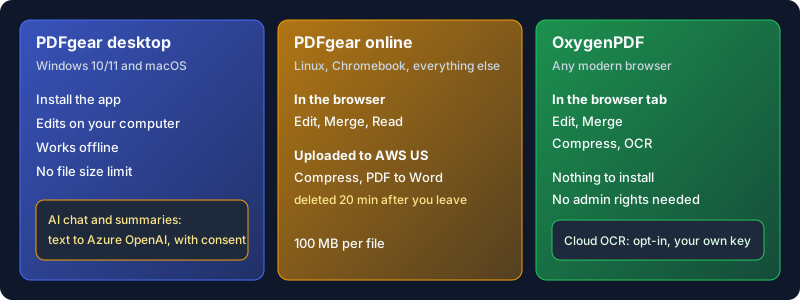
The website is decent, but it isn't one thing. Each online tool handles your file its own way, and you find out which way from the fine print on that tool's page:
- The online editor says files "will be processed locally in your browser" and caps each PDF at 100 MB.
- The online merger also runs on your device: "PDF file contents are not uploaded for merging."
- The online compressor says "your files are uploaded to and processed on AWS US secure cloud servers," and its footer says files are deleted 20 minutes after you leave the site.
- PDF to Word online carries the same AWS wording and the same 20-minute window.
That's a reasonable policy, plainly disclosed. It still means that on a Chromebook, editing a contract keeps it local while compressing the same contract sends it to a server. The desktop app's keep-it-local promise only carries over to some online tools.
The AI features use a server, with your consent
PDFgear's headline extra is its AI assistant. The Windows page describes chatting with a PDF to summarize it, "with the built-in GPT 3.5." The model doesn't run on your laptop, though.
The privacy notice (updated March 23, 2026) spells out the route. AI features run on Microsoft Azure OpenAI Service, and PDFgear "may transmit... the content of PDF files you upload" plus the text you type, only "after you provide explicit consent within the app," and not for advertising. A summary of a document means sending the document. Decide per file.
PDFgear vs OxygenPDF at a glance
| PDFgear desktop | PDFgear online | OxygenPDF | |
|---|---|---|---|
| Runs on | Windows 10/11, macOS 10.14+ | Any browser | Any modern browser |
| Install needed | Yes | No | No |
| Linux and ChromeOS | No app | Yes | Yes |
| Edit and merge | On your computer | In the browser | In the browser |
| Compress | On your computer | Uploaded to AWS US | In the browser |
| OCR | Yes, 30+ languages | Via PDF to Word, uploaded | On-device by default |
| AI chat | Azure OpenAI, with consent | Azure OpenAI, with consent | Not in the editor |
| Price | Free | Free | Free web tools |
Sources for the PDFgear columns are linked in the sections above. OxygenPDF's web tools are free with no usage cap. A one-time Pro purchase adds a multi-tab workspace and desktop apps; nothing on the web tools is locked behind it.
When PDFgear is the better pick
Be honest about your own setup before switching.
- You're on a Windows or Mac machine you control. Install PDFgear. You get offline editing and batch conversion with no file-size limit, for free. A browser tool can't beat a good native app on its home turf.
- You need to rewrite paragraphs. PDFgear advertises editing existing text "like you are working with a Microsoft Word document," including deleting paragraphs. OxygenPDF's text editing is an overlay on the original (more on that below). For heavy reflowing edits, PDFgear fits better.
- You want AI summaries inside the editor. PDFgear has them built in. OxygenPDF's editor doesn't.
- You work on a phone. PDFgear has native iOS and Android apps. OxygenPDF works in a mobile browser, which is fine for a signature or a quick fix and less comfortable for a long editing session.
How to edit a PDF in your browser with OxygenPDF
- Open Edit PDF in Chrome, Firefox, Edge or Safari. On a Chromebook or Linux box there's nothing to download.
- Select your PDF. It loads into the page from your disk; you can check DevTools' Network panel and see no upload request.
- Pick a tool from the toolbar: Text to add new text, or click existing text to rewrite it. Images, shapes, stamps, highlights and whiteout sit in the same toolbar.
- For a signature, choose Create Signature and draw, type or import one, then place it on the page.
- Use the Pages panel to reorder, rotate, duplicate, insert blank pages or delete them. Every step goes into the undo history.
- Press Export and the edited PDF downloads to your device.
Need more than edits? Merge PDF combines files and Compress PDF shrinks them to a target size, both in the tab, which covers the two PDFgear jobs most likely to send a Chromebook user's file to a server.
Honest limits
OxygenPDF fits the machines PDFgear doesn't install on. It still has gaps.
Rewriting existing text is an overlay. When you click a block of text and change it, the editor covers the old words with a background-matched box and draws your new text on top. It looks and prints right, but the original text is still inside the file underneath. To remove something sensitive, use Redact PDF, which rebuilds the affected pages so the text is gone.
Edits stay inside the block you clicked. Nothing reflows down the page the way it does in Word or, by its own description, in PDFgear.
Scanned pages aren't editable until you ask. The editor detects them and offers "Make text editable," which runs OCR on your device. It downloads an engine the first time and takes a few seconds a page. For a whole scanned document, OCR PDF is the better route; its default engines run locally, and the more accurate cloud engines only run if you opt in with your own API key.
The page has to load once over the internet. After that, the work happens on your machine, but a browser tool isn't an offline desktop app.
Frequently Asked Questions
Is PDFgear completely free?
Today, yes. PDFgear's online editor page says there's "no sign-up, ads, premium plan, or purchase required," and the Windows page says the same of the app. Its own explainer, last updated April 2, 2024, says "most features will remain free" but a fee may come for some advanced options such as cloud AI tools, with no timeline set.
Is PDFgear as good as Adobe?
For everyday work like editing text, signing, merging and converting, PDFgear covers what most people open Acrobat for, and it costs nothing. Acrobat Pro is a paid subscription with a larger feature set. If you don't need those extras, PDFgear on Windows or Mac is a sensible swap.
Does PDFgear work on Linux or a Chromebook?
Not as an app. PDFgear's own FAQ lists Windows 10 and 11, macOS and iOS for the software, and points ChromeOS and Linux users to its online tools. Some of those run in your browser; compression and PDF to Word upload to AWS in the US.
What is the best 100% free PDF editor?
It depends on your machine. On Windows or Mac you control, PDFgear's desktop app is hard to beat at $0. On ChromeOS or a locked-down work PC, the best PDFgear alternative is a browser editor that keeps files local, like OxygenPDF's Edit PDF. If you want source code you can audit, see our roundup of open-source PDF editors.
What is the best free PDF editor in 2026?
There's no single winner, because "best" turns on where the file is allowed to go. We compared another popular free option in our Sejda alternative post and explained the trade-offs of in-browser processing in why local-first PDF tools matter. Start with your platform and your privacy needs, then pick.
Edit on the machine you have
PDFgear is a generous product, and if your computer can run it, keep it. If you're on a Linux laptop or a work PC that won't take an installer, you don't have to settle for uploading your file. Open Edit PDF, drop the document in, and it stays on your device from the first click to the download.