Rohman
Quick answer: PDF/A is the ISO 19005 standard for archiving documents as PDF. A PDF/A file must contain everything it needs to display the same way decades from now: embedded fonts, defined colors and metadata, with no encryption, JavaScript or links to outside content. The number (1 to 4) is the edition; the letter (b, u, a) is how strict it is.
That's the definition. The rest of this page is about what an archive, court or e-invoicing system means when it asks for "PDF/A-2b" instead of just a PDF.
Why a Normal PDF Isn't Enough for an Archive
A normal PDF is allowed to lean on its surroundings. It can name a font like Helvetica and assume the computer opening it has a copy. It can describe a color as "this much red, green and blue" without saying which red. It can run JavaScript, point to a video on a server, or be encrypted with a password somebody will forget in 2031.
Each of those works fine today and fails later. The font gets substituted and the line breaks move. The server goes away. The password leaves the company with the person who set it.
PDF/A closes those doors. The standard, published by ISO as ISO 19005, is a restricted subset of PDF: it removes the features that depend on something outside the file and requires the ones that make the file self-describing. It doesn't use a different file extension or need a special viewer. A PDF/A file is a normal PDF that follows stricter rules, plus a small marker in its metadata that says which PDF/A part and level it claims.
What PDF/A Requires and What It Forbids
The rules differ a little between parts, but the core is the same in all of them:
- Embed every font used to draw text, so the text renders identically without the original fonts installed.
- Define color device-independently, usually by embedding an ICC color profile (an "output intent") that says what the RGB or CMYK numbers mean.
- Carry XMP metadata, including the identification that says "this is PDF/A-2, level b."
- Contain no encryption, JavaScript, audio or video, or references to external content. PDF/A-1 also bans LZW compression and all transparency.
Nothing in that list is about what the document says. PDF/A is about whether the file will still render correctly after the software that made it is gone.
The Parts: PDF/A-1, 2, 3 and 4
There are four parts. A newer part doesn't replace an older one. Each is its own current standard, and an archive that asks for PDF/A-1 still means PDF/A-1.
| Part | Standard | Published | Built on | Levels | What changed |
|---|---|---|---|---|---|
| PDF/A-1 | ISO 19005-1 | 2005 | PDF 1.4 | a, b | The original. No transparency, no layers, no attachments |
| PDF/A-2 | ISO 19005-2 | 2011 | PDF 1.7 (ISO 32000-1) | a, b, u | Adds transparency, JPEG 2000, layers, and attaching other PDF/A files |
| PDF/A-3 | ISO 19005-3 | 2012 | PDF 1.7 (ISO 32000-1) | a, b, u | Like PDF/A-2, but any file type can be attached |
| PDF/A-4 | ISO 19005-4 | 2020 | PDF 2.0 (ISO 32000-2) | (none), e, f | Drops a/b/u; 4f allows attachments, 4e allows 3D |
Dates and bases are from the PDF/A reference and the PDFlib knowledge base.
PDF/A-3's attachment rule is the one with real-world weight today. The German ZUGFeRD and French Factur-X e-invoice formats are PDF/A-3 files with the invoice's machine-readable XML attached inside. A person reads the PDF, the accounting software reads the XML, and both live in one file.
The Levels: What b, u and a Mean
The letter after the number tells you how much the file promises beyond looking right.
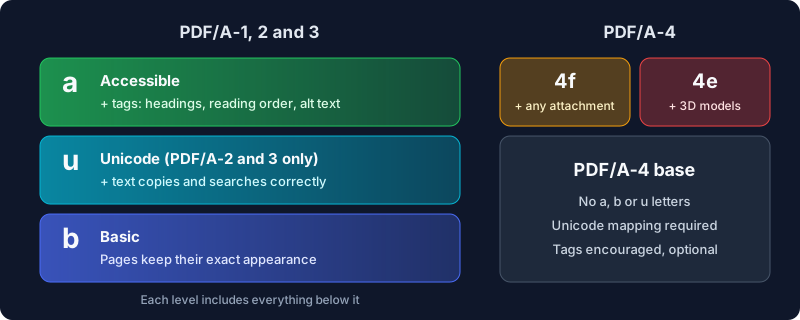
- b (basic) guarantees the visual appearance. The pages will look the same. It does not guarantee that you can reliably copy or search the text.
- u (Unicode), available in PDF/A-2 and PDF/A-3, adds that every character maps to Unicode, so copying, searching and text extraction return the right characters.
- a (accessible) adds tagged structure on top of u: headings, reading order, alternative text for images. It's the level that works with screen readers, and the hardest to produce, because the structure has to exist in the source. A converter can't guess it reliably from a finished page.
- PDF/A-4 drops the three letters. Its base level already requires Unicode mapping for fonts, and tags are encouraged but optional. It adds 4f, which permits embedded files of any kind, and 4e, which is for engineering documents with 3D models.
So "PDF/A-2b" reads as "the 2011 edition, basic level": appearance guaranteed, transparency allowed, no promise about text extraction.
Which PDF/A Do You Actually Need?
The honest answer is whichever one the person receiving the file names. After that:
| Situation | Pick | Why |
|---|---|---|
| The recipient names a part and level | That exact one | Validators check the claimed level, not a "better" one |
| General archiving, no instructions | PDF/A-2b | Allows transparency and modern compression; broadly accepted |
| An old system that predates 2011 | PDF/A-1b | Maximum compatibility, at the cost of transparency |
| You must carry source files inside the PDF | PDF/A-3b | The only b-level part that allows any attachment |
| Accessibility is required | PDF/A-2a or PDF/A-3a | Needs a properly tagged source; export from the authoring app |
Some real requirements, so you know what these requests look like in practice:
- The US Supreme Court asks that documents submitted through its electronic filing system be in PDF/A format, and text-searchable where possible. It does not name a part or level.
- The US National Archives lists PDF/A-1 and PDF/A-2 as preferred formats for born-digital text records, with ordinary PDF 1.0 to 1.7 as acceptable.
- Other courts vary. The US District Court for Oregon, for example, says it doesn't require PDF/A for filings at this time. Always read the specific court's electronic filing rules.
- E-invoices in Germany and France that use ZUGFeRD or Factur-X are PDF/A-3 by definition.
When a rule just says "PDF/A" with no level, PDF/A-2b is the safe default. PDF/A-1b is the fallback if the receiving system rejects anything newer.
How to Convert a PDF to PDF/A in Your Browser
PDF to PDF/A converts to PDF/A-1b, PDF/A-2b or PDF/A-3b. It doesn't produce the u or a levels, or PDF/A-4. Here's how to use it:
- Open PDF to PDF/A and drop in your PDF. Several files at once work too.
- Choose a conformance level. PDF/A-2b is preselected.
- Convert and read the result summary before downloading. It lists anything the tool had to remove and any font it couldn't embed.
- Download the file, which is saved as
yourfile-pdfa.pdf.
What the conversion does, in plain terms: it flattens form fields into the page, removes JavaScript and automatic actions, drops annotations that have nothing to print, embeds an sRGB color profile, and writes the PDF/A identification into the metadata. For 1b and 2b it removes embedded files, since those levels don't allow arbitrary attachments; 3b keeps them. For 1b it also removes transparency and layers and writes the file as PDF 1.4.
It all runs in your browser. For documents that are headed to an archive in the first place, such as contracts, court filings and board minutes, not uploading them to a conversion service seems like the right starting point. Here's why OxygenPDF works that way.
What No Converter Can Do, and What We Tested
A converter can only rearrange what's already in the file. Four things trip people up.
Fonts that were never embedded. If the source PDF names Helvetica or Arial without including the font data, there is nothing to embed. The tool detects this and names the fonts in the result instead of claiming success. The only fix is to go back to the source document and export it again with fonts embedded.
Structure for the a level. Tags have to come from the authoring app. That's why the tool stops at b.
Transparency at 1b. PDF/A-1 forbids it, so the tool removes it, and a 50% gray box becomes a solid one. Check pages with overlays and shadows, or use 2b, which keeps transparency.
Password-protected input. To remove the encryption, the tool renders each page to an image first. The result is valid but no longer has selectable text, and the tool warns you when that happens.
Because "PDF/A" is a claim any file can make about itself, I checked our output with veraPDF, the open-source validator built with the PDF Association and the Open Preservation Foundation. Four test files, three levels each:
- A plain text document printed to PDF from macOS passed at 1b, 2b and 3b.
- The same document with Word-style properties added (author, title, subject, keywords, creator) passed at all three levels too.
- A page printed from Chrome passed at 2b and 3b but failed 1b. PDF/A-1 requires every embedded font subset to list the characters it contains (a CIDSet). Chrome doesn't write one, and our tool doesn't create it. PDF/A-2 dropped that rule.
- A file using a non-embedded Helvetica failed at every level, correctly, for the missing font, which the tool had already reported.
The first round of that test failed at 1b on files that should have passed. The metadata the tool wrote didn't mirror the document's own properties date for date, and PDF/A-1 requires the two to match. Files without a file identifier also failed every level. Both are fixed, and tests now cover them.
Four files are not a certification, and the tool still describes itself as a best-effort converter because it is one. If a court or archive will validate what you send, run the result through veraPDF yourself, or through whatever validator the recipient uses, before the deadline.
Frequently Asked Questions
What is the difference between PDF and PDF/A?
PDF/A is a stricter subset of PDF, not a different format. Every PDF/A file is a PDF that opens in any viewer. The difference is what's guaranteed: PDF/A must embed its fonts and color profile, carry identifying metadata, and contain no encryption, scripts or external dependencies, so it renders identically long after the software that made it is gone.
What does the "b" in PDF/A-1b or PDF/A-2b mean?
"b" is the basic conformance level. It guarantees the document's visual appearance will be preserved. It does not guarantee reliable text extraction (that's "u") or tagged structure for accessibility ("a").
Should I use PDF/A-1b, 2b or 3b?
Use whatever the recipient specifies. Without instructions, PDF/A-2b is the usual choice: it allows transparency and modern compression, and archives widely accept it. Use 1b only for systems that require it, and 3b when you need to embed other files such as spreadsheets or XML.
Is PDF/A-4 better than PDF/A-2?
It's newer, based on PDF 2.0, and simpler in its levels, but it isn't a replacement. Many archives, courts and validation workflows still list PDF/A-1 and PDF/A-2. Use PDF/A-4 when a recipient asks for it.
Can a PDF/A file be edited?
Technically yes, since it is still a PDF. But any change can break conformance, and many workflows treat an edited PDF/A as no longer valid. Edit the source and convert again instead.
How do I check whether a PDF is really PDF/A?
Run it through a validator. veraPDF is free, open source and checks every PDF/A part and level. A viewer banner saying "this file claims PDF/A" only reads the metadata marker. It doesn't validate the file.
Can I convert a scanned PDF to PDF/A?
Yes. A scan is a set of images, and images convert cleanly. To make the archive searchable too, run OCR PDF first, then convert the OCR'd file.
Archive It Once, Properly
PDF/A exists so that a document filed today can be opened in thirty years without anyone calling IT. Pick the level the recipient names, or 2b when nobody names one. Fix missing fonts at the source. Validate before a deadline that matters.
Convert your PDF to PDF/A in your browser, and see exactly what had to change before you download it.