Rohman
You open a converted research paper on your e-reader and the second sentence is half of a sentence from the right-hand column. The journal's name turns up every few paragraphs. A footnote sits in the middle of the argument, and "infor- mation" is still broken in two.
That is what most PDF to EPUB conversions look like when the source is anything more complicated than a plain novel. The fix is to rebuild the order in which a person would read the page, then package that as an ebook.
Quick answer: To convert PDF to EPUB without scrambled text, rebuild the reading order before you package it. PDF Reflow does this in your browser: it detects columns, strips repeated headers and page numbers, rejoins hyphenated lines, infers headings from font size, and exports an EPUB 3 file with one chapter per heading and the images kept in place.
Why PDF to EPUB Is Hard
A PDF describes pages. Each piece of text sits at an exact position on a fixed sheet, and nothing in the file has to say "this is a paragraph" or "read the left column first". An EPUB is the opposite. Its content is XHTML and CSS, and the package lists a spine, the default sequence in which the reading system shows each document. The reader app decides where lines break. That is reflow, and it is the whole reason you want an EPUB on a 6-inch screen.
So converting is reconstruction. Calibre's own manual is blunt: PDFs are "one of the worst formats to convert from" because they are "a fixed page size and text placement format", which makes it "very difficult to determine where one paragraph ends and another begins".
EPUB does have a fixed-layout mode, where each page is designated pre-paginated. That suits picture books and comics. For a paper it hands you back the PDF's problem: a full page shrunk to fit a phone.
Where Converters Fall Apart
Four features of real PDFs account for most broken ebooks.
Two-column layouts come first. Text inside a PDF is stored in whatever order the program that made it chose to draw it, often line by line straight across both columns. Read top to bottom, the columns interleave. Calibre lists "complex, multi-column, and image based documents" as not supported.
Running headers and footers are next. The journal title and page number on every page are plain text to a converter, so they land mid-paragraph, once per page.
Then hyphenation. Every PDF line ends where the typesetter ended it, and the converter must decide whether a break ends a paragraph or just the column, and whether "infor-" plus "mation" is one word.
Last, tables and footnotes. A table is text placed on a grid; a footnote is small text at the page bottom. Neither is labelled as such, and Calibre notes that extraction of tables is not supported in its PDF input.
Reflow First, Then Package
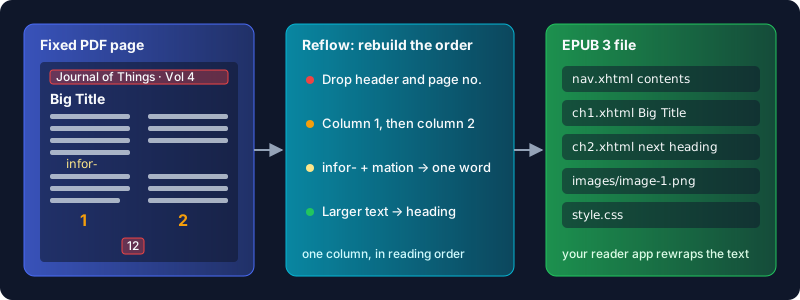
A blind text dump takes fragments in file order and wraps them in HTML. Reflowing does the layout analysis first. Here is what PDF Reflow does, from its source:
- It finds the gutter. Text is grouped into lines, and the widest vertical band in the middle of the page that no line crosses splits the columns: left first, then right. A title spanning both columns stays above them.
- It drops repeated edge text. With "Remove repeated headers and footers" on (the default), text in the top or bottom 8% of the page that repeats on most pages goes, digits ignored, so "Page 3" and "Page 4" match. A line that is only a page number is always dropped.
- It rebuilds paragraphs and headings. Lines join until one ends with sentence punctuation, and a trailing hyphen is removed as the word is glued back together. Text noticeably larger than the body becomes a heading; bullet and numbered lines become lists.
- It keeps raster images where they were, as PNGs placed before the paragraph that sat below them.
A live preview, with four themes and text from 13 to 24 pixels, shows whether the columns came out right before you export.
How to Convert PDF to EPUB, Step by Step
- Open PDF Reflow and drop in your PDF. If it is password-protected, enter the password; it is passed to the PDF reader directly, so the real text survives.
- Read the preview. Scroll to a two-column page and check that the left column finishes before the right one starts.
- In the settings, keep "Remove repeated headers and footers" on unless your document has an important line that genuinely repeats at the page edge. Leave "Keep images in place" on if you want the figures.
- Set Export format to "EPUB e-book (.epub)". The default is Markdown, so this step matters.
- Export. The file downloads with your PDF's name and an
.epubextension.
The EPUB is an EPUB 3 package. Each level 1 or 2 heading starts a new chapter file, a contents page lists those chapters by their heading text, and images ship as PNGs inside the book. Body text uses a serif font with justified paragraphs, which your reading app can override.
Check the Result in an EPUB Reader
Don't trust a conversion until you've opened it. Load the file into the app you'll actually read with, or into Calibre's built-in E-book viewer, and spend two minutes on this:
- Open the table of contents. Chapter names should be real headings, not a sentence that happened to be in a bigger font.
- Jump to a page that was two columns in the PDF and read across the point where the left column ended. The sentence should carry on.
- Change the font size. The text should rewrap with no stray line breaks in the middle of sentences.
- Find a table or a figure and decide if it is still usable.
If you publish or distribute the file, run it through EPUBCheck, the open-source conformance checker maintained by the DAISY Consortium as a W3C project. For a Kindle, Amazon's Send to Kindle accepts EPUB files directly; our PDF to Kindle guide covers that route.
Honest Limits
Scans need OCR first. A scanned PDF is a picture of each page with no text layer, so there is nothing to reflow. PDF Reflow spots this and points you to OCR PDF instead of producing an empty book; our guide to OCR for scanned PDFs explains that step.
Tables become text. There is no table detection, so cells come out as lines or paragraphs. Keep the PDF if the tables matter. If you only want the words for notes, the same tool exports Markdown, and our PDF to Markdown guide compares the options.
Footnotes stay where they fell, as plain paragraphs at the point the page bottom lands in the flow. They aren't linked to their markers.
Paragraphs restart at page breaks. A sentence running from one page onto the next becomes two paragraphs. Readable, but you'll see the seam.
Some things are out of reach. Charts drawn as vector shapes are skipped. The column finder looks for one gutter, so a three-column magazine page may come out in the wrong order. And the metadata is thin: the title is the file name and the language is always English, with no cover image. Calibre's metadata editor fixes that in a minute.
Calibre deserves a fair word. It is a free desktop app that runs on your own machine, and its heuristic processing gives you far more knobs, from a line un-wrapping factor to regex rules for stripping headers. Its manual says the results range "from decent to unusable, depending on the input PDF", and its listed limits are mostly about complex layouts. A plain single-column book is its best case. A two-column paper is where reflowing first saves you the cleanup.
Everything in PDF Reflow happens in your browser tab. The PDF is read with pdf.js and the EPUB is zipped on your device, which matters when the file is a purchased ebook or an unpublished manuscript.
Frequently Asked Questions
How do I convert a PDF to EPUB for free?
Use a converter that rebuilds the reading order, such as PDF Reflow in the browser or Calibre on the desktop. Both are free. Pick EPUB as the output and check the result in a reader app.
Can you convert PDF to EPUB without losing formatting?
Not exactly. A reflowable EPUB lets the reader app set line breaks, fonts and page size, so the PDF's page design is gone by definition. What you can keep is structure: headings, paragraphs, lists, images and reading order.
Why does my converted EPUB have text in the wrong order?
The PDF was probably laid out in columns and the converter read straight across them. Reflow the PDF so each column is read in full before the next.
Can I convert a scanned PDF to EPUB?
Only after OCR. A scan has no text layer, so run OCR PDF first, then reflow the searchable result. Expect some recognition errors to proofread.
Is EPUB better than PDF for an e-reader?
For reading text on a small screen, yes, because it reflows. For anything where the page layout carries meaning, such as forms or sheet music, keep the PDF. Going the other way, EPUB to PDF fixes the layout for printing, and our EPUB to PDF guide explains when that's worth it.
Make the PDF Readable on Any Screen
A good PDF to EPUB conversion is mostly about reading order. Get the columns, headers and hyphens right and the rest is packaging. Rebuild your PDF as an EPUB in your browser, check it in your reader, and keep the file on your own device the whole time.