Rohman
It's Wednesday afternoon. The production is due Friday: roughly 4,000 pages across a dozen PDFs, and opposing counsel expects every page stamped ACME000001 onward. You open Acrobat to start the PDF Bates numbering, and the tool isn't there. Your firm licensed Acrobat Standard.
That's the moment you start looking for a way around Acrobat. The stamp itself is simple. What goes wrong is everything around it: a sequence that restarts in file seven, a number printed on top of a signature block, padding that jumps from six digits to seven halfway through the set.
This post covers what a Bates number is made of, what courts and production protocols actually ask for, why Adobe charges for it, and how to stamp a production in your browser without the files going anywhere.
Quick answer: Merge or order your pages first, then open Bates Numbering, drop in the PDF, set a prefix (say ACME), a start number, and a digit count (6 gives 000001), pick a corner from the 3×3 grid, check the preview, and apply. You get <name>-bates.pdf with a unique label on every page. It all happens in your browser tab.
Where "Bates" comes from
The name belongs to Edwin G. Bates, who patented an automatic numbering machine in 1891. Each press of the hand stamp printed a number and advanced the wheel, so a clerk could number a stack of pages without resetting anything by hand. The original machine ran four digits, 0000 to 9999, which is where zero-padding comes from: page 852 printed as 0852. Courts and law firms took to it quickly. The Bates Manufacturing Company, incorporated in 1890, lasted long enough to be bought by General Binding Corporation in 1993.
The ink stamper is mostly gone. The convention outlived it. Today the number is drawn onto a PDF or TIFF image by software, but the job hasn't changed: give every page in a set of documents one identifier that nobody else's page shares, so anyone can cite "ACME001337" and everyone lands on the same sheet.
There is no official format. Wikipedia's summary is blunt about it: there is no standard method for numbering documents and no standard typeface. The rules come from whoever governs your production, usually a stipulated ESI order or protective order in the case.
Anatomy of a Bates number
A Bates label has three parts. Only the middle one is required.
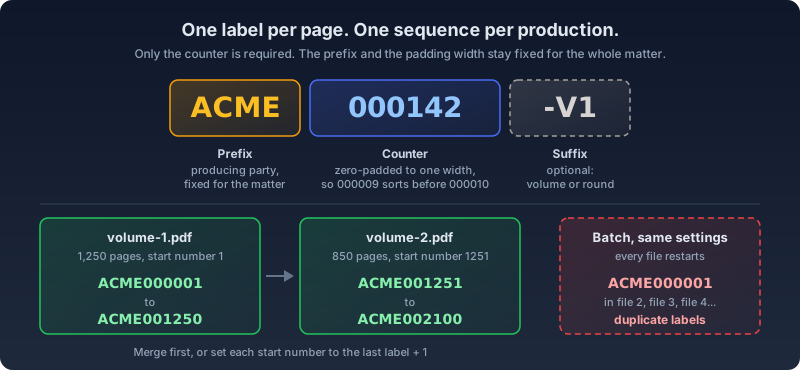
The prefix names the producing party. It stays fixed for the whole matter, so a page stamped ACME can't be confused with one stamped BETA from the other side. One real example: the stipulated ESI order in Sarasota County Public Hospital Board v. Blue Cross and Blue Shield of Florida (M.D. Fla.) required "a prefix associated with the Producing Party's name followed by 8 numbers (e.g., ABCD00000001)" and barred switching prefixes later in the case.
The counter is zero-padded to a fixed width. Padding is what keeps ACME000009 sorting before ACME000010 in a file listing or a review database. Without it, text sorting puts 10 before 9 and your index turns into a puzzle.
The suffix is optional. People use it for a volume, a production round, or a designation tag.
Two properties matter more than the format. Every page gets its own number, which is what the criminal ESI recommendations from the DOJ and the Administrative Office of the U.S. Courts mean by "Each page of the PDF should be stamped with a unique Bates number." And the sequence runs across the whole production, so file two picks up where file one ended.
Placement is the part people forget. The same Florida order required the number be burned in "at a location that does not unreasonably obliterate, conceal, or interfere with any information from the source document." That order even had images shrunk by up to 10% to leave dedicated space for the stamp.
Bates numbering in Adobe: an Acrobat Pro feature
If you searched "bates numbering adobe", here's the short version. Adobe's own help page is titled Add Bates numbering in Acrobat Pro, and when a Standard 2017 owner asked where the tool was, an Adobe Community Expert's accepted answer was one line: "Bates numbering is a pro-only feature."
Acrobat's version is good. It takes a list of files in the order you set, offers 3 to 15 digits with 6 as the default, and handles prefix and suffix. Two details from that help page are worth knowing: "Protected, encrypted files, and some form types aren't supported," and Adobe advises avoiding the # character in the prefix or suffix.
The price is the sticking point. Adobe's plans page localizes prices by region; US list pricing checked by Xodo in June 2026 puts Acrobat Pro at $19.99 a month on an annual plan ($239.88 a year) against $14.99 for Standard. For a firm that needs PDF Bates numbering twice a year, that's a Pro seat bought for one dialog box.
How to add Bates numbers to a PDF with OxygenPDF
- Fix the page order first. Bates numbers are permanent labels, so the set has to be final before they go on. If the production is several PDFs, combine them in the order they'll be produced with Merge PDF, and delete or reorder pages in Organize PDF. Merging PDF files covers the ordering details.
- Open Bates Numbering and drop in the file. The file info card shows the page count before anything is stamped, which is your first sanity check against the index.
- If the file is password-protected, an inline prompt asks for the password. There's a trade-off here; see the FAQ below.
- Set the label: the prefix (
ACME, orACME-if you want a separator), the start number, the digit count, and an optional suffix. Defaults are an empty prefix, start number 1, and 6 digits. The digit field accepts 1 to 10. - Pick a position. A 3×3 grid covers top, middle and bottom rows by left, center and right. Bottom-right is where I'd start. Font size runs from 6 to 72 pt (default 10) and the margin from 0 to 200 pt (default 30).
- Read the preview. Every page appears as a thumbnail with its exact label overlaid where it will print. Scroll to the end and confirm the last label matches the count you expect.
- Apply and download. The output saves as
<original-name>-bates.pdf, so your unstamped source stays untouched. The success card reports how many pages were numbered.
Under the hood the tool loads the PDF with pdf-lib, measures each label, and draws it in black text into each page's content at coordinates computed from that page's own width and height. A landscape exhibit in a portrait set gets its number in the right corner for its shape. The PDF itself is never uploaded: pages are read, stamped, and saved inside the browser tab.
Several files, one sequence
This is the part to get right. Drop more than one PDF in and the tool switches to batch mode, applying one configuration to every file. Each file then starts from the same start number. Batch mode is great for stamping unrelated documents in one go. For a production it's the wrong move, because you'd get twelve files that all begin at ACME000001.
There are two clean ways to keep one unbroken sequence:
- Merge, then number. One file, one run, no arithmetic. This is the default for anything that ships as a single volume.
- Number file by file. If the files must stay separate, run them one at a time and set each start number to the previous file's last number plus one. Volume 1 has 1,250 pages and ends at
ACME001250, so Volume 2 starts at 1251.
Keep a running log of the first and last label in each file as you go. Production cover letters usually list those ranges anyway.
Where the confidentiality legend goes
A protective order usually adds a second mark to the page. The Northern District of California's model protective order, for example, tells the producing party to "affix the legend 'CONFIDENTIAL' to each page that contains protected material."
You can stuff a designation into the suffix (ACME000001-CONF), and the tool's own placeholder suggests exactly that. I'd keep them apart: a separate legend reads better, and the Bates number stays the same if a page is later re-designated. Stamp the Bates number bottom-right, then run the file through Add Header & Footer with "CONFIDENTIAL" in the bottom-left slot. That tool stamps every page, so if only some pages are protected, split those out for the legend pass and merge the set back in order afterward.
Mistakes that break a production
Restarting the count per file. The batch-mode trap above. The symptom is duplicate labels, and receiving counsel will find them the moment they load the set into review software.
Stamping over content. The stamp is plain black text with no white box behind it, so on a dark header band or a full-bleed scan it can disappear or collide with a signature line. Check the preview for pages with content running to the edges. The margin is the distance from the page edge, so a smaller margin pushes the label into the blank strip at the edge, and a different corner often clears it entirely. Don't fix it by shrinking the font past legibility. Center positions exist in the grid, but they belong to other jobs.
Choosing padding too short. The counter pads to your digit count but never truncates. Set 4 digits on a 12,000-page production and the labels run ACME9999, then ACME10000, and the fixed width you wanted is gone. Pick the width for the whole matter, including productions that haven't happened yet.
Numbering before the order is final. A page pulled for privilege after stamping leaves a hole in the sequence, and a page added means restamping everything after it. Settle privilege review, redactions, and page order first. If pages need material removed, redact them properly before the numbers go on.
Changing the prefix midstream. Once the first volume goes out as ACME, later volumes stay ACME. A new prefix breaks every citation convention the other side has built on your numbers.
Why not upload it to a free tool
Discovery sets are full of confidential business records, medical files and financial statements, and before review they can hold privileged email too. Under ABA Model Rule 1.6(c), a lawyer "shall make reasonable efforts to prevent the inadvertent or unauthorized disclosure of, or unauthorized access to, information relating to the representation of a client." Uploading a production to an unknown converter so it can draw a few characters per page is hard to square with that.
The risk isn't hypothetical. In 2024, researchers found that two online PDF tools, PDF Pro and Help PDF, had left a storage bucket open, exposing more than 89,000 user-uploaded documents, contracts included.
Bates stamping doesn't need a server. It's text drawn at coordinates, which a browser does fine. The file stays in the tab, and the numbered copy downloads to your machine.
Frequently Asked Questions
Does Acrobat Standard include Bates numbering?
No. Adobe documents Bates numbering as an Acrobat Pro feature, and Standard users who go looking for it are told it's Pro-only. Getting it from Adobe means a Pro subscription or Acrobat Studio, which Adobe's plans page says includes everything in Pro.
Can you Bates number a PDF without Adobe Acrobat?
Yes. A Bates number is just a string of text drawn on each page, and any tool that can insert Bates numbers as a sequential label with a fixed-width counter will do. OxygenPDF's Bates Numbering tool does it in the browser for free, with prefix, suffix, start number, digit count, nine positions, and a per-page preview.
How many digits should a Bates number have?
Enough that the whole matter never overflows the width. Six digits (000001 to 999999) is Acrobat's default and leaves room for 999,999 pages. Larger matters go wider; the Florida ESI order quoted above specified eight. If the ESI order or protocol names a format, follow it exactly.
Will the Bates number survive flattening and printing?
Yes. The label is drawn into the page content itself, not added as a comment or form field, so flattening leaves it alone, printing shows it, and every viewer renders it. It's also real text, which means a PDF viewer's search can find a specific Bates number.
Can I Bates number a password-protected PDF?
Yes, with a caveat. Enter the password when prompted. To write the stamp, the tool needs an unencrypted copy, so it rebuilds the file by rendering each page at 144 DPI. The output reads and prints normally, but the original text layer doesn't survive, so the document text won't be selectable or searchable anymore. The Bates labels themselves are still real text. If the production needs searchable text, stamp an unencrypted copy if one exists, and keep the protected original alongside the stamped output. When a production does go out encrypted, the federal criminal ESI recommendations say passwords belong in a separate communication, not in the cover letter.
Is Bates numbering the same as adding page numbers?
No. A page number describes position inside one document and restarts at 1 in each file. A Bates number is unique across the whole production. If you need ordinary page numbers, adding page numbers to a PDF covers the formats and edge cases.
Bates number your PDF here. It stays in your browser.