Rohman
The first booklet most people print comes out wrong. Page 2 sits upside down on the back of page 1, or the pages read 1, 3, 2, 4 after folding, or the whole thing works except the last sheet, which is somehow blank on one side. The printer did exactly what it was told. It just wasn't told the right thing.
Printing a PDF as a booklet takes two separate steps that are easy to blur together: rearranging the pages into booklet order, which is called imposition, and printing that rearranged file double-sided with the right flip. Get both right and a stack of folded paper reads 1 to 8 like a real booklet.
Quick answer: To print a PDF as a booklet, run it through PDF Booklet, which reorders the pages two to a landscape sheet and pads the count to a multiple of four. Print the result double-sided with flip on short edge at 100% scale, stack the sheets in order, fold them in half and staple the spine.
Why the Pages Print Out of Order
A booklet is made of sheets folded in half and nested inside each other. One sheet folded once gives you four pages: two on the front, two on the back. That's why every booklet has a page count that's a multiple of four, and why a booklet maker adds blank pages to make the count come out even.
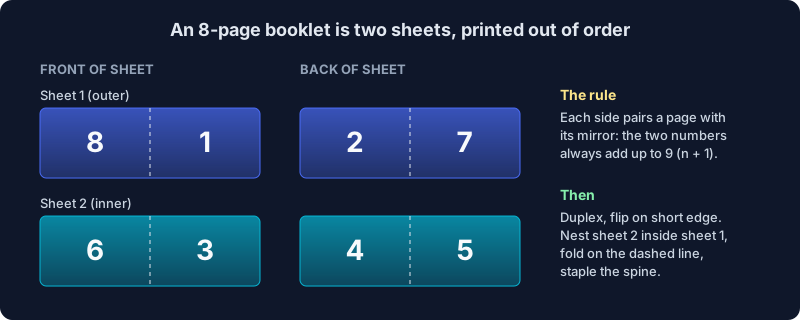
Nesting is what scrambles the order. The outermost sheet carries the first and last pages, and the innermost sheet carries the middle spread. For an 8-page booklet on two sheets:
| Sheet | Front (left, right) | Back (left, right) |
|---|---|---|
| 1, outer | 8, 1 | 2, 7 |
| 2, inner | 6, 3 | 4, 5 |
There's a simple check: on any side of any sheet, the two page numbers add up to the page count plus one. In an 8-page booklet every pair adds up to 9. In a 12-page booklet every pair adds up to 13, starting 12 and 1 on the front of the outer sheet and ending with 6 and 7 at the centre. If you ever have to check a booklet file by eye, that's the fastest test there is.
This is the kind of booklet that's folded and stapled through the spine, which printers call saddle stitching. It's what you want for programs, zines, manuals, order-of-service sheets and anything up to a few dozen pages.
The Setting That Ruins Most Booklets: Short Edge vs Long Edge
Once the file is imposed, every page in it is a landscape sheet with two pages side by side. Printing it double-sided means the printer turns the paper over between the front and the back, and it can turn it over two ways:
- Flip on long edge turns the sheet like a page in a book. It's the default on most printers, because most documents are portrait.
- Flip on short edge turns the sheet like a notepad flipped over at the top. This is the one you want for a booklet.
Use the wrong one and the back of every sheet comes out upside down relative to the front. The pages are all there in the right positions, just rotated 180 degrees, and once you fold the stack every other spread is unreadable. Adobe's own booklet instructions give the same advice for the same reason.
Two more settings matter:
- Print at 100%, or "Actual size". The imposed file is already the size of the paper. Letting the printer "fit to page" shrinks it again and shifts the fold line off the centre.
- Landscape orientation, or let the printer auto-rotate. Most print dialogs pick this up from the file.
Printing Without a Duplex Printer
You can still make a booklet with a printer that only prints one side. Print the odd pages of the imposed file (the fronts), put the stack back in the paper tray, and print the even pages (the backs). Which way round the stack goes back in depends on your printer, and it's the one thing nobody can tell you in advance.
So test it on the cheapest booklet there is: an 8-page file, which is two sheets. Mark the fronts with a pencil before you reload them. Once you know how your printer feeds, write it on a sticky note and stick it to the printer.
How to Make a PDF Booklet
- Open PDF Booklet and drop in your PDF. It runs in your browser, so the file isn't uploaded.
- Choose the output sheet size: A4, Letter or Legal. This is the paper you'll print on, not the size of your document.
- Check the summary. It shows your source pages, how many blank pages it will add, how many sheets of paper you need, and how many output pages that makes, one per printed side. A 10-page document becomes a 12-page booklet with two blanks, on three sheets.
- Create the booklet and download it. Print it with the settings above, stack the sheets in the order they come out of the printer, fold the stack in half and staple the spine.
The padding blanks go at the end of the booklet, which puts them on the inside and outside of the back cover. If you'd rather have the blanks somewhere else, such as an empty inside front cover, add them yourself with Add Blank Page so the page count is already a multiple of four. Then the booklet maker has nothing left to pad.
While writing this I found a file that broke the tool. The PDF standard allows a blank page to have no content at all, not even an empty list of drawing instructions. The library we use refused to place such a page, so one deliberate blank page anywhere in a document failed the whole booklet. Booklet documents are full of deliberate blank pages, which made it the worst possible tool to have this bug. That's fixed now, in the booklet and in N-Up PDF and the other tools that place pages onto new sheets.
Paper Size: Why A4 Booklets Look Better Than Letter
Each page of your document gets half of the output sheet, scaled to fit and centred. How much it shrinks depends on the paper.
A4 has a clever property: fold it in half and you get A5, the same shape at 70.7% of the size. An A4 document printed as an A4 booklet fills each half exactly, with no extra white space.
US Letter doesn't have that property. Half a Letter sheet is 5.5 × 8.5 inches, a squatter shape than the page itself, so a Letter document shrinks to 64.7% of its size and leaves about 0.7 inches of extra white space above and below each page. If your document is Letter-sized and the text feels small, print the booklet on Legal paper instead. Each page then comes out at 77% of its size, with almost no gap.
How Thick Can a Booklet Get?
Folded paper isn't flat. Every sheet wraps around the ones inside it, so the inner pages stick out further at the open edge. Printers call this creep. A print shop trims the edge flat, which shaves more off the middle pages than the outer ones, and it starts to show around 40 pages, according to Printivity's guide to creep.
At home, you won't trim, so creep shows up as a slightly staggered edge rather than lost margins. On ordinary office paper, staying at or under about 10 sheets (40 pages) keeps the fold manageable. Past that the stack fights the fold, and an ordinary stapler won't reach the spine anyway. Use a long-reach stapler, or split the document into two booklets.
If you don't need the fold at all, and just want to save paper by putting several pages on each sheet in reading order, you want N-Up PDF instead. We covered when to use which in a separate post.
Frequently Asked Questions
How do I print a PDF as a booklet?
Run the PDF through PDF Booklet to reorder the pages, then print the new file double-sided with "flip on short edge" at 100% scale. Fold the stack of sheets in half and staple along the fold.
Why are the pages on the back of my booklet upside down?
The printer flipped the paper on the long edge. Booklet sheets are landscape, so they need "flip on short edge" (sometimes called short-edge binding). Change that one setting and print again.
Why does my booklet have blank pages?
A folded sheet always holds four pages, so a booklet's page count must be a multiple of four. A 10-page document becomes 12 pages, and the two extra pages are blank and go at the end. Add blank pages yourself where you want them if the end isn't the right place.
What page order is a booklet printed in?
For 8 pages: 8 and 1, then 2 and 7 on the back of the same sheet, then 6 and 3, then 4 and 5. On every side the two numbers add up to the total plus one.
Can I print a booklet without a duplex printer?
Yes. Print the odd pages of the booklet file, put the printed stack back in the tray, and print the even pages. Test it with a two-sheet booklet first, since printers differ in which way the paper has to go back in.
Does Adobe Acrobat print booklets?
Yes. Acrobat Reader has a Booklet option in its print dialog that imposes on the fly. The difference with PDF Booklet is that you get an imposed PDF file, which you can send to a print shop, print from a phone or tablet, or print from any program on any computer.
Fold Once, Read in Order
Booklet printing looks like a puzzle until you see the two moving parts: the pages are paired so that each pair adds up to the total plus one, and the sheet flips on its short edge. Let the tool handle the first, set the second in your print dialog, and test on two sheets before you print fifty.
Make your PDF into a booklet in your browser, with nothing uploaded.