Rohman
"There was an error opening this document. The file is damaged and could not be repaired." If you've seen Acrobat's version of that message, you've probably also tried a second viewer, then a third, then a repair site. Sometimes one of them works. Often none do.
Which outcome you get depends on where the damage is, not on which tool you pick. A PDF has a small amount of structure that tells a reader where everything is, and a large amount of content. Lose the structure and a good repair rebuilds it. Lose the content and nothing brings it back.
I broke a PDF on purpose in nine different ways to see exactly where that line is. The results are below, along with two fixes to our own repair tool that the test made obvious.
Quick answer: To repair a corrupted PDF, open Repair PDF, drop in the file and click Repair PDF. It reads every object it can find, rebuilds the cross-reference table, and rebuilds the page list if that was lost too, then saves a clean copy. That fixes broken indexes, cut-off downloads and junk in the file. It can't restore pages or fonts that were never in the file you have. If the file still won't repair, the best fix is a fresh copy from the sender.
How a PDF Finds Its Own Pages
A PDF is a pile of numbered objects (pages, fonts, images, drawing instructions) plus an index. The index, called the cross-reference table, lists the byte position of every object. The file ends with a short trailer that says where the index starts and which object is the catalog, the root that leads to the list of pages.
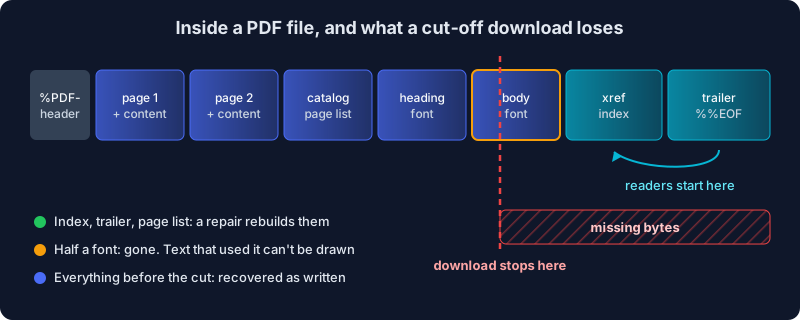
Here's the important part: readers start at the end of the file. They read the trailer, jump to the index, and use it to find everything else. That's efficient, and it's also why the most common kind of damage is so disruptive. A file that's missing its last few kilobytes has lost the very part a reader opens first.
What Actually Breaks a PDF
Most corrupted PDFs come from a handful of ordinary accidents:
- A download or transfer that stopped early. A dropped connection, a sync app that gave up, an email gateway that clipped a large attachment. The file looks normal but is shorter than it should be, and it's missing its index and trailer.
- Bytes overwritten with zeros. A crash during saving, a failing USB stick, a cloud placeholder that was never filled in. The file is the right size, but the end of it is empty.
- A wrong index. An app that edited the file without updating the byte positions, or a tool that inserted a few bytes near the start, so every recorded position is off.
- Damaged content. Flipped bits in the middle of a compressed stream, from bad storage or a broken copy. The structure may be fine, but the drawing instructions for one page are garbage from that point on.
- Not a PDF at all. An expired download link that saved an HTML error page under a
.pdfname. Open it in a text editor: if it starts with<html>instead of%PDF-, there's nothing to repair.
What a Repair Can Recover, Tested
I took a four-page report printed to PDF from Chrome and damaged it nine ways. Then I tried each broken file in pdf.js (the engine inside Firefox and many web viewers, and the one our tools use), in our Repair PDF tool before and after the fixes described below, and in qpdf, a respected open-source command-line repair tool.
| Damage | Opens in pdf.js? | Repair PDF (before) | qpdf | Repair PDF (now) |
|---|---|---|---|---|
| Index positions all wrong | Yes | Fixed | Fixed | Fixed |
| Index deleted | Yes | Fixed | Fixed | Fixed |
| Wrong stream length | Yes | Fixed | Fixed | Fixed |
| Cut off at 95%, 50% or 30% | No | Failed | 4 pages | 4 pages |
| Last 30% overwritten with zeros | No | Failed | 4 pages | 4 pages |
| First 2 KB missing | Partly | Failed | 4 pages | 4 pages |
| Catalog and page list cut off | No | Failed | Not tested | 4 pages |
| 24 bytes scrambled inside one page | Yes, one page's text lost | Same loss | Same loss | Same loss |
| Same file with compressed object streams, cut at 95% | No | Failed | Failed | Failed |
Three things stand out.
Index damage is easy. A wrong or missing cross-reference table is the classic "corrupted PDF", and it's the most repairable kind. Every tool, and even pdf.js on its own, finds the objects by scanning the file. If your PDF opens in one viewer but not another, this is usually why, and any repair, ours included, gives you a file every viewer accepts.
Truncated files come back as pages, not always as content. When the file was cut at 95%, every page came back. But Chrome writes the main body font near the end of the file, and that font was in the missing 5%. The repaired pages had their headings and lost their body text: the instructions to draw it survived, but the font it needed did not. A repair can rebuild the index to objects that exist. It can't invent a font, an image or a page that isn't in the bytes you have.
Compressed object streams are all or nothing. Since PDF 1.5, many apps pack page and font information into compressed bundles called object streams. If the cut lands inside one, everything in that bundle is lost, and in my test that included every page. Both qpdf and our tool gave up. That's the honest ceiling: there was nothing left to rebuild from.
Two Fixes to Repair PDF This Test Forced
The "before" column above was embarrassing. Our Repair PDF tool handled index damage, the easy case, and failed every truncated file, which is the most common way a PDF actually breaks.
Two things were wrong. First, the library we parse PDFs with refuses a file whose last object stops mid-way, and it refuses a file with no catalog. A cut-off download has both problems. Repair PDF now trims a half-written final object, puts back a header if the start of the file is missing, reads every complete object it can find, and if the list of pages was lost, rebuilds it from the page objects that survived, in their original order.
Second, and worse: the tool never even let you click Repair. Like every OxygenPDF tool, it opened the file to show a preview first, and a file that wouldn't open ended there with an error. A repair tool that rejects broken files had the job backwards. Now, when a file won't open for preview, Repair PDF keeps it and tries anyway. You'll see the file size and a dash where the page count would be, and the repair runs on the bytes. If nothing is recoverable, for example an HTML page saved as .pdf, it says so plainly instead of failing quietly.
Both fixes have tests that cut a file before its index, remove its header, and remove its catalog, and check the pages come back in the right order.
How to Repair a PDF File, Step by Step
- Copy the file first. Work on a copy. A repair writes a new file, but keep the original in case another tool does better with it later.
- Check the size. If you know roughly how big the file should be and this one is noticeably smaller, it was cut off. Re-downloading usually beats any repair.
- Open Repair PDF and drop in the file. You can add several broken files at once.
- If the file is password-protected, enter the password when asked.
- Click Repair PDF, then download the result, named
yourfile-repaired.pdf. - Open the repaired file and check every page, not just the first. Blank areas or missing text mean that part of the content was lost before the repair saw it.
Not sure what's wrong? Run the file through PDF Health Check first. It reports whether the file opens at all, whether it's encrypted, whether pages are scans with no text layer, and which tool fixes each problem, so you don't repair a file whose real issue is something else.
When Repair Isn't the Right Tool
Some "broken PDF" problems aren't corruption at all:
- It opens but asks for a password you don't have. That's encryption, and no repair tool removes it. If you do know the password and want it gone, use Unprotect PDF.
- It opens but the text can't be selected or searched. The pages are images, usually scans. Run OCR to add a text layer.
- It opens but text shows as boxes or gibberish. Fonts weren't embedded, or the file's text mapping is broken. Repair won't change that. Re-exporting from the app that made the file, with fonts embedded, will.
- It's password-protected and damaged. Repair PDF can still help, but to write a clean copy it has to render each page to an image, so the repaired file's text can no longer be selected.
Your Broken File Stays on Your Computer
Damaged files are often the important ones: the signed contract that downloaded halfway, the tax return from a dying laptop. Repair PDF reads and rebuilds the file inside your browser tab, so it's never uploaded anywhere. You can see why every OxygenPDF tool works that way.
If you're comfortable with a terminal, qpdf is worth having too: qpdf damaged.pdf fixed.pdf attempts a recovery and prints what it found. On every case I ran through both, it and Repair PDF now recover the same pages.
Frequently Asked Questions
Why won't my PDF open all of a sudden?
Usually because the end of the file is missing or damaged, often from an interrupted download, sync or copy. Readers start at the end of a PDF to find its index, so losing even the last few kilobytes can stop it from opening anywhere.
Can a corrupted PDF be repaired for free?
Yes. Repair PDF is free and runs in your browser, and qpdf is a free command-line tool. Both rebuild a damaged index and recover cut-off files when the page objects survived.
Will repairing a PDF recover all my pages?
It recovers every page object still in the file. If a page's content, font or images were in the damaged or missing part, the page comes back with gaps. Nothing can restore content that isn't in the bytes you have.
How can I tell if my PDF is truncated?
Compare the size with the original if you know it. You can also open the file in a text editor and look at the very end: a complete PDF ends with %%EOF. A file that stops in the middle of binary data was cut off.
Is it safe to use an online PDF repair tool?
It depends on the file. Most online repair tools upload your document to their server. Repair PDF processes it in your browser, so a damaged contract or statement never leaves your computer.
Have a PDF that won't open? Try a repair in your browser. If it can be rebuilt, you'll have a clean copy in seconds.