Rohman
Somebody hands you a shoebox of letters your grandmother wrote in the 1950s, or a stack of clinic intake forms filled in with a ballpoint pen, and asks for the text. You scan a page, run it through whatever OCR you already have, and get back a few confident words surrounded by noise. Handwriting OCR fails like this all the time, and the reason is rarely your scan. Most OCR engines were built to read type, and handwriting isn't type.
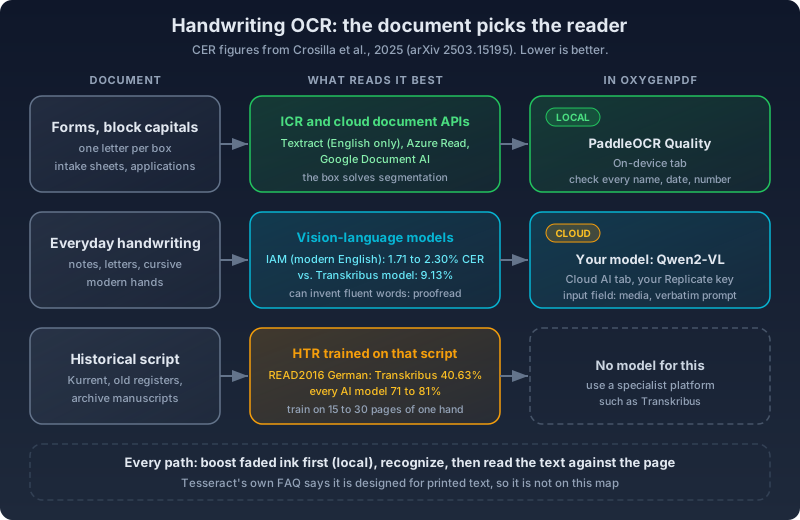
The quick answer: match the tool to the handwriting. Block capitals in form boxes are the easiest case, because each letter already sits in its own box. Everyday handwriting and cursive are where vision-language models (the "AI OCR" everyone is selling) post the best published numbers, around 2% character error rate on a standard English benchmark, and most of them run in the cloud. Old scripts like German Kurrent need a recognizer trained on that script. Whatever you pick, check the output against the page, because the models that read handwriting best also invent plausible text when they can't read a word.
In OxygenPDF that comes down to four steps:
- If the ink is faded, run the scan through Enhance Handwriting Ink. It works in your browser and returns a cleaned PDF.
- Open that PDF in OCR PDF.
- Pick an engine: the On-device tab for anything sensitive, Cloud AI with your own Replicate key for the best shot at cursive.
- Read the extracted text against the page before you trust it.
Why OCR Built for Print Breaks on Handwriting
Tesseract, the open-source engine OxygenPDF's OCR tool uses by default, is blunt about this in its FAQ: "You can, but it won't work very well, as Tesseract is designed for printed text. Look for projects focused on handwriting recognition" (Tesseract FAQ). That's the first thing to know about OCR for handwritten text. The engine you already have probably wasn't built for it.
Two things make handwriting hard, and a sharper scan fixes neither.
The first is segmentation. A print engine expects letters with gaps between them. Cursive joins them, so you can't cut a word into letters until you know the letters, and you can't know the letters until you've cut the word. That circular problem is called Sayre's paradox, and it's why older systems only handled print with separated characters (Wikipedia). Modern recognizers sidestep it by reading a whole line at once.
The second is that handwriting has no fixed glyph shapes. More than 700,000 printed font variants exist, and that's tiny next to the variation in how people form letters by hand (Wikipedia). A print engine has seen the typeface on your invoice millions of times. It has never seen your grandmother's "r."
You'll meet three acronyms. OCR is printed text. ICR, intelligent character recognition, is the forms-industry term for hand-printed capitals in boxes, and by its own definition it "cannot read cursive handwriting since it must still be able to assess each character individually." HTR, handwritten text recognition, covers real handwriting, cursive included. The six stages every recognizer runs are covered in How OCR text recognition works.
What the Benchmarks Actually Say
The standard English handwriting test set is IAM, "the most popular dataset for handwritten text recognition" according to Microsoft's TrOCR paper, which set a record on its 2,915 test lines in 2021 with a 2.89% character error rate (Li et al.). TrOCR reads "single text-line images" (model card), so something else has to find the lines first.
Then general-purpose vision models arrived. A 2025 benchmark by Crosilla, Klic and Colavizza ran them zero-shot, with no training on the task (arXiv 2503.15195):
| Dataset | Best AI model | Qwen2-VL-7B | Transkribus model |
|---|---|---|---|
| IAM, modern English | GPT-4o-mini, 1.71% CER | 2.30% | 9.13% |
| Bentham, historical English | Qwen2-VL-7B, 8.01% | 8.01% | 7.07% |
| READ2016, historical German | Claude 3.5 Sonnet, 71.17% | 76.37% | 40.63% |
On modern handwriting, a general vision model with no special training beats a dedicated handwriting model by a wide margin. On old handwriting the lead flips back to the specialist, and on historical German nothing produces usable text. The authors also asked the models to review their own output, and any improvement was "insufficient to shift the output from 'unusable' (CER over 10%) to 'good'."
For scale, the paper treats under 5% as very good. At 2%, a 1,500-character letter still has about 30 wrong characters. That's a transcription you proofread, not one you file.
Local engines lag further. PaddleOCR's PP-OCRv5, which runs in your browser in OxygenPDF, is a rare on-device engine whose makers publish handwriting results at all: on Paddle's internal sets its larger model scores 0.58 recognition accuracy on handwritten English against 0.87 on printed English (PaddleOCR docs). Different metric from the table, same lesson.
Match the Approach to the Document
Forms Filled In With Block Capitals
This is ICR territory and the kindest case, since the form designer already solved segmentation. All three big cloud document services read handwriting. Amazon Textract only reads it "from the Standard English alphabet and ASCII symbols" (Textract FAQ), Microsoft's Read engine supports handwriting in nine languages (Microsoft Learn), and Google's Document AI extracts handwriting by default (Google Cloud).
For intake forms I'd try local first. The two PaddleOCR engines are the on-device ones with published handwriting results, Quality scored higher, and hand-printed capitals avoid the joined-letter problem. Check every name, date and number, since those are the fields where one wrong character matters and context can't rescue a guess.
Everyday Handwriting and Cursive
Letters, journals, meeting notes, a recipe card. This is where vision-language models earn their reputation. In OxygenPDF you reach one through Cloud AI, then Your model, which runs any public Replicate model on your key. Point it at lucataco/qwen2-vl-7b-instruct, the same 7-billion-parameter model that scored 2.30% on IAM above. Your hosting, prompt and pages differ from the paper's, so treat that as a guide. Before you run it:
- Set "Image input field" to whatever the model's Replicate page calls its image input. For this model that's
media; the form won't guess it for you. - Write a prompt that forbids editing: "Transcribe the handwriting exactly as written. Keep spelling mistakes. Mark unreadable words as [illegible]."
The prompt matters because of how these models fail. A NeurIPS 2025 paper found that on degraded document images, multimodal models lean on "linguistic priors" and produce "hallucinatory content" instead of admitting they can't read it (He et al.). Faded, cramped handwriting is that kind of image, and a fluent wrong word is harder to spot than garbage.
I won't claim the other presets read cursive well, because I found no evidence. The listing behind the Surya preset (datalab-to/ocr) talks about languages, layout and tables (Replicate), GOT-OCR 2.0's paper is about formulas, tables and sheet music (arXiv 2409.01704), and Florence-2's model card has no handwriting benchmark (Hugging Face). Try them on a page if you like.
Historical Script
A 19th-century parish register or a letter in Kurrent needs a model trained on that script. Transkribus, a cooperative-run platform hosted in Austria, offers more than 300 public models and says 15 to 30 transcribed pages from one writer typically train a model under 5% CER on that hand (Transkribus). Those are vendor figures, and the independent benchmark's historical results are less rosy, but both point the same way. OxygenPDF has no historical-script model, and I'd rather say so than pretend PaddleOCR can read Sütterlin.
Prep the Page Before You Recognize It
A good handwriting scan to text job starts at capture. Flatten notebook pages, light them evenly so strokes don't sink into shadow, and scan at 300 DPI or more, as both Adobe and Transkribus recommend. Shooting with a phone? The resolution math for phone scans is worth two minutes. OCR PDF takes PDFs, so convert photos with JPG to PDF or HEIC to PDF, and straighten pages with Deskew PDF.
Old letters add a problem of their own: ink fades faster than paper ages. A brightness slider darkens the paper along with the ink. Enhance Handwriting Ink uses CLAHE (contrast-limited adaptive histogram equalization), which works tile by tile, so a faint word in a stained corner gets the same lift as one in a clean corner. Then it darkens strokes toward their own color and bleaches the paper. You pick blue ink, black ink or both, tune grid size and strength against a live preview, and can leave red stamps untouched. It all runs on a canvas in your browser.
One trade-off: the booster redraws each page at 2 pixels per PDF point (about 144 pixels per inch on a letter page) and saves JPEG images. Any existing text layer is gone, and a 600 DPI archival scan comes back at lower resolution. Boost before OCR, keep the original, and skip it if the ink is already dark.
Local or Cloud Is a Per-Document Decision
Here's the uncomfortable part of handwriting OCR: the strongest readers in that benchmark were cloud models, and the engines that keep pages on your device are weaker.
OxygenPDF's OCR tool keeps the two apart in separate tabs. The On-device tab, marked "Local only," holds Tesseract, PaddleOCR Fast (about 20 MB), PaddleOCR Quality (about 165 MB), Florence-2 (about 190 MB) and Florence-2 HD (about 480 MB). PaddleOCR and Florence-2 models download on first use and are cached in your browser, and your pages stay on your machine. Florence-2 needs WebGPU; without it, the tool quietly runs PaddleOCR Fast.
The Cloud AI tab holds Surya, GOT-OCR 2.0, Text Extract OCR and Your model, and each needs your own Replicate token, stored in your browser. Each page is rendered to an image and sent with your token through OxygenPDF's /api/ocr relay, which exists because Replicate's API won't take calls straight from a browser. It forwards the request and returns the text. Replicate deletes API inputs and outputs after an hour by default (Replicate docs).
My rule: patient forms, legal papers and anything with an ID number stay on-device, or go to a vendor you have a contract with (Textract is HIPAA eligible once you sign a BAA with AWS). A family's letters are your call, and an hour on Replicate for a better transcription is a reasonable trade to make with your eyes open. Vendor privacy terms are compared in the OCR text recognition guide.
Step by Step: Convert a Handwritten PDF to Text
- Get the pages into one PDF. Photos go through JPG to PDF or HEIC to PDF.
- If the ink is faint, open Enhance Handwriting Ink, start with "Blue and black," raise Boost strength until the faintest word reads in the preview, and download.
- Load the file in OCR PDF. Leave "Auto-detect text" on; a boosted PDF has no text layer, so OCR runs.
- Choose the engine. Sensitive pages: On-device, PaddleOCR Quality. Cursive you're willing to send out: Cloud AI, Your model,
lucataco/qwen2-vl-7b-instructwith input fieldmediaand a verbatim prompt. - Open the per-page view and read each page against the original. Names, dates and numbers first, then anything that sounds too smooth.
- Copy the text, download a .txt, or download a searchable PDF. Verifying OCR output covers the checks that catch quiet errors.
Mistakes That Waste an Afternoon
Tuning Tesseract for cursive. No setting fixes an engine that says in its FAQ it wasn't built for this.
Trusting a clean-looking result. Garbage is obvious; a fluent sentence with one invented word isn't.
Asking the model to "clean up" the text. You'll get a tidier letter your grandmother didn't write. Ask for verbatim and fix spelling later.
Boosting after OCR. The booster flattens pages to images, so it goes first.
FAQ
Can OCR read cursive?
Traditional OCR mostly can't: Tesseract is designed for printed text, and ICR reads capitals in boxes. Handwriting recognition models and vision-language models can, and on modern English the best score under 2% character error in published tests. Expect to proofread.
Is AI OCR better than regular OCR for handwriting?
For modern handwriting, yes, by a wide margin in the 2025 benchmark above. For historical scripts, no: a Transkribus model beat every AI model on the historical English and German sets. AI OCR also fails by writing fluent text that isn't on the page, so check it harder, not less.
Is Google Lens or Google Drive OK for handwriting?
Google Lens gained a way to copy handwritten notes from your phone to your computer as text in 2020 (The Jakarta Post), which is handy for a line or two. Drive's OCR asks for "common fonts, such as Arial or Times New Roman" (Google Drive Help), which tells you what it's tuned for, and it means uploading the file to Google first. Its other limits are in Google Drive OCR's hidden limits.
Does Adobe Scan convert handwriting to text?
Adobe's marketing says Acrobat OCR converts handwriting "including cursive" (Adobe). Its community forum is more modest: the answer marked correct on a March 2026 thread says "handwritten text recognition is limited in Adobe Scan" and "cursive or irregular handwriting is often not recognized" (Adobe Community). Neat block capitals have a chance. More in Adobe Acrobat OCR: where it hides.
How accurate is handwriting OCR?
It depends on the writing more than the tool. Published results run from under 2% character error on modern English with the best AI models, to 7–17% on historical English, to over 40% on historical German even for the best specialist. Run a few pages and count the errors before you commit to a whole box.
Is handwriting OCR private?
Only if it runs on your device. The On-device engines in OCR PDF never upload your pages, though their handwriting accuracy is lower. Cloud engines send page images to a server: Replicate deletes API inputs after an hour by default, and AWS says Textract may store inputs to improve the service unless you opt out. Decide per document.
Run handwriting OCR on your PDF. The On-device engines never upload it.