Rohman
Quick answer: Open Remove Watermark, drop in your PDF, and delete the watermark layer. In a born-digital PDF the watermark is a separate object in the file, not ink baked into the page, so it can be removed without touching the text underneath. Everything runs in your browser — nothing is uploaded.
A watermark that has outlived its purpose is a common problem. A contract is ready to sign but every page still carries a diagonal red "DRAFT" from internal review. A lease was edited in an unactivated trial utility that burned an evaluation banner across the header. An archived deed was scanned on security paper whose faint "COPY" pantograph confuses OCR. Most people who try to remove one of these discover that the obvious tools either fail outright or quietly destroy the document.
The confusion comes from a wrong mental model. People assume a watermarked PDF is like a flattened JPEG, where removing a stamp means guessing which pixels used to be underneath. A born-digital PDF isn't like that. Under the ISO 32000 specification, a watermark is usually an independent object — a drawing sequence in the page's content stream, a reusable Form XObject, or a tagged artifact in the object tree. It sits next to your text, not inside it.
That distinction decides how removal goes. Treat it as an image-editing problem and you get the worst outcomes: cloud converters that rasterize crisp vector pages into low-resolution bitmaps, destroy searchability, and ship your confidential file to a server you know nothing about. Treat it as the object-tree problem it is, and removal is clean and lossless.
Key takeaways:
- Legality: removing your own status stamps ("DRAFT", "INTERNAL USE ONLY") is routine maintenance; stripping copyright-management information to redistribute someone else's work is unlawful under DMCA §1202.
- Acrobat's blind spot: its "Remove Watermark" command only recognizes stamps Acrobat itself made, so it reports "No watermark found" on watermarks from Word, Google Docs, or print drivers.
- Scans are the exception: on a scanned page the watermark and the text share the same pixels, so object-level removal can't help — you need OCR or image cleanup instead.
- Privacy: client-side removal keeps the file in your browser's memory; cloud "AI inpainting" tools upload it and rasterize it.
When Removing a Watermark Is Legitimate
Watermarks do real work during drafting, and everyday workflows produce good reasons to remove them:
- Retiring obsolete status markers. Stamps like "PRELIMINARY" or "EMBARGOED" matter during review and have to come off once the document is executed. When the editable source file is lost or the author has left the company, pruning the marker from the PDF is the only practical path.
- Clearing trial-software banners. Someone edits a critical filing on a laptop with an unactivated editor, and now every page carries a vendor demo stamp. Rebuilding an 80-page compiled filing costs days; removing the stamp takes seconds.
- Unblocking OCR. Archival deeds and invoices are often printed on security paper with faint void pantographs meant to defeat photocopiers. Fed to an OCR engine, those patterns corrupt the text — commas become periods, account numbers garble. Removing the background pattern restores accuracy; our guide to OCR on scanned PDFs covers that case in detail.
- Fixing automation collisions. Pipelines that assemble PDFs from several tools sometimes stamp the same page twice — "CONFIDENTIAL" from legal's step and "DRAFT" from a later script on the same coordinates — leaving body text illegible.
The legal line: copyright management information
The tool is neutral; the law is about intent. Under Section 1202 of the DMCA — and the parallel provisions of the WIPO Copyright Treaty that EU member-state directives implement — it is unlawful to knowingly remove or alter copyright management information (CMI) with the intent to enable or conceal infringement.
In practice:
- Stripping stock-agency watermarks (Getty, Shutterstock, Adobe Stock previews), photographer credits, or a publisher's copyright line to redistribute the work is the prohibited case, and it carries statutory damages.
- Removing your own organization's operational stamps, or a trial banner from your own filing, is ordinary document maintenance.
If you own the document or administer it, removal is fine. If the watermark is how the rightsholder marks their property, leave it.
The Five Ways a Watermark Lives Inside a PDF
A PDF isn't a flat canvas. Under ISO 32000 it is a graph of numbered objects tied together by a cross-reference table (xref), and a watermark can be implemented in five different ways. Which one you're dealing with determines how removal works.
Type 1: Inline content-stream operators
The most common technique writes drawing operators directly into the page's /Contents stream. The generator pushes the graphics state, applies a rotation matrix, sets transparency, draws the text, and pops the stack:
q                                            % Push graphics state to stack
/GS1 gs                                      % Apply 20% alpha transparency
0.85 0.15 0.15 rg                            % Set fill color to subtle red
/F1 54 Tf                                    % Set font F1 at 54 points
0.7071 0.7071 -0.7071 0.7071 180 240 cm      % Rotate 45 degrees counter-clockwise
BT                                           % Begin Text Object
0 0 Td                                       % Position text cursor
(STRICTLY CONFIDENTIAL) Tj                   % Render the watermark string
ET                                           % End Text Object
Q                                            % Pop graphics state (restore stack)
Here the watermark lives in the same stream as the body text. Naive search-and-replace scripts corrupt the byte offsets declared in the xref table and break the whole file. Proper removal parses the operator stream, isolates the self-contained q ... Q block that carries the rotation and transparency instructions, and excises it while rebuilding the cross-reference table.
Type 2: Form XObjects
Professional layout software (Acrobat, InDesign, Cairo-based engines) avoids polluting the page stream. It wraps the watermark in an independent sub-document called a Form XObject:
- The page dictionary's
/Resources << /XObject >>maps a name to an object:/Resources << /XObject << /WatermarkFm1 42 0 R >> >> - The page
/Contentsstream needs two operators to paint it:q /WatermarkFm1 Do % Paint external Form XObject Q - Object
42 0 Rholds its own stream, bounding box (/BBox [0 0 612 792]), fonts, and transparency group.
Because the watermark is isolated in its own object, removal is clean: drop the /WatermarkFm1 Do operator from the content stream and the reference from the /XObject dictionary, and the body text is untouched.
Type 3: Tagged artifacts
In accessibility-compliant PDFs (PDF/UA, Section 508), non-semantic background elements are wrapped in Marked Content so screen readers don't announce "Confidential" on every page:
/Artifact << /Type /Pagination /Subtype /Watermark >> BDC
q
/F1 48 Tf
(DRAFT) Tj
Q
EMC
The /Artifact tag is a clear signature: a parser scans for BDC sequences carrying /Subtype /Watermark and removes everything up to the matching EMC.
Type 4: Annotations
Some applications store watermarks as annotation objects in the page's /Annots array rather than in the content stream. Removal doesn't touch drawing operators at all — the engine inspects /Annots, finds entries whose /Subtype is /Watermark or /Stamp, and splices them out of the array.
Type 5: Raster scans
When a paper document with a pre-printed watermark goes through a scanner, the resulting PDF page is a single image (/Subtype /Image). There are no vector operators, fonts, or XObjects — watermark pixels and text pixels are physically merged. Object-level pruning is impossible; cleaning these files means luminosity filtering, thresholding, or re-extracting the text with OCR.
Why the Usual Removal Methods Fail
Search for how to remove a watermark from a PDF and you'll meet three flawed approaches, plus the one that works:
| Removal technique | How it works | Quality impact | Privacy profile | Main failure |
|---|---|---|---|---|
| Adobe Acrobat "Remove Watermark" | Looks for its own /PieceInfo metadata |
Lossless when it works | Local desktop execution | Reports "No watermark found" on any stamp Acrobat didn't create |
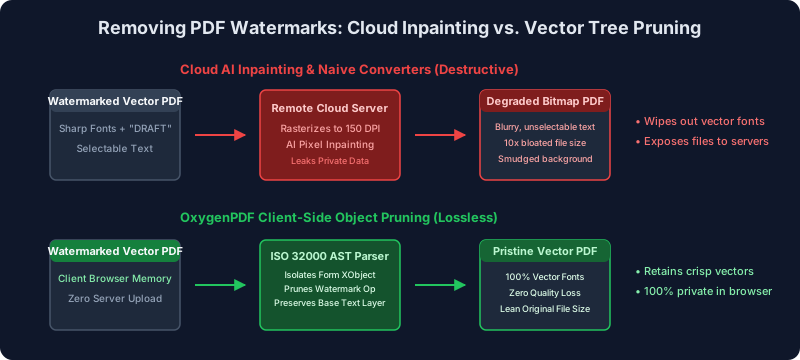
| Cloud "AI inpainting" sites | Rasterize pages, inpaint pixels on a remote server | Destructive: vector text becomes a blurry bitmap, searchability gone, file size balloons | Uploads confidential files to third-party servers | Smudged output, unselectable text, data exposure |
| White-rectangle overlays | Draw opaque boxes over the watermark | Leaves ugly voids over underlying text | The watermark text stays in the file — copy-paste reveals it | Covers real content; deletes nothing |
| OxygenPDF client-side pruning | Parses the ISO 32000 object tree and removes watermark objects in browser memory | Lossless: fonts, vectors, and searchability untouched | No upload; works offline | Can't split merged pixels on a scanned page |
Why Acrobat Says "No Watermark Found"
Adobe Acrobat Pro costs $19.99 per month on an annual plan — about $240 a year — as of September 2026 (Adobe's pricing page). Many corporate users assume that subscription can remove any watermark. In practice, Edit PDF → Watermark → Remove fails on most real-world documents with a small dialog: "No watermark was found on this page."
Acrobat isn't doing pattern recognition. It doesn't look for diagonal text or transparent lettering. It checks for a proprietary metadata dictionary it writes when it applies a watermark itself:
/PieceInfo <<
  /ADBE_CompoundType <<
    /DocData 48 0 R
    /Private <<
      /WatermarkType /Standard
      /WatermarkID (Acrobat_Watermark_2026)
    >>
  >>
>>
If the page doesn't carry that /PieceInfo signature, Acrobat treats the watermark as ordinary page artwork and refuses to touch it. Watermarks made by Microsoft Word, Google Docs, PDF-XChange, Foxit, Nitro, Wondershare, Sejda, Canva, or a print-to-PDF driver all lack the tag — so users are told the stamp is permanent when it's really just an unindexed Form XObject.
What Cloud "Inpainting" Tools Actually Do
Frustrated by Acrobat, people land on free web-based watermark removers. These are the worst trade-off in the category, for two separate reasons.
They destroy the document
Cloud removers rarely touch the PDF object tree. The backend pipeline is usually:
- Rasterize. The server renders each vector page into a bitmap at a low fixed resolution. Every glyph — drawn as scalable curves in the original — becomes a grid of pixels.
- Inpaint. An image model detects the watermark and fills the region with estimated background texture, leaving smudges and distorted character edges.
- Re-wrap. The bitmaps go back into a new PDF container.
The result: text can't be selected or searched, the file often comes back several times heavier than the original, and printouts show jagged edges.
They take your file
Documents stamped "STRICTLY CONFIDENTIAL" or "DO NOT DISTRIBUTE" are, by definition, an organization's most sensitive records. Uploading them to a free multi-tenant service means the file crosses the public internet to servers you can't audit, where it may be logged, cached, or retained.
That's not just a hygiene problem. Sending employee records, patient charts, or client financials to an unvetted processor can put you on the wrong side of GDPR Article 28 (which requires a vetted processor under contract), HIPAA, and ordinary NDAs.
How Client-Side Removal Works
The alternative is to do the object surgery locally. OxygenPDF's Remove Watermark runs entirely in your browser:
- Load. The file is read into browser memory through the File API. Nothing is uploaded.
- Parse. The engine walks
/XObjectdictionaries,/Annotsarrays, and/Contentsstreams. - Classify. It identifies Form XObjects, rotation-matrix text blocks,
/Artifacttags, and watermark annotations. - Prune. The watermark operators are excised without re-compressing the surrounding text.
- Serialize. The cross-reference table is rebuilt and a clean vector PDF is written out.
Three things follow from doing it this way:
- Vectors stay vectors. The engine edits drawing operators, not pixels, so fonts, line weights, and metadata are untouched — text stays crisp at any zoom.
- Privacy is verifiable. Open your browser's Network tab, or pull the network cable entirely: zero bytes leave the machine.
- Vendor doesn't matter. Because it reads universal ISO 32000 structure rather than Adobe's
/PieceInfotag, it handles watermarks from Word, PDF-XChange, Wondershare, Sejda, and print drivers the same way.
Removing a Watermark, Step by Step
1. Check what kind of PDF you have
Open the file in any viewer and drag your cursor across the body text:
- If the text highlights cleanly, it's a born-digital vector PDF (Types 1–4) and can be cleaned losslessly.
- If the whole page selects as one rectangle — or nothing selects — it's a scan (Type 5). Vector pruning won't help; use OCR or image thresholding instead. Our scanned-PDF guide walks through that workflow.
2. Remove the watermark
- Open Remove Watermark in your browser.
- Drag the PDF into the workspace. It's parsed in local memory.
- The engine lists what it found — Form XObjects, watermark annotations, background text blocks.
- Select the layers to remove and run it. The object references are excised and the file rebuilt.
- Download the result and check it: watermark gone, text sharp, selection intact.
Finishing the Job
Watermark removal is usually one step in a finalization pass. Companion tools cover the rest:
- Redact sensitive content. If the document contains account numbers or confidential clauses that must be permanently gone, a white box isn't enough — Redact PDF deletes the underlying character codes and vector paths.
- Apply the right stamp. Once the draft marker is off, add the approved status marking with Insert Watermark; our guide on watermarking a PDF without uploading covers opacity and rotation.
- Flatten for distribution. Flatten PDF locks form fields, signatures, and artwork into the base content stream so recipients can't move them.
- Compress for email. If the file picked up redundant resources along the way, Compress PDF brings the weight back down.
Frequently Asked Questions
Can Adobe Acrobat remove watermarks created in Microsoft Word or other software?
Rarely. Acrobat's "Remove Watermark" keys on the proprietary /PieceInfo metadata it writes when it applies a stamp itself. Watermarks from Word, Google Docs, PDF-XChange, and other tools lack that tag, so Acrobat reports "No watermark found." Object-level tools like Remove Watermark read the universal ISO 32000 structure instead and can clear third-party stamps.
Does removing a watermark make the text blurry?
Not with a vector-aware tool. Object pruning deletes the watermark's drawing instructions and leaves the original text glyphs untouched. Blurriness only appears when a tool rasterizes the page first — the cloud "AI inpainting" approach — because vector text is converted to a pixel grid before the watermark is even touched.
Can I remove a watermark from a scanned document?
Not by object pruning. On a scan, watermark ink and text ink occupy the same pixels — there are no separate objects to delete. The options are image-level cleanup (contrast thresholding, luminosity filtering) or re-extracting the text with OCR, covered in our scanned-PDF guide.
What's the difference between removing a watermark and redacting a PDF?
Watermark removal clears semi-transparent status labels like "DRAFT" to reveal clean content underneath. Redaction is a security operation: it permanently deletes sensitive data — characters and byte codes — so it can't be recovered by search, copy-paste, or inspection. For confidential data, use Redact PDF, not a white overlay.
Is it safe to upload a confidential watermarked contract to an online remover?
No. Web-based converters move your file to remote multi-tenant servers where it can be stored, cached, or logged — a real exposure for documents that are watermarked precisely because they're sensitive, and a compliance problem under GDPR and HIPAA. OxygenPDF runs client-side, so no bytes leave your device.
Conclusion
A watermark that served its purpose shouldn't cost you the document. The stamp is almost always a separate object in the file — which means it can be removed exactly, without rasterizing the page or shipping the file to a stranger's server.
Skip the metadata trap in legacy editors and the inpainting roulette of cloud tools. Open Remove Watermark, prune the object, and get your document back — crisp, searchable, and still private.