Rohman
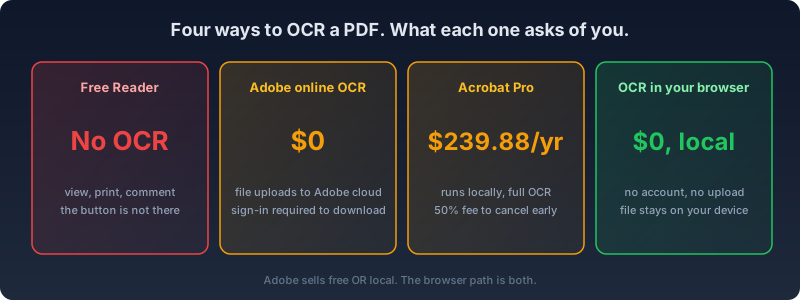
You have a scanned PDF open in the free Adobe Acrobat Reader and you are hunting for the OCR button. Stop hunting. It is not there. Reader views and prints; it does not recognize text. OCR — optical character recognition — is the step that turns a flat image of a page into text a computer can search, select, and copy. Skip it, and a "digital" document is really just a photograph of paper: you can look at it, but you cannot find a word in it, copy a sentence out of it, or run it through a screen reader. Adobe Acrobat OCR lives in the paid tiers and in an online tool with strings attached, and knowing which is which saves you either $239.88 or an upload you did not mean to make.
Where the Feature Actually Lives
In the current Acrobat interface, the path is:
- Open the scanned PDF in Acrobat (not Reader).
- All tools → Scan & OCR → Recognize Text → In This File.
- Click the gear icon to check the PDF Output Style before you commit to one.
- Click the blue Recognize Text button.
- Save the file, ideally as a copy, so the original scan survives if the run goes wrong.
In the classic interface it sits under Tools → Scan & OCR, and in older DC builds it was called Enhance Scans. Same engine, different door.
The settings gear hides the decision that matters, PDF Output Style, with three modes. Searchable Image keeps the scan visible and slides an invisible text layer under it, possibly deskewing and recompressing the image along the way. Searchable Image (Exact) does the same without touching the image, the mode legal and government submissions tend to require. Editable Text and Images replaces the scan with live, editable text in synthesized fonts, and it can visibly change how the page looks.
That third mode is also a tier gate. Acrobat Standard runs Scan & OCR but only produces searchable images; making a scan editable requires Pro. So does Action Wizard, the batch mechanism. After recognition, Correct Recognized Text shows the engine's suspected misreads in red boxes, one at a time, click by click. What the engine got wrong but never flagged, you cannot correct there at all — there is no bulk find-and-replace across the OCR layer, no confidence-score filter, just the boxes Acrobat itself decided to flag.
Does Acrobat's OCR Handle Handwriting?
Adobe markets Scan & OCR as capable of reading handwriting, not just printed text, and Adobe's own guide to it is upfront about the catch: accuracy depends heavily on how uniform and print-like the handwriting is, and Adobe's own tips for better results include writing on lined paper and keeping letters clear and separated. Treat it as a secondary capability layered on an engine built for typed and printed text, not a dedicated handwriting model — a doctor's scrawled note and a neatly printed form will not get the same result, no matter which tier you are paying for.
The Price of Each Path
As of September 2026, Acrobat Standard runs $14.99 a month and Acrobat Pro runs $19.99 a month on the annual plan ($239.88 a year) or $29.99 month to month, per Adobe's own pricing page. Cancel the annual-billed-monthly plan after the first 14 days and Adobe charges 50 percent of the remaining months — a fee structure the FTC sued Adobe and two of its executives over in June 2024, alleging the early termination fee was hidden behind hover icons at signup.
That case is no longer open. It settled on March 13, 2026 for $150 million — $75 million as a penalty to the DOJ, $75 million back to customers as credits — with a federal injunction signed April 10, 2026 requiring Adobe to disclose early termination fees upfront, send pre-renewal reminders, and offer one-click cancellation (DOJ release). The full story, and what changed for anyone paying Adobe by the month, is in our companion piece on Acrobat alternatives — the short version is that the disclosure problem is fixed going forward, but the price of the product itself did not move.
Adobe also offers a free online OCR tool. Read its fine print: the file uploads to Adobe Document Cloud, and downloading the result requires signing in with an Adobe account. To be fair, desktop Acrobat OCR runs locally on your machine. But that means Adobe sells you a choice: local costs $239.88 a year, free costs the file and an account. That framing did not come from nowhere — Adobe's June 2024 update to its general terms of use stated the company could "access, view, or listen to your Content … through both automated and manual methods, but only in limited ways, and only as permitted by law," a clause that triggered enough backlash from photographers and illustrators that Adobe rewrote the wording within weeks. The rewrite settled the PR fire. It did not change the fact that the free tool still asks for your file and your account.
The Errors Veterans Already Know
Ask anyone who runs OCR in Adobe Acrobat weekly and they will recite this string from memory: "Acrobat could not perform recognition (OCR) on this page because: This page contains renderable text." One fragment of digital text on a page — a scanner's half-baked OCR layer, a stamped header — and Acrobat refuses the whole page. Adobe's own knowledge base suggests converting the PDF to TIFF and back as a workaround: Save As, choose TIFF from the format list, then bring the resulting image files back into a fresh PDF and OCR that instead. Adobe's 2015 blog post declared the error dead with Acrobat DC's ability to segment image layers from text layers on the same page; the community threads about it, a decade later, did not get the memo.
File bloat is the quieter surprise. On the Acrobat Users forum, one report has a 62 KB scan growing to 645 KB after Recognize Text — roughly tenfold — and a second document going from 200 KB to over 2 MB the same way. On Adobe's own community forum, a user documented a 6 MB, 295-page scanned book ballooning to 264 MB after Enhance Scans plus Recognize Text — a roughly 44x increase. The explanation in both threads is the same: OCR adds the recognized text as a separate layer on top of the original image rather than replacing it, so the file carries both. The prescribed fix is another manual pass: Save As, then Optimize PDF, every time, on every file.
Accuracy draws the sharpest complaints for a paid product. The "OCR seems very poor" thread on Adobe's own forum has been running since 2021 and was still collecting replies in January 2025, including one flatly stating: "For the price of Acrobat, this is simply unacceptable."
Free and Local at the Same Time
Adobe's two paths make you pick between free and local. OxygenPDF's OCR PDF tool declines the choice: recognition runs in your browser, on your machine, at no cost and with no account. "Client-side" and "on-device" mean the same thing here — the model runs as code executing in the tab you already have open, not on a server somewhere Adobe or anyone else controls. Open the network tab while it works — the document never leaves.
It ships five on-device engines by default: Tesseract, tuned for English and fast to load; two PaddleOCR models sized for Asian scripts, one lightweight and one higher-accuracy; and two Florence-2 vision models that run on WebGPU for the best on-device accuracy the tool offers. Tesseract also has three quality presets — fast, balanced, and best — trading processing time for accuracy on the same page. The language picker covers 20 languages, including Hindi, Thai, Vietnamese, and Hebrew. Indic languages are a gap Acrobat's own OCR support forum confirms is still open — full OCR for Hindi, Marathi, and several other major Indian languages is, in Adobe's own words, "limited or unavailable."
For the rare document where none of the five local engines are accurate enough — a heavily degraded scan, a script the local models don't cover well — three additional cloud engines are available as an explicit opt-in, each requiring your own API token and each sending page images to a remote model to process. That is the honest trade-off: broader coverage in exchange for images leaving the browser, and it is never the default. Every other claim in this section — no upload, no account, no cost — describes the five engines that ship active from the start.
Batch processing is built in: select multiple scanned files at once, and the tool works through them in sequence with no Action Wizard, no Pro tier, and no per-document fee. Password-protected files are handled correctly too — the password is passed straight to the reader rather than used to pre-decrypt and rasterize the file first, so a PDF that already has a real text layer underneath its encryption keeps that text layer instead of losing it to a lossy round-trip.
The renderable-text error does not exist here by design. Smart mode checks each page for usable embedded text before recognizing anything. What is already digital stays digital; OCR runs only on the pages that actually need it. Mixed digital-and-scanned documents — a contract with one signed, scanned page stapled to nine typed ones — are the exact case Acrobat chokes on. Here they are the normal case, not the error case.
From there, take the output where you need it: a searchable PDF with the invisible text layer written in, plain text to copy or download, or an editable Word document — plain or with the page's images carried over.
FAQ
Does Adobe Acrobat Reader have OCR?
No. Reader can open, view, annotate, and print a PDF, but it cannot recognize text in a scanned page. Recognize Text (formerly Enhance Scans) only exists in the paid Acrobat Standard and Pro applications, or in Adobe's separate online OCR tool.
Is Adobe's free online OCR tool actually free?
It costs no money, but it is not free of terms. The file uploads to Adobe Document Cloud, and getting the recognized result back down requires signing in with an Adobe account. If you would rather not hand over a document just to read it back, browser-based, no-account OCR is the alternative — the trade you are actually being asked to make is money for desktop Acrobat, or your file and an account for the web version.
Can Adobe Acrobat's OCR read handwriting?
Sometimes, and Adobe says so itself, with caveats. Its guidance for better handwriting results — use lined paper, write clearly, keep letters separated — is a tell that this is a secondary capability layered onto an engine built for typed text, not a purpose-built handwriting model. Neat block printing will do far better than fast cursive.
Why does Acrobat refuse to OCR a page that already has some text on it?
Because of the "renderable text" check: if Acrobat detects any existing vector text on a page, even a single stamped word or a scanner's own half-formed OCR layer, it refuses to recognize the rest of the page rather than working around the fragment. Adobe's documented fix is to convert the page to a TIFF image and back, stripping the offending text before OCR runs again.
Will running OCR make my PDF bigger?
Usually, yes, sometimes dramatically. Acrobat's OCR adds the recognized text as a layer on top of the original scanned image instead of replacing it, so file size increases have run from roughly 10x on small scans to over 40x on longer ones in documented cases. Save As followed by Optimize PDF typically recovers most of that bloat, but it is a manual step you have to remember to run every time.
Does Adobe Acrobat's OCR support Hindi and other Indian languages?
Not fully. Adobe's own community moderators have confirmed that full OCR support for Hindi, Marathi, and several other major Indian languages is limited or unavailable in Acrobat, a gap that has stood in user feature requests for years without a fix. Tools built around open OCR engines, including OxygenPDF's, cover Hindi as a standard language option rather than a missing one.
Is there a genuinely free, local way to OCR a PDF?
Yes. OxygenPDF's OCR tool runs recognition in your browser using on-device models, with no file upload, no account, and no subscription. It covers the same core job Acrobat's Recognize Text does — turning a scan into searchable, selectable text — without the choice between paying $239.88 a year or handing your file to a cloud service.
If you already pay for Acrobat Pro and it earns its keep elsewhere, its desktop OCR is competent and local. If you were about to subscribe for this one job, or upload a contract to get it done free — run the OCR in your browser instead. Same result, zero dollars, no upload, no account. Then verify the OCR actually worked, a step nearly everyone skips — and if the output comes out wrong, how OCR text recognition works explains which stage to blame.