Rohman
Every OCR product on the market advertises a single accuracy number. Not one of them will tell you which of its six processing stages broke your page, which is the only fact that helps you fix it.
OCR text recognition sounds like one operation: look at the picture, write down the letters. It isn't. It's a pipeline, and most of the failures people blame on "bad OCR" happen in stages that never look at a letter at all.
Put plainly: OCR text recognition is the process that turns an image of text — a scanned page, a photographed receipt, a screenshot of a form — into machine-readable characters a computer can search, copy, and edit. Every implementation, whether it's a paid cloud API or a free tool running entirely in your browser, pushes that image through the same six-stage pipeline before anything becomes text. Knowing where in that pipeline a page went wrong is what turns "the OCR is bad" into something you can actually fix.
Six Stages Between Image and Text
Optical character recognition takes an image and hands back characters. Between those two points sit six steps, each with its own way of going wrong.
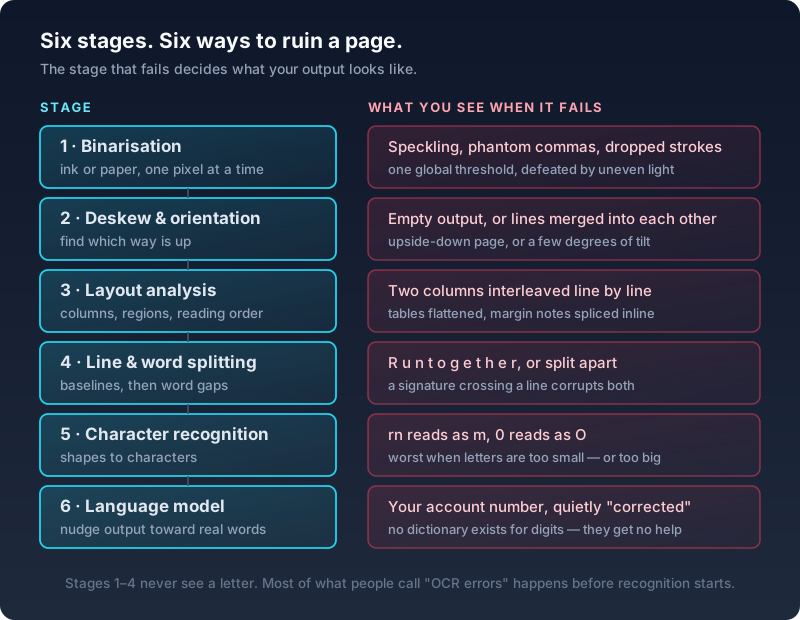
The same six stages, as plain text:
| Stage | What it does | What failure looks like | Root cause |
|---|---|---|---|
| 1. Binarisation | Sorts each pixel into ink or paper | Speckling, phantom commas, dropped strokes | One global brightness threshold, defeated by uneven light |
| 2. Deskew & orientation | Works out which way is up | Empty output, or lines merged into each other | An upside-down page, or a few degrees of tilt |
| 3. Layout analysis | Finds columns, regions, reading order | Two columns interleaved line by line | Tables flattened, margin notes spliced into body text |
| 4. Line & word splitting | Finds baselines, then word gaps | Text run together, or split apart | A signature or stamp crossing a line corrupts both |
| 5. Character recognition | Matches shapes to characters | "rn" reads as "m", "0" reads as "O" | Letters that are too small, or too large, for the model |
| 6. Language model | Nudges output toward real words | Your account number, quietly "corrected" | No dictionary exists for digits — they get no help at all |
Read that table backwards and it becomes a diagnostic tool. Speckled output with commas that were never on the page means the threshold step misjudged your paper. Two columns woven together line by line means layout analysis picked the wrong reading order. Nothing at all usually means the page was upside down.
Stage six deserves special attention, because it explains the errors that hurt most.
The language model exists to nudge output toward real words. Recognition produces candidates, the dictionary votes, plausible spellings win. It works well, and it works only on words. There is no dictionary for an account number. No dictionary for a dosage, a case number, a part code, or a sum of money. The step that quietly repairs the rest of your page cannot help the characters you care about most, and it will occasionally "correct" a proper noun or a reference code into something that looks tidier and means nothing.
Why "99% Accurate" Tells You Nothing
Character accuracy and word accuracy are different measurements that answer different questions, and vendors quote whichever flatters them.
Tesseract's own regression testing makes the point better than any critic could. Moving from its legacy engine to the modern LSTM engine cut character errors by 17% on a standard corpus while raising word errors by 22.6%. Same engines, same pages, opposite verdicts. Which number you publish decides whether that release was an improvement.
Then there's what the standard metric leaves out. The canonical benchmark in this field, the UNLV/ISRI accuracy reports that most later work builds on, defines word accuracy in a way that states plainly that errors in recognizing digits or punctuation have no effect on the score. Digits are simultaneously the worst-recognized class of character. On UNLV's numeric-heavy sample, digit accuracy read as low as roughly 87.6% while lowercase letters sat near 98%.
So the headline metric excludes the characters that fail most often and matter most. A page can score 99% word accuracy and still have a wrong figure in every table on it.
One more distribution problem, from the same reports: between 50% and 75% of all errors land on the worst 20% of pages. Accuracy is not spread evenly across a document. Spot-checking three random pages and finding them clean tells you almost nothing, because the damage is concentrated somewhere you didn't look.
Accuracy Is a Property of the Page
The most instructive number in OCR research comes from Google's own research team adapting Tesseract for languages beyond English.
Tesseract estimates where the x-height of a line sits by assuming ascenders and short letters separate into two clear populations, which holds for most Latin fonts. Applied unchanged to Cyrillic, it doesn't. On a set of Russian books, the word error rate came out at 97%.
Not because Cyrillic is harder. Because one geometric assumption about letter heights stopped being true. After the fix, the same engine scored 1.35% character error on Russian. Hindi in the same paper still sat at 15.41% character error and 69.44% word error, mostly down to older typography missing from the training data.
An engine does not have an accuracy. It has an accuracy on a particular script, in a particular typeface, at a particular size, on a particular quality of scan.
There Is Such a Thing as Too Much Resolution
Everyone repeats "scan at 300 DPI." Tesseract's own documentation does say it works best at a minimum of 300. What almost nobody mentions is that the same documentation describes an upper limit.
The recognizer wants x-height, the height of a lowercase letter without ascenders, to land in a usable pixel range. Below about 10 pixels, the docs say you have very little chance of accurate results. Above roughly 30 pixels, the LSTM engine stops producing accurate results. At 300 DPI, 10-point body text gives you an x-height around 20 pixels, sitting comfortably in the middle.
Scan that same text at 600 DPI and you push x-height outside the range the engine was built for. Researchers measuring exactly this on typewritten pages watched Tesseract 4's character accuracy collapse at 600 DPI while a commercial engine on the same pages held nearly steady — so this is a property of one engine's design rather than a law of scanning.
The practical version: pick the resolution that puts letter height in range, which means going above 300 only when the print is genuinely small. And note that authorities disagree on the number itself. The Library of Congress, which specifies OCR capture separately from preservation imaging, says 400 ppi.
Two settings beat resolution for return on effort. Feeding greyscale instead of your scanner's black-and-white document mode roughly halved character errors for two independent engines in the UNLV tests, taking one from 97.02% to 98.50%. And squaring the page matters more than it looks, because skew damages line segmentation rather than only letter shapes. Merged lines are unrecoverable later.
The Failures That Aren't About Resolution or Script
Resolution and script explain most bad results. A handful of page types fail for reasons that have nothing to do with either, and each one maps back to a specific stage in the pipeline above.
A table with ruled lines confuses layout analysis (stage 3) worse than an unruled one, because the engine has to decide whether a horizontal rule is a text boundary or noise to strip. Pull structured data out of a table with a tool built to detect table geometry rather than plain OCR, or expect cells to merge into a single run-on line.
A form with a signature or a stamp crossing printed text corrupts stage 4 (line and word splitting) on that one line only — the rest of the page is unaffected, which is why a single garbled line in an otherwise clean scan is diagnostic, not random.
Carbon copies and faded thermal receipts fail at binarisation (stage 1) before anything else even runs: the ink-to-paper contrast is often below what one global threshold can separate, which is the same failure mode as uneven scanner lighting, just caused by the paper stock instead.
Right-to-left scripts like Arabic and Hebrew add a reading-order problem that is purely a layout-analysis (stage 3) issue. The characters themselves aren't harder to recognize; the pipeline has to know the page reads right to left before it hands lines to the recognizer in the correct order, and a script mismatch here produces reversed or interleaved words that look like a recognition failure but aren't one.
A photo taken with a phone camera, rather than a flatbed scan, pushes error into stages 1 and 2 at once: uneven ambient light defeats the threshold, and the perspective distortion of a hand-held shot is a harder problem than the few degrees of tilt a flatbed scanner produces. Where you can, a flat scan beats a photo for exactly this reason, not because the recognizer itself is any worse at photographs.
Each of these is fixable once you know which stage is failing, and none of them improves by switching to a "better" OCR engine — the engine is stage 5, and none of these five problems happen there.
Handwriting Is a Different Problem
Handwriting recognition gets filed as "OCR, but harder." It's a different technology with a different failure mode, and one number shows why.
Take a model trained on a standard handwriting corpus and point it at a hand it has never seen, and the error rate is unusable. Fine-tuning that same model on lines written by that specific person is what fixes it: one study measured a 25% relative error reduction from just 16 lines of a new writer's handwriting, and 50% from 256 lines.
Nothing about the model got better. It learned one person's handwriting. Printed text works because a typeface is shared by millions of documents. Handwriting is unique per writer, so recognition quality depends on adaptation rather than on any quality setting you can pick from a dropdown.
For classic OCR engines, the blocker isn't even the recognizer. A Tesseract maintainer has stated the layout stage can't separate text lines in handwritten text, and points people toward tools built for handwriting instead. If you're feeding cursive to a standard OCR engine and tuning settings, you're tuning the wrong thing.
Modern vision models do better here, with a caveat worth knowing. They fail differently rather than less. Their documented failure mode is fluent invention: repeating a line until the output collapses, or silently "fixing" what the page actually said. For transcription, output more correct than the source is a serious problem, and an invisible one.
OCR, ICR, and "Document Intelligence" Aren't the Same Claim
The industry doesn't use one term for this, and the differences aren't just marketing.
OCR (optical character recognition) is the original term, built for machine-printed text: books, forms, invoices in a known typeface. ICR (intelligent character recognition) is the older, narrower term for recognizing constrained handwriting — hand-printed block letters in boxes on a form, not cursive prose — and it predates the deep-learning models that now handle both jobs with one architecture. If a vendor's documentation still lists "ICR" as a separate line item from "OCR," it usually signals a system built around forms with defined fields, not free-form pages.
IDP (intelligent document processing) is the newer umbrella term cloud vendors use for OCR plus everything after it: classification, entity extraction, table structure, and routing into a workflow. AWS Textract, Azure Document Intelligence, and Google Document AI are all sold under this framing, and it maps directly onto the pipeline above: stage 6, the language model, is where "recognize the text" stops and "understand the document" begins, and IDP products are built to keep going past that point — pulling out a specific invoice total or a named form field, rather than handing back a wall of undifferentiated text.
None of this changes what actually happens to your page. A recognizer still runs the same six stages whether the product calling it is named "OCR," "ICR," or "IDP." The label tells you what the vendor built on top of recognition, not how well the recognition underneath will handle your document.
Where the Recognition Runs
OCR used to mean a server, because the models were too heavy for anything else. That stopped being true.
Compiled to WebAssembly, an English recognition model plus engine is roughly 4 MB on first load, and a 300 DPI A4 page takes about two seconds on a normal desktop. Call it twice the time of the same engine running natively. Most of that gap is SIMD instruction width, which on its own is worth a multiple of the non-vectorized speed, so a browser that supports it does most of the work a native binary would.
That matters because of what gets fed to OCR. Published censuses of scanned documents in health records find that identity paperwork — insurance cards, driver's licences, consent forms, patient registration — makes up a large share of the volume. Identity documents, not clinical notes.
The published terms for cloud OCR vary more than most people assume, and some are genuinely good. Google's Document AI documentation commits to deleting documents immediately after processing with a one-day failsafe, states it never trains on customer content, and says no employee sees the documents. Azure's Document Intelligence deletes input and results after 24 hours, though its privacy page says nothing either way about training.
Two entries deserve a closer read. AWS Textract is opt-out, not opt-in: the AWS Service Terms grant Amazon permission to use and store processed content to improve the service unless an administrator configures an organization-level opt-out policy, and Textract is not included in the medical carve-out that covers several sibling services. Deletion is by support request. Separately, the Gemini API splits on billing status. On the unpaid tier, the terms say human reviewers may read, annotate, and process your input and output, and instruct you not to submit confidential information. On the paid tier, they don't. Same model, opposite data posture.
The consumer-facing versions of the same tradeoff get their own teardowns elsewhere on this blog: Google Drive's built-in OCR and Adobe Acrobat's OCR each make a different version of the upload-for-convenience deal.
None of that makes cloud OCR wrong. It makes it a decision, and the honest version of the decision needs the document in front of you.
Reading Your Own Output
Once you know the pipeline, checking OCR takes about a minute.
- Search three words from different parts of the page, including one from a heading or a table.
- Verify every number by hand. Digits fail most and are excluded from the metric that scores your document.
- Check your worst-looking pages, not random ones. That's where most errors live.
- Select a paragraph and paste it somewhere you can read it, which surfaces reading-order problems that Ctrl+F won't.
- Keep the searchable PDF rather than only the extracted text, so the original pixels stay attached to the words and you never OCR the file twice.
If output looks wrong, the pipeline tells you what to change. Speckling points at thresholding, so send greyscale. Merged lines point at skew, so rescan squared. Interleaved columns point at layout analysis. Mangled small print points at x-height, so scan that document hotter. Garbled accents point at the wrong language pack.
Doing It Without Uploading Anything
OCR PDF runs in your browser. Five of its eight engines never send a page anywhere: Tesseract for Latin scripts, two sizes of PaddleOCR that handle Asian languages well, and two sizes of Florence-2 on WebGPU for messier layouts. Twenty languages, three quality tiers, and a smart mode that checks for an existing text layer first so you don't OCR a document that was already digital.
The remaining three engines are cloud models, labelled as such, opt-in, and useful for complex tables and mathematics where on-device models still struggle. You pick. Output comes back as clipboard text, a .txt file, or a searchable PDF with the text layer written over your original pages, and batch mode does a folder at once.
For the step-by-step version of that workflow, see how to make a scanned PDF searchable. If your PDF was never scanned in the first place and text still won't copy, that's a different problem with a different fix, covered in why your PDF won't give up its text.
FAQ
What is OCR text recognition?
OCR (optical character recognition) text recognition converts an image of text into machine-readable characters through a multi-stage pipeline — binarisation, deskewing, layout analysis, line and word splitting, character recognition, and language-model correction. It isn't a single lookup step, which is why the same source image can fail in six distinct, diagnosable ways rather than one generic "bad OCR" outcome.
Why does OCR misread numbers more often than letters?
The final pipeline stage, the language model, corrects most letter mistakes by checking candidates against a dictionary of real words. There's no dictionary for a phone number, a dosage, or an account code, so digits get none of that correction. That's also why digit accuracy is usually excluded from the headline "word accuracy" score vendors publish — the metric quietly leaves out the characters most likely to be wrong.
Is ICR the same thing as OCR?
No. ICR (intelligent character recognition) is the older, narrower term for recognizing constrained handwriting, such as hand-printed characters inside boxes on a form. OCR was built for machine-printed text. Modern engines increasingly handle both with the same underlying model, but a vendor that still separates the two terms in its documentation is usually describing a forms-processing system, not general-purpose text recognition.
Does OCR need an internet connection to work?
No — that's an implementation choice, not a property of OCR itself. The recognition models can run entirely on-device, in a browser or an app, or on a remote server the document gets uploaded to. OCR PDF's five client-side engines never send a page anywhere; its three cloud engines do, and are opt-in rather than default.
What's the best DPI for OCR?
300 DPI is the safe default for normal body text, but it isn't a floor with no ceiling. Most engines want the height of a lowercase letter to land in a specific pixel range, and scanning small print at too high a resolution can push letter height past the upper end of that range and make results worse, not better. Match the resolution to the print size rather than maximizing it.
Can OCR read handwriting?
Classic OCR engines are built for printed text and generally can't segment handwritten lines reliably, let alone recognize the letterforms. Purpose-built handwriting recognition is a different technology that improves dramatically with per-writer fine-tuning rather than any setting you can pick in advance. Modern vision-language models do better on handwriting but introduce a new risk: fluent invention, where the output looks plausible but doesn't match what was actually written.
Is OCR accurate enough for legal or medical documents?
Treat it as a first draft, not a verified transcript, for anything with legal or clinical weight. The language-model correction step that makes most OCR output look clean provides no safety net for exactly the characters — case numbers, dosages, dates, account numbers — that carry the most consequence if wrong. Verify those by hand against the original page every time; don't rely on a high headline accuracy score to cover them.
Does OCR work on a phone photo, or only a proper scan?
It works on both, but a flatbed scan usually outperforms a hand-held photo for reasons that have nothing to do with the recognizer itself. A photo adds uneven ambient lighting and perspective distortion, which hit the binarisation and deskewing stages before recognition even starts. Where a flat scan is an option, it removes two whole failure modes a photo can't avoid.
The Useful Takeaway
Worth keeping:
- OCR is six stages, and four of them never see a letter. The shape of your bad output tells you which one failed.
- A single accuracy number is marketing. Word accuracy commonly excludes digits, and digits fail most, so check your numbers by hand every time.
- Where recognition runs is a choice now. In-browser OCR costs about 4 MB and two seconds a page, which is a small price for a document that never leaves your machine.
Paper doesn't come with a text layer. Once you know how the machine builds one, a bad result stops being bad luck and starts being a specific thing you can go fix.
Run OCR on a scanned document in your browser, with nothing uploaded.