Rohman
You fed thirty pages through the office scanner and page 12 came out leaning. Two degrees, maybe three. Nobody would call it broken, yet every line runs downhill and the whole document looks rushed. Straightening a scanned PDF fixes that, and it matters more than looks: text recognition reads a level page far better than a tilted one.
Quick answer: To straighten a scanned PDF, measure each page's tilt and rotate it back by that angle. Deskew PDF does both in your browser: it detects the skew on every page within ±10°, previews each correction on an alignment grid, lets you override any page by hand, and downloads one straightened PDF. Nothing is uploaded.
Why Scanned Pages Come Out Crooked
Most crooked scans come from the sheet feeder. Paper that enters the feeder at a slight angle stays at that angle all the way through. Ricoh's support pages for its fi-series scanners put it plainly: make sure the document is loaded straight, with the side guides pressed against the stack and any folds or curl smoothed out first. Skip that, and one curled receipt in a stack of letters twists while its neighbours go through clean.
Phone scans skew for a simpler reason. Your hand is not a tripod.
Plenty of scanner drivers can fix this on the way in. Brother's ADF Auto Deskew, for example, corrects a skewed document within 5 degrees, but only when the page goes through the feeder and the option was switched on before scanning. If the PDF already exists, or came from someone else, the driver can't help you. You need to fix the file.
What Deskew Means, and Why It Differs From Rotate
"Skew" is the small angle between a page's text lines and the horizontal. Deskewing measures that angle and turns the page back by exactly that much, usually something like 1.7° rather than a round number.
That makes it a different job from rotating a sideways page, and PDF treats them differently. The page's Rotate setting must be a multiple of 90 (ISO 32000-1, Table 30). A quarter turn is a one-number edit that any viewer honours, and it costs nothing in quality; our guide to rotating PDF pages covers that case. A 2° turn can't be written that way. The tool has to either redraw the page content through a rotation matrix or render the page as an image and rotate the pixels.
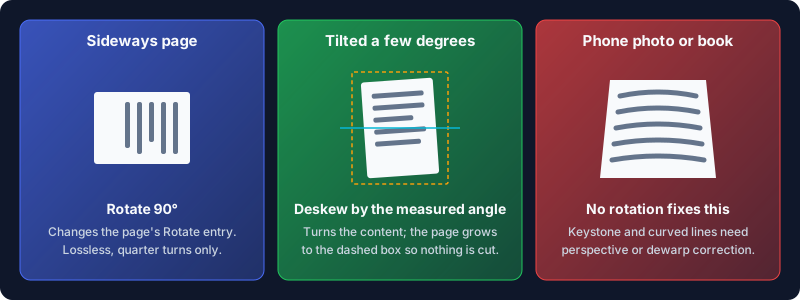
Either way the rotated page no longer fits its old rectangle; its corners poke out. A careless tool crops them. Both OxygenPDF tools grow the page to the rotated bounding box instead, so every edge survives.
Straighten Before You OCR
If the scan is headed for text recognition, deskew it first. Tesseract's own documentation says that when a page is skewed, the quality of its line segmentation reduces significantly, "which severely impacts the quality of the OCR," and its advice is to rotate the image until the text lines are horizontal. OCR engines find lines first and characters second. Tilt the lines and characters from one row bleed into the next.
So the order is: straighten, then run OCR PDF to add the searchable text layer. Our walkthrough on how to OCR a scanned PDF and check the result picks up from there.
The order matters for a second reason. Deskew PDF turns each corrected page into a new image, which drops any text layer that page already had. Run OCR afterwards and you lose nothing.
How to Straighten a Scanned PDF, Step by Step
- Open Deskew PDF and drop in your scan. You can add several PDFs at once; they share one set of settings.
- Wait for the analysis. Every page is measured, and the counter tells you how many will be straightened.
- Step through the alignment preview. Each page is shown with its correction applied and a grid over it, so you can see whether a line of text sits level against the rules.
- Check the sensitivity slider. It sets the smallest tilt worth fixing, and the default of 10 skips anything under about 2.1°. Move it to 30 to catch tilts down to 0.3°, or toward 1 to fix only obvious leans.
- Fix any page the detector misread with the Manual angle slider, which covers −10° to +10° in 0.1° steps. Reset to auto undoes it.
- Choose the output resolution: 72, 150 or 300 DPI. 150 is the default; pick 300 for small print or a file you'll OCR.
- Straighten and download. The file is saved as
yourfile-deskewed.pdf.
There's also a Snap to whole degrees switch, on by default, which rounds detected angles to the nearest degree. Turn it off for a 1.4° tilt; snapped, it becomes 1°. Your manual overrides are never rounded.
How the detection works, briefly: the tool picks out the page's ink, projects it onto a slightly rotated axis for every candidate angle in the ±10° range, and keeps the angle where the ink piles up into the sharpest rows. That's where the text lines run flat. A coarse sweep in half-degree steps, then a fine one in tenths, gets it to a fraction of a degree.
Rotate by an Exact Angle Instead
Sometimes you already know the angle, or the page has too little text to measure. A diagram or a mostly blank form gives the detector nothing to line up. For those, Rotate by Any Angle takes a number per page, or one angle applied to every page, with presets for 45°, 90°, 180° and 270°.
It works differently under the hood, and that's the reason to reach for it. It rewraps the page's existing content in a rotation and enlarges the page boxes to fit. Nothing is rasterised, so text stays selectable and highlights and links move with the content they mark. The catch is precision. It takes whole degrees only, so rotating a PDF by 1 degree is fine, while a 0.4° tilt is a job for Deskew PDF's 0.1° slider.
Positive and negative numbers turn the page in opposite directions. Check the downloaded page, and if the tilt doubled instead of vanishing, flip the sign.
What Straightening Can't Fix
Rotation corrects a flat page turned on the glass. Some of what looks like skew is a different fault.
Keystone from phone photos is the common one. Shoot a page from an angle and it comes out as a trapezoid, wide at the bottom and narrow at the top. No rotation makes those lines parallel. That needs perspective correction, which document-scanning apps apply when they find the page corners, or a retake held flat over the page.
Curved book pages are the other. Lines bow toward the spine, so straightening by any single angle levels the middle of a line and leaves its ends curving. Fixing that takes a dewarping model such as the "cubic sheet" approach in Matt Zucker's page-dewarping write-up.
Then the limits of the tool itself. Detection stops at ±10°, so a page tilted 15° needs Rotate by Any Angle. Pages with almost no ink, under a couple of hundred dark pixels at analysis size, are reported as straight. Corrected pages are re-rendered at the DPI you chose, so 72 DPI will soften fine print, and each comes out a little larger than the original with white corners. In a batch, manual overrides apply to the file you're previewing; the others use automatic detection. A dark scanner border left around the page is a separate fix: trim it with Crop PDF.
Pages already straight are copied through untouched, vectors and text layer included. A 40-page file with three crooked pages keeps its original quality on the other 37.
Frequently Asked Questions
How do I straighten a crooked scanned image?
Measure the tilt and rotate the page back by that angle. For a PDF, Deskew PDF detects the angle on every page and corrects it in your browser. For a single image, most photo editors have a straighten or level tool that does the same.
Why are my scanned documents crooked?
Usually the paper entered the sheet feeder at an angle, because the side guides were loose or the sheet was curled or folded. Phone scans tilt because the camera wasn't square to the page. Loading the stack straight with the guides snug prevents most of it.
What does deskew page mean?
It means detecting how many degrees a page's text lines are tilted from horizontal and rotating the page back by that amount. It's a small-angle correction, typically under 10°, unlike a 90° rotation.
How do I fix a PDF that is sideways?
A sideways page needs a 90° turn, not a deskew. Use Rotate PDF, which changes each page's stored rotation so it opens upright everywhere without touching the page content.
Can I rotate a PDF by 1 degree?
Yes. Rotate by Any Angle accepts any whole number of degrees per page and keeps the text selectable. For fractions of a degree, use the manual slider in Deskew PDF.
Does deskewing improve OCR accuracy?
It helps the step OCR depends on most: finding the lines. Tesseract's documentation says skew significantly reduces line segmentation quality. Straighten first, then OCR. For other scan fixes, see our guide to editing a scanned PDF.
Send It Out Level
A crooked page follows the file into print and into OCR. Straighten your scanned PDF with Deskew PDF, check every page on the grid, and download it level. It all happens in your browser tab, so the contract or medical form you scanned never leaves your machine.